#TOP1

When building a high-performance workstation or a custom gaming rig, the chassis is more than just a metal box. It is the structural foundation that dictates thermal efficiency, component compatibility, and aesthetic identity. ASUS chassis are renowned for bridging the gap between industrial-grade durability and cutting-edge design, often serving as the centerpiece for enthusiasts who demand both form and function. Whether you are looking for a compact build to save desk space or a massive tower to house multiple liquid cooling loops, choosing the right ASUS enclosure requires a deep understanding of how your internal hardware will interact with the physical constraints of the case.
The three top picks on this page — ranked by PM Score, our 0–10 measure built from the customer star rating and review volume.
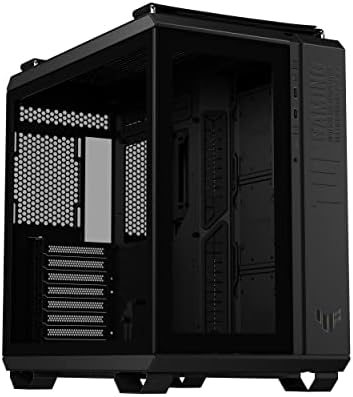

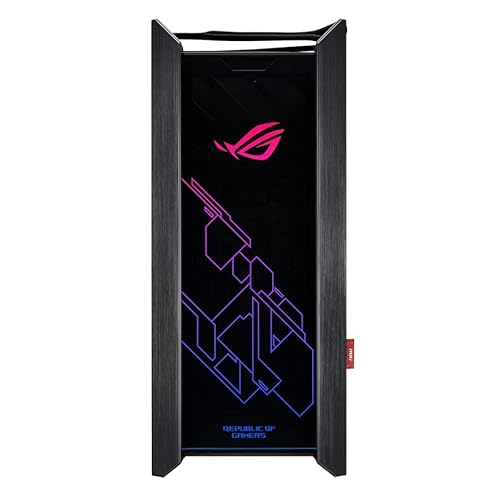


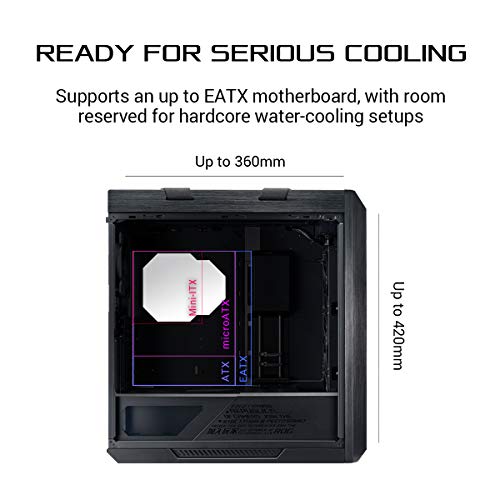
Asus ROG Strix Helios GX601 RGB Mid-Tower Computer Case for up to EATX Motherboards with USB 3.1 Front Panel, Smoked Tempered Glass, Brushed Aluminum...
| SELLER | SELLER SCORE | AMAZON FULFILLED | PRIME | FREE SHIPPING |
|---|---|---|---|---|
| Triplenet Pricing INC | 9.81 | No | No | No |
The brushed aluminum finish on the Asus ROG Strix Helios feels incredibly substantial the moment you run your hands across its chassis. This isn't just another plastic mid-tower. It is a heavy-duty command center built from steel and premium metal that supports massive EATX motherboards. I was particularly impressed by the thoughtful cable management, which utilizes an adjustable multi-function cover and pre-run cables to keep the interior looking surgical. Cooling is clearly a priority here, with four 140mm fans already installed and enough headroom to fit a massive 420mm radiator. Whether you are mounting one or two GPUs vertically, the smoked tempered glass side panels offer a clear, sophisticated view of your high-end components without looking cluttered.


ASUS TUF Gaming GT502 ATX Mid-Tower Computer Case with Front Panel RGB Button, USB 3.2 Type-C and 2X USB 3.0 Ports
| SELLER | SELLER SCORE | AMAZON FULFILLED | PRIME | FREE SHIPPING |
|---|---|---|---|---|
| BeachAudio | 9.73 | No | No | No |
Can a computer case actually transform your entire build from a cluttered mess into a professional showcase? The ASUS TUF Gaming GT502 answers that with a sophisticated dual-chamber layout that physically separates your CPU and GPU cooling zones from the cable management clutter in the rear. I was particularly impressed by the panoramic tempered glass panels, which offer a beautifully tinted view of your hardware without the usual obstruction. Building is a breeze thanks to the tool-free side panels that pop off with a simple button press, and the inclusion of both a vertical GPU mount and a sag-prevention bracket means you don't have to hunt for extra accessories. With high-speed USB 3.2 Type-C connectivity right on the front, it balances aesthetic grandeur with modern, practical utility.
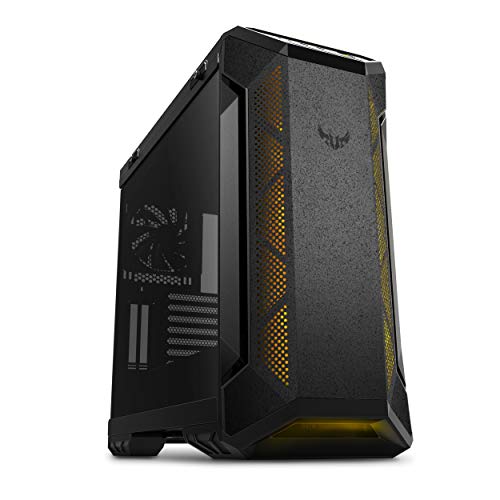


ASUS TUF Gaming GT501 Mid-Tower Computer Case for up to EATX Motherboards with USB 3.0 Front Panel Cases GT501/GRY/WITH Handle
| SELLER | SELLER SCORE | AMAZON FULFILLED | PRIME | FREE SHIPPING |
|---|---|---|---|---|
| OneDealOutlet Online | 9.47 | No | No | No |
Most high-end gaming chassis are designed to stay stationary on a desk, yet the ASUS TUF Gaming GT501 treats your rig like a piece of heavy-duty gear meant for travel. The inclusion of ergonomic, woven-cotton carry handles is a game-changer for enthusiasts who move their setups frequently, making it easy to transport a build weighing up to 65lbs. Inside, the metal chassis feels incredibly robust, accommodating massive EATX motherboards and offering a 4mm-thick smoked tempered-glass panel that showcases your components beautifully. With three Aura Sync RGB fans included and ample space for 360mm liquid cooling radiators, thermal management is never an afterthought. Whether you are utilizing the vertical GPU expansion or the seven traditional slots, this case balances rugged utility with high-performance aesthetics.
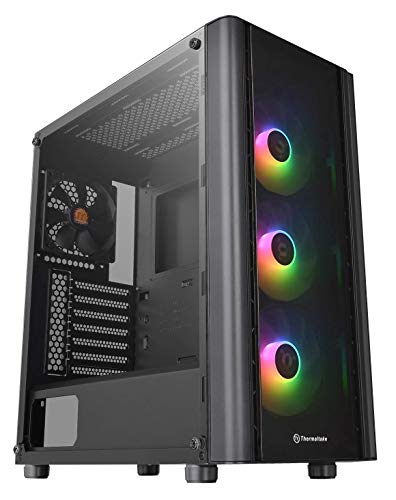


Thermaltake V250 Motherboard Sync ARGB ATX Mid-Tower Chassis with 3 120mm 5V Addressable RGB Fan + 1 Black 120mm Rear Fan Pre-Installed CA-1Q5-00M1WN-...
| SELLER | SELLER SCORE | AMAZON FULFILLED | PRIME | FREE SHIPPING |
|---|---|---|---|---|
| Amazon.com | 9.68 | Yes | Yes | Yes |
Why should you have to choose between a clean aesthetic and complex lighting control? The Thermaltake V250 solves this dilemma by integrating a dual-mode 5V ARGB system directly into the chassis. You get three pre-installed 120mm motherboard-sync fans and a rear exhaust fan, providing immediate airflow right out of the box. I found the inclusion of a dedicated I/O button particularly useful, as it offers 27 distinct LED modes ranging from wave patterns to radar effects without needing to touch your software. The 4mm tempered glass side panel offers a crystal-clear view of your build, while the full-length PSU shroud helps keep cable clutter tucked away. It is a versatile, well-organized mid-tower that balances high-end visual customization with practical expandability for modern ATX builds.
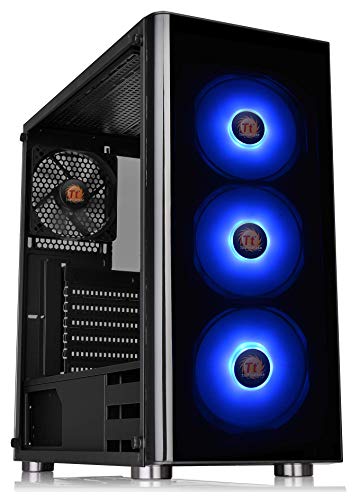


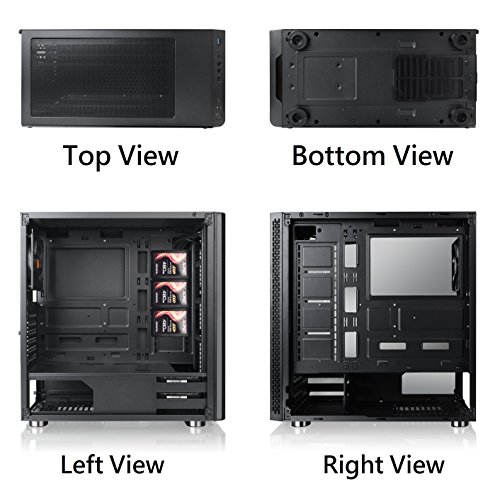
Thermaltake V200 Tempered Glass RGB Edition 12V MB Sync Capable ATX Mid-Tower Chassis with 3 120mm 12V RGB Fan + 1 Black 120mm Rear Fan Pre-Installed...
| SELLER | SELLER SCORE | AMAZON FULFILLED | PRIME | FREE SHIPPING |
|---|---|---|---|---|
| BeachAudio | 9.84 | No | No | No |
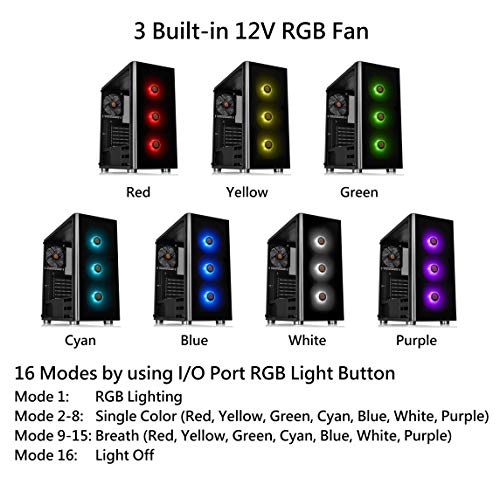
The Thermaltake V200 RGB Edition is a budget-friendly powerhouse that prioritizes visual flair without sacrificing essential airflow. What really caught my eye during testing is the dual-mode 12V sync controller. You can either tap the dedicated RGB button on the I/O port to cycle through 16 lighting modes or hand over total control to your motherboard. With three 120mm RGB fans and a dedicated rear exhaust already installed, you won't be hunting for extra cooling right out of the box. The 4mm tempered glass side panel offers a crystal-clear view of your components, while the built-in PSU shroud keeps your cable management looking professional and tidy. It is a versatile ATX mid-tower that makes high-end aesthetics accessible for any custom build.
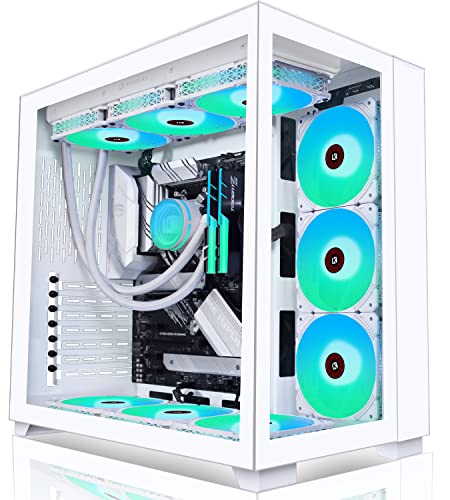


KEDIERS PC Case - ATX Tower Tempered Glass Gaming Computer Case with 9 ARGB Fans,C590
| SELLER | SELLER SCORE | AMAZON FULFILLED | PRIME | FREE SHIPPING |
|---|---|---|---|---|
| KEDIERS-PC-SHOP | 6.27 | Yes | Yes | Yes |
Your desktop setup finally transforms from a dark corner of the room into a vibrant centerpiece the moment you fire up the nine pre-installed ARGB fans in this KEDIERS tower. Building a high-performance rig usually involves a secondary hunt for cooling, but this case arrives ready to go with a massive airflow array that covers almost every angle. The dual 4mm tempered glass panels offer a crystal-clear view of your internal components, making the 16.8 million color spectrum look incredible. I was particularly impressed by the practical side of the build. The removable storage cable box and thoughtful routing holes make cable management much less of a headache. With enough bays for three HDDs and three SSDs, it balances heavy aesthetic flair with serious storage expansion.
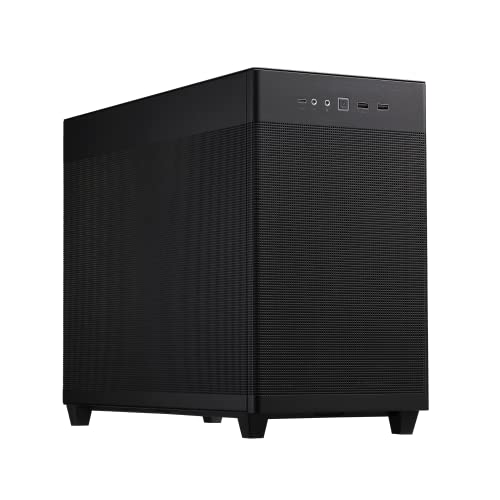


ASUS Prime AP201 33-Liter MicroATX Black case with Tool-Free Side Panels and a Quasi-Filter mesh, with Support for 360 mm Coolers, Graphics Cards up t...
| SELLER | SELLER SCORE | AMAZON FULFILLED | PRIME | FREE SHIPPING |
|---|---|---|---|---|
| Hot Deals 4 Less® | 9.69 | No | No | No |
Your desk space is precious, and watching a massive, bulky tower swallow your workspace is a frustration every enthusiast knows too well. The ASUS Prime AP201 solves this by packing massive thermal headroom into a compact 33-liter footprint. I was particularly impressed by the quasi-filter mesh panels. The 57,000 precision-machined holes don't just look sleek, they actually facilitate serious airflow for high-performance builds. You can fit a 360mm radiator and long graphics cards up to 338mm without feeling cramped. Building is a breeze thanks to the tool-free side panels and a clever 32mm cable management gap behind the motherboard tray. It is a rare find that balances high-end cooling capabilities with an incredibly efficient spatial design.
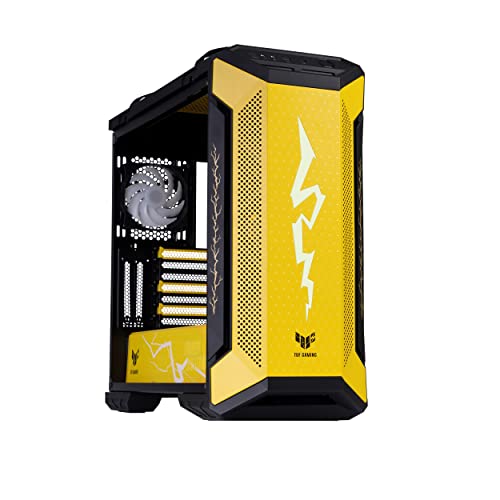


ASUS TUF Gaming GT501 ZENITSU Mid-Tower Computer Case for up to EATX Motherboards with USB 3.0 Front Panel Cases GT501/GRY/WITH Handle Demon Slayer Ed...
| SELLER | SELLER SCORE | AMAZON FULFILLED | PRIME | FREE SHIPPING |
|---|---|---|---|---|
| Amazon.com | 9.68 | Yes | Yes | Yes |
Most builders settle for generic, sterile chassis that hide their hard work, but the ASUS TUF Gaming GT501 Zenitsu Edition turns your rig into a centerpiece. This mid-tower isn't just about the striking Demon Slayer aesthetics and the custom TUF Gaming spatter pattern. It is a heavy-duty powerhouse built to house massive EATX motherboards. I was particularly impressed by the thermal headroom provided by the four included RGB and PWM fans, alongside massive support for 360mm liquid cooling radiators. The 4mm-thick smoked tempered glass offers a premium view of your components without sacrificing durability. Plus, if you frequently move your setup, those woven-cotton carry handles are a total game-changer for transporting a heavy build safely.


Phanteks (PH-ES916E_BK) Enthoo Elite Extreme Full Tower Chassis Aluminum, Black
| SELLER | SELLER SCORE | AMAZON FULFILLED | PRIME | FREE SHIPPING |
|---|---|---|---|---|
| Amazon.com | 9.68 | Yes | Yes | Yes |
Building a workstation that doubles as a centerpiece requires more than just high-end components. It demands a chassis that commands the room. The Phanteks Enthoo Elite Extreme feels less like a computer case and more like a piece of precision industrial art, thanks to that stunning 4mm sand-blasted aluminum exterior. I was particularly impressed by the tri-chamber architecture, which keeps the main chamber pristine by hiding the PSU and messy cables behind aluminum covers. Whether you are mounting a massive GPU vertically or setting up a dual-system ITX configuration, the organization is effortless. With 35mm of dedicated cable management space and included PWM hubs, even the most complex builds stay clean. It is a massive, premium beast that prioritizes both thermal performance and aesthetic perfection.

The first decision in selecting an ASUS chassis is defining the physical scale of your build. ASUS typically offers a range of sizes, from Micro-ATX and Mini-ITX layouts to massive Mid-Tower and Full-Tower configurations. If you are building a dedicated gaming station, a Mid-Tower is often the 'sweet spot,' providing ample room for high-end graphics cards and standard ATX motherboards without consuming an entire desk. However, if you are a professional creator or an enthusiast looking to install custom water-cooling reservoirs and massive radiator arrays, a Full-Tower chassis is non-negotiable. Conversely, if you prioritize a minimalist setup, look for compact chassis that support smaller motherboards, but be wary of the trade-offs in expansion slots and airflow capacity.
High-performance components, particularly modern GPUs and CPUs, generate significant heat. An ASUS chassis is only as good as its ability to move air. When evaluating a case, look at the mesh density of the front panel and the number of pre-installed fan mounts. A chassis with a high-airflow mesh front is superior to a solid glass or plastic front for heavy gaming sessions. Furthermore, consider the compatibility with liquid cooling. Check if the chassis supports 240mm, 280mm, or even 360mm radiators at the top or front positions. A well-designed chassis will allow for a 'chimney effect' or a front-to-back airflow path that prevents heat soak in the component pockets.
One of the most common mistakes in PC building is purchasing a beautiful chassis that cannot physically house your chosen components. Before finalizing your purchase, check the maximum GPU length clearance. Modern high-end graphics cards are becoming increasingly long and thick. You must ensure the chassis can accommodate these without hitting front-mounted radiators. Additionally, if you are using a large air cooler rather than an AIO liquid cooler, verify the maximum CPU cooler height clearance. ASUS chassis often feature optimized internal layouts, but the physical dimensions of your specific hardware remain the ultimate limiting factor.
A clean build isn't just about looks. It is about airflow. A cluttered interior with loose cables can obstruct air movement and lead to thermal throttling. Look for chassis that offer dedicated cable management channels, rubber grommets, and ample space behind the motherboard tray. High-quality ASUS enclosures typically include integrated routing paths that make it easy to tuck away excess power supply cables. This ease of assembly significantly reduces the time spent on your build and ensures a professional, high-performance finish.
Finally, consider the visual impact. ASUS chassis often feature tempered glass side panels that allow you to showcase your internal lighting and component synergy. If you are an RGB enthusiast, look for cases that offer easy integration with lighting controllers. Some models may also feature modularity, such as removable drive cages or adjustable mounting points, which allow you to reconfigure the internal space as your storage needs grow over time. Match the chassis style to your workspace—whether that is a sleek, professional look for an office or a vibrant, light-heavy design for a gaming sanctuary.
Quick answers about Asus Chassis before you buy.
Share of top-ranked products by brand, from our rankings.
We compared Asus Chassis products using product details and customer ratings to identify the best options in the categories..
From that comparison we shortlisted the top 9 Asus Chassis for this page..
We aim to help you find the right cases products for your needs and save you time when choosing which Asus Chassis to buy.
Compare the top 9 picks at a glance — select a column to sort.


