PickSmartly Buying Guide

Best Kinesis Computer Keyboards in 2026

9.6 PM Score
Products Compared
19
Brands Ranked
1
Our guides are compiled from product information and customer ratings. If you click on links we provide, we may receive compensation.

For professionals who spend upwards of eight hours a day typing, a standard membrane keyboard isn't just a tool—it is a potential liability for repetitive strain injuries (RSI) and carpal tunnel syndrome. Kinesis has carved out a niche as the gold standard for ergonomic computing, moving away from the flat, cramped layouts of consumer hardware toward biomechanically sound designs. Choosing a Kinesis keyboard is not a casual purchase. It is an investment in your long-term physical health and typing efficiency. This guide will help you navigate the complex landscape of split designs, contoured wells, and mechanical switches to find the specific ergonomic solution that fits your workflow and your anatomy.

Editor's Choice

Our Top Picks for Kinesis Computer Keyboards

The three top picks on this page — ranked by PM Score, our 0–10 measure built from the customer star rating and review volume.

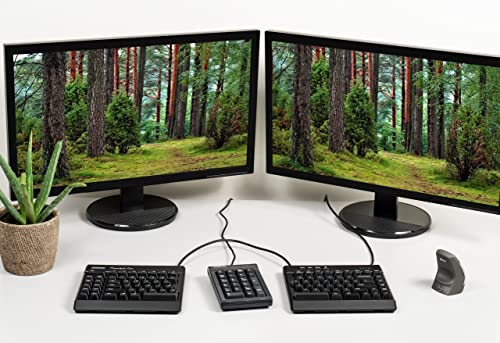
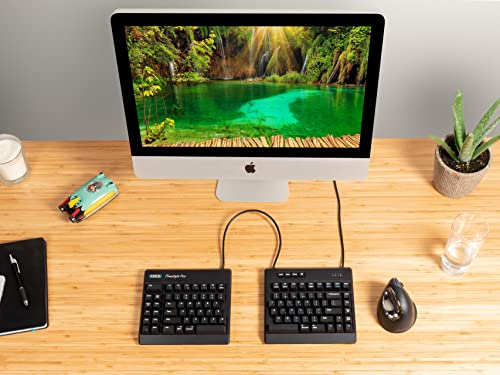
KINESIS Freestyle2 Ergonomic Keyboard for PC (9" or 20" Separation) (9" Separation)

KINESIS Freestyle2 Ergonomic Split Wired Keyboard

KINESIS 0607998800010 15.94 X 9.25 X 1.26 Inches 2.00 Pounds

PM Score for KINESIS (PM Score)

9.6 PM Score
Buy on Amazon
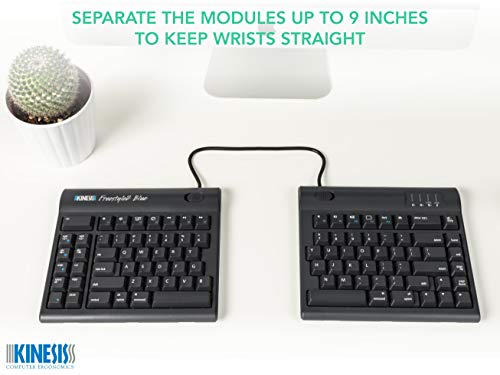
  • AWARD-WINNING SPLIT DESIGN: Unlike fixed ergonomic keyboards, the Freestyle2 allows you to rotate and separate the key modules up to 9" to achieve natural hand, wrist and forearm positions for your specific body type and preferences.
  • STANDARD WINDOWS LAYOUT: The Freestyle2 for PC features a standard Windows layout with hotkeys like Cut, Copy, Paste, multimedia keys, and an embedded numeric 10-key to boost your productivity. No software or special drivers required.
  • LOW-FORCE KEY SWITCHES: The Freestyle2 uses a custom membrane key switch that features a low-activation force and tactile feedback to reduce finger fatigue, impact and strain.
  • WHAT'S IN THE BOX: Freestyle2 USB Wired keyboard with a standard Windows Layout, detachable pivot tether for adjustable splay, and Quick Start Guide. Plug-and-Play for Windows 7-10.
  • PLUG-AND-PLAY: Windows 7-10, Linux, and Chrome. No software or special drivers required.
SELLER SELLER SCORE AMAZON FULFILLED PRIME FREE SHIPPING
ErgoWarehouse 9.25 Yes Yes Yes

The KINESIS Freestyle2 redefines ergonomic comfort through its award-winning split design that lets you physically separate the modules. Unlike standard fixed boards, this setup allows you to adjust the splay up to 9 inches, meaning you can finally find a wrist and forearm position that actually feels natural for your specific body type. I was impressed by the low-force membrane switches. They provide enough tactile feedback to feel responsive without the heavy impact that usually leads to finger fatigue during long sessions. It’s a true plug-and-play experience for Windows, Linux, or Chrome users, complete with a standard layout and a dedicated numeric 10-key. You get all the essential productivity hotkeys without the headache of hunting for specialized drivers or complex software.

What We Like
Adjustable split design
Low-force tactile switches
Standard Windows layout
Integrated numeric keypad
Plug-and-play connectivity

KINESIS Advantage2 Quiet LF Ergonomic Keyboard (KB600LFQ)

Kinesis Advantage2 Quiet LF Ergonomic Mechanical Keyboard

KINESIS KB600LFQ 16.50 X 8.00 X 3.00 Inches 2.20 Pounds

PM Score for KINESIS (PM Score)

9.6 PM Score
Buy on Amazon
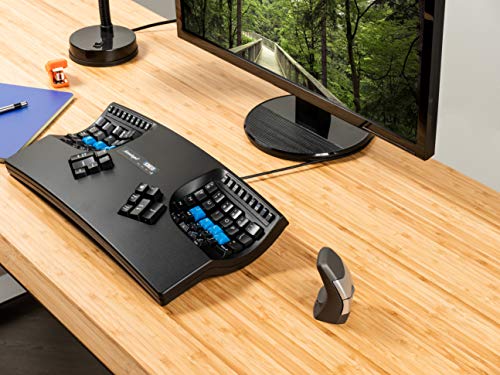
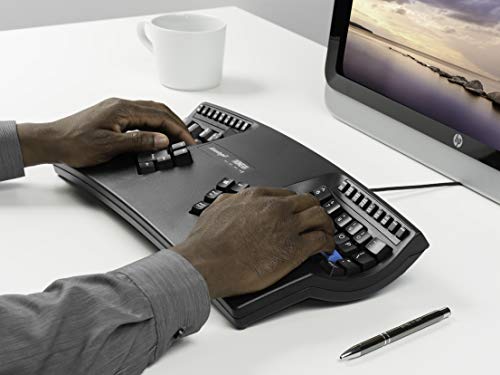
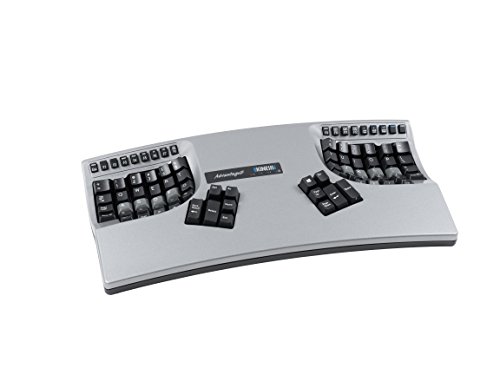
  • Contoured ergonomic shape proven to increase comfort and productivity: patented design features split key wells with concave shape, thumb keys, orthogonal layout, 20 degrees of tenting, and integrated Palm Supports with cushioned palm pads.
  • Genuine Cherry mechanical switches for premium typing feel and performance with less noise: Cherry MX "Silent" Red mechanical switches feature a low activation force, linear feel and are rated for 50M key presses for unmatched durability. Function row features new Cherry ML mechanical switches.
  • Full onboard programmability with the Driverless Smart Set engine: custom layouts in QWERTY or Dvorak, on-the-fly macro recording, one-touch key remapping, Windows, Mac, and PC modes, settings saved to keyboards 4MB flash memory, and the Smart Set app GUI for Windows.
  • Plug-and-play with all major operating systems: Windows 7-10, Mac OS X, Linux, Chrome.
  • 3 year manufacturer's : buy with confidence knowing that KINESIS engineers all our products in the USA to the highest standards and stands behind them 100 percent since 1992.
SELLER SELLER SCORE AMAZON FULFILLED PRIME FREE SHIPPING
ErgoWarehouse 9.25 Yes Yes Yes

Most people assume a quieter keyboard means sacrificing that tactile mechanical soul, but the Kinesis Advantage2 Quiet LF proves you can have both. I was surprised by how the Cherry MX Silent Red switches provide a premium, linear feel without the disruptive clatter typical of high-end mechanical boards. The contoured, split-key well design and 20-degree tenting immediately change how your hands rest, moving away from awkward strain toward a much more natural posture. Because it uses a driverless Smart Set engine, you can remap keys or record macros directly onto the onboard flash memory without hunting for software. It is a heavy-duty tool designed for serious productivity, backed by decades of American engineering and a solid three-year warranty.
What We Like
Silent Cherry switches
Contoured split wells
Driverless programmability
Integrated palm supports
Orthogonal layout
#3

Kinesis Advantage2 Silver Ergonomic Keyboard (KB605)

Kinesis Advantage2 Silver Ergonomic Mechanical Keyboard

KINESIS KB605 16.50 X 8.00 X 2.80 Inches 2.20 Pounds

PM Score for KINESIS (PM Score)

9.6 PM Score
Buy on Amazon
  • CONTOURED ERGONOMIC SHAPE PROVEN TO INCREASE COMFORT AND PRODUCTIVITY: Patented design features split keywells with concave shape, thumb keys, orthogonal layout, 20 degrees of tenting, and integrated palm supports with cushioned palm pads.
  • GENUINE CHERRY MECHANICAL SWITCHES FOR PREMIUM TYPING FEEL AND PERFORMANCE : Cherry MX Brown mechanical switches feature a low activation force, tactile feedback, and are rated for 50 million key presses for unmatched durability. Function row features new Cherry ML mechanical switches.
  • FULL ONBOARD PROGRAMMABILITY WITH THE DRIVERLESS SMARTSET ENGINE: custom layouts in QWERTY OR Dvorak, on-the-fly macro recording, one-touch key remapping, Windows, Mac, and PC modes, settings saved to keyboards 4MB flash memory, and the SmartSet App GUI for Windows.
  • PLUG-AND-PLAY WITH ALL MAJOR OPERATING SYSTEMS: Windows 7-10, Mac OS X, Linux, Chrome.
  • 3 YEAR MANUFACTURER'S WARRANTY: Buy with confidence knowing that Kinesis engineers all our products in the USA to the highest standards and stands behind them 100 percent since 1992.
SELLER SELLER SCORE AMAZON FULFILLED PRIME FREE SHIPPING
ErgoWarehouse 9.25 No No No

The Kinesis Advantage2 Silver redefines the ergonomic workstation by prioritizing anatomical alignment through its patented concave keywells and split design. After testing this keyboard, it is clear that the combination of 20 degrees of tenting and integrated cushioned palm supports makes a massive difference in long-term typing comfort. The tactile experience is exceptional thanks to genuine Cherry MX Brown mechanical switches, which offer a durable, low-activation feel that enthusiasts will crave. Beyond the physical shape, the driverless SmartSet engine provides incredible flexibility, allowing you to remap keys or record macros directly to the onboard flash memory without needing constant software interference. It is a heavy-duty, highly programmable tool that works seamlessly across Windows, Mac, and Linux environments.
What We Like
Concave keywells
Cherry MX switches
Onboard macro recording
Integrated palm supports
Driverless SmartSet engine
#4

KINESIS Freestyle2 Ergonomic Keyboard w/ VIP3 Lifters for PC (9" Separation) (KB820PB-US)

Kinesis Freestyle2 Ergonomic Split Keyboard with VIP3 Tenting

KINESIS KB820PB-US 19.00 X 12.50 X 3.50 Inches 2.00 Pounds

PM Score for KINESIS (PM Score)

9.4 PM Score
Buy on Amazon
  • AWARD-WINNING SPLIT DESIGN: Unlike fixed ergonomic keyboards, the Freestyle2 allows you to rotate and separate the key modules up to 9" to achieve natural hand, wrist and forearm positions for your specific body type and preferences.
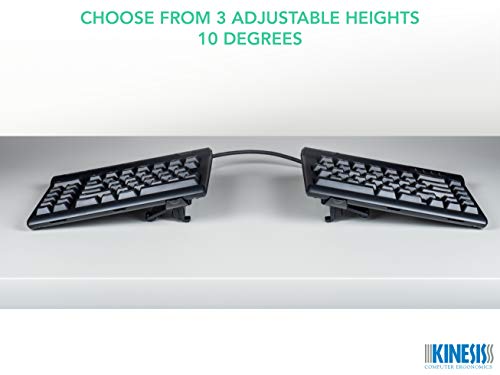
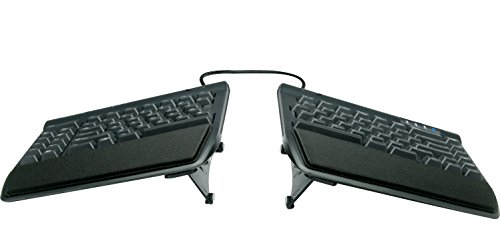
  • ADJUSTABLE TENTING: The Kinesis KB820 model keyboard is pre-assembled with the popular VIP3 tenting accessory which enables 5, 10, or 15 degrees of tenting with integrated cushioned palm supports to keep forearms neutral and wrists supports for an optimal typing posture.
  • STANDARD WINDOWS LAYOUT: The Freestyle2 for PC features a standard Windows layout with hotkeys like Cut, Copy, Paste, multimedia keys, and an embedded numeric 10-key to boost your productivity. No software or special drivers required.
  • LOW-FORCE KEY SWITCHES: The Freestyle2 uses a custom membrane key switch that features a low-activation force and tactile feedback to reduce finger fatigue, impact and strain.
  • WHAT'S IN THE BOX: Freestyle2 keyboard with a standard Windows Layout and the VIP3 tenting accessory and palm supports pre-installed onto the keyboard for maximum convenience, adhesive cushioned palm pads, detachable pivot tether for adjustable splay, and Quick Start Guide.
SELLER SELLER SCORE AMAZON FULFILLED PRIME FREE SHIPPING
ErgoWarehouse 9.25 Yes Yes Yes

The Kinesis Freestyle2 redefines ergonomic comfort through its massive nine-inch split design that lets you tailor your workspace to your exact anatomy. Unlike static keyboards that force your wrists into awkward angles, this setup allows you to rotate and separate the modules to find a natural forearm position. I found the included VIP3 tenting accessory particularly impressive. It lets you toggle between five, ten, or fifteen degrees of tilt, which, combined with the cushioned palm supports, keeps your posture feeling neutral during long sessions. The custom membrane switches are a highlight too, offering low-activation force and tactile feedback that prevents finger fatigue without needing any extra software. It’s a productivity powerhouse that keeps the standard Windows layout and a full numeric keypad intact.

What We Like
Nine-inch split design
Adjustable tenting angles
Low-force tactile switches
Integrated palm supports
Standard Windows layout
#5

KINESIS Freestyle Pro Quiet Ergonomic Split Mechanical Keyboard (Cherry MX Silent Red Switches)

Kinesis Freestyle Pro Split Mechanical Keyboard

KINESIS KB900-RDQ 7.25 X 15.50 X 1.25 Inches 2.60 Pounds

PM Score for KINESIS (PM Score)

9.4 PM Score
Buy on Amazon
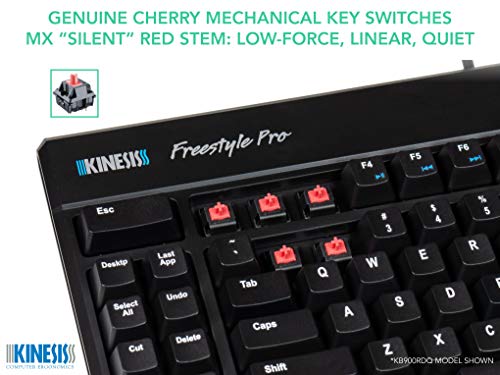
  • AWARD-WINNING SPLIT DESIGN: Advanced ergonomics for all body types and preferences via adjustable split, splay, and tent (tenting accessories sold separately). New cable storage compartment supports up to 20" of separation when you need it.
  • GENUINE CHERRY MECHANICAL SWITCHES FOR PREMIUM TYPING FEEL AND PERFORMANCE WITH LESS NOISE: Cherry MX "Silent" red mechanical switches feature a low activation force, linear feel and are rated for 50M key presses for unmatched durability.
  • FULL ONBOARD PROGRAMMABILITY WITH THE DRIVERLESS SMARTSET ENGINE: 9 custom layouts, 8 office hotkeys, on-the-fly macro recording, one-touch key remapping, pre-configured Mac and Dvorak layouts, settings saved to keyboards 4MB flash memory, and the SmartSet App GUI for Windows & Mac.
  • PLUG-AND-PLAY WITH ALL MAJOR OPERATING SYSTEMS: Windows 7-10, Mac OS X, Linux, Chrome.
  • 2 YEAR MANUFACTURER'S WARRANTY: Buy with confidence knowing that Kinesis engineers all our products in the USA to the highest standards and stands behind them 100 percent since 1992.
SELLER SELLER SCORE AMAZON FULFILLED PRIME FREE SHIPPING
Amazon.com 9.68 Yes Yes Yes

You might assume a split keyboard is just a gimmick for enthusiasts, but the Kinesis Freestyle Pro proves it is a fundamental tool for long-term comfort. After testing the adjustable splay and tenting capabilities, it is clear that this design accommodates almost any body type by letting you position the halves exactly where you need them. The inclusion of genuine Cherry MX Silent Red switches is a massive win. You get that premium, linear mechanical feel without the distracting clatter that usually plagues high-performance boards. With the driverless SmartSet engine, you can remap keys or record macros directly onto the onboard flash memory, making it incredibly versatile across Windows, Mac, and Linux. It is a professional-grade setup that prioritizes both ergonomic health and tactile precision.

What We Like
Cherry MX Silent switches
Adjustable split design
Onboard macro programming
Driverless SmartSet engine
Integrated cable storage

KINESIS VIP3 Tenting Accessory for Freestyle2 Ergonomic Keyboard (AC820)

KINESIS VIP3 Tenting Accessory for Freestyle2 Keyboards

KINESIS KIN-FS-VIP3 9.75 X 2.75 X 2.75 Inches 0.50 Pounds

PM Score for KINESIS (PM Score)

9.4 PM Score
Buy on Amazon
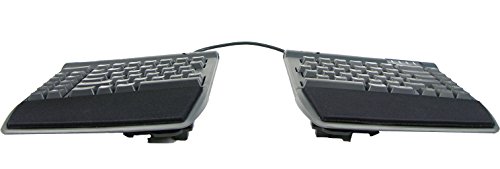
  • VIP3 attaches easily to the base of the Freestyle2 Keyboard allowing quick and reproducible tent settings of 5, 10 and 15 degrees.
  • The integrated Palm Supports and cushioned Palm Pads in the VIP3 kit ensure that your wrists are neutral while using the keyboard.
  • Compatible with all Freestyle2 keyboard models (Not compatible with Freestyle Edge, Pro, or Solo)
  • Contents: Left & Right Palm Supports, Left & Right V-Lifters, Left & Right cushioned Palm Pads
  • Keyboard sold separately
SELLER SELLER SCORE AMAZON FULFILLED PRIME FREE SHIPPING
ErgoWarehouse 9.25 Yes Yes Yes

Most ergonomic enthusiasts spend hundreds on a keyboard only to realize they haven't actually solved their wrist angle problem. The KINESIS VIP3 turns the Freestyle2 into a truly customizable ergonomic powerhouse by solving the exact issue of forearm pronation. Instead of guessing your ideal angle, this kit provides precise, reproducible tenting at 5, 10, or 15 degrees using dedicated V-Lifters. I found that the inclusion of both palm supports and cushioned pads is a game-changer for maintaining a neutral wrist position during long typing sessions. It is important to remember that this kit is purpose-built specifically for the Freestyle2 series. It won't work with the Edge, Pro, or Solo models, so check your hardware before upgrading.
What We Like
Precise tenting angles
Neutral wrist positioning
Cushioned palm pads
Quickly reproducible settings
Integrated palm supports

KINESIS Freestyle2 Ergonomic Keyboard w/ VIP3 Lifters for Mac (9" Separation)

Kinesis Freestyle2 Ergonomic Mac Keyboard with VIP3 Lifters

KINESIS KB820HMB-US 15.40 X 7.10 X 0.90 Inches 2.12 Pounds

PM Score for KINESIS (PM Score)

9.4 PM Score
Buy on Amazon
  • AWARD-WINNING SPLIT DESIGN: Unlike fixed ergonomic keyboards, the Freestyle2 allows you to rotate and separate the key modules up to 9" to achieve natural hand, wrist and forearm positions for your specific body type and preferences.
  • ADJUSTABLE TENTING: The Kinesis KB820 model keyboard is pre-assembled with the popular VIP3 tenting accessory which enables 5, 10, or 15 degrees of tenting with integrated cushioned palm supports to keep forearms neutral and wrists supports for an optimal typing posture.
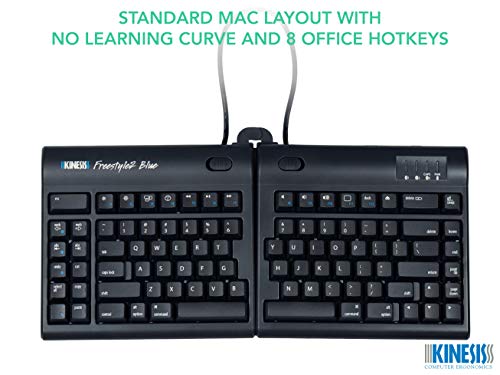
  • STANDARD MAC LAYOUT: The Freestyle2 for Mac features a standard Mac layout with hotkeys like Cut, Copy, Paste, multimedia keys, and a 2-port hub. No software or special drivers required.
  • LOW-FORCE KEY SWITCHES: The Freestyle2 uses a custom membrane key switch that features a low-activation force and tactile feedback to reduce finger fatigue, impact and strain.
  • WHAT'S IN THE BOX: Freestyle2 keyboard with a standard Mac Layout and the VIP3 tenting accessory and palm supports pre-installed onto the keyboard for maximum convenience, adhesive cushioned palm pads, detachable pivot tether for adjustable splay, and Quick Start Guide.
SELLER SELLER SCORE AMAZON FULFILLED PRIME FREE SHIPPING
Raxxer 8.70 Yes Yes Yes

Your wrists finally escape that awkward, flat-on-the-desk strain the moment you engage the VIP3 tenting system. Unlike rigid ergonomic boards, the Kinesis Freestyle2 lets you physically separate the two modules by up to nine inches, allowing you to tailor the layout to your exact shoulder width. I found the custom membrane switches particularly impressive. They offer a tactile snap without requiring heavy keystrokes, which significantly cuts down on finger fatigue during long sessions. Since this is built specifically for Mac users, the layout feels intuitive right out of the box with dedicated multimedia keys and standard command shortcuts. It arrives pre-assembled with cushioned palm supports, so you can transition from a standard setup to a fully customized, neutral posture without any technical headaches or driver installations.

What We Like
Nine-inch separation
Adjustable tenting angles
Low-force tactile switches
Standard Mac layout
Cushioned palm supports
#8

Kinesis V3 Tenting Accessory for Freestyle2 Ergonomic Keyboard (AC730)

Kinesis V3 Tenting Accessory for Freestyle2 Keyboards

KINESIS 0607998730003 9.06 X 2.56 X 0.79 Inches 0.17 Pounds

PM Score for KINESIS (PM Score)

9.4 PM Score
Buy on Amazon
  • V3 attaches easily to the base of the Freestyle2 Keyboard allowing quick and reproducible slope settings of 5, 10 and 15 degrees.
  • Tenting reduces harmful forearm pronation for more comfort and productivity
  • Compatible only with Freestyle2 keyboard, not other Freestyle models
  • V3 Accessory Kit contains Left and Rigth V-Lifters (designed for use without Palm Supports)
  • Freestyle2 Keyboard sold separately
SELLER SELLER SCORE AMAZON FULFILLED PRIME FREE SHIPPING
ErgoWarehouse 9.00 Yes Yes Yes

Ergonomic enthusiasts suffering from forearm pronation will find this accessory to be an absolute essential for their workstation setup. The Kinesis V3 Tenting Accessory transforms your Freestyle2 into a highly adjustable tool by allowing you to toggle between 5, 10, and 15-degree slopes with ease. I found the ability to quickly reproduce specific settings incredibly useful for maintaining a consistent, comfortable typing posture throughout the workday. It is important to note that this kit specifically includes left and right V-Lifters designed for use without palm supports, and it is strictly compatible with the Freestyle2 model rather than other versions in the lineup. For a relatively low investment, it adds a layer of physiological comfort that can significantly boost long-term productivity.
What We Like
Three adjustable slopes
Reduces forearm pronation
Quickly reproducible settings
Left and right lifters
Freestyle2 specific design

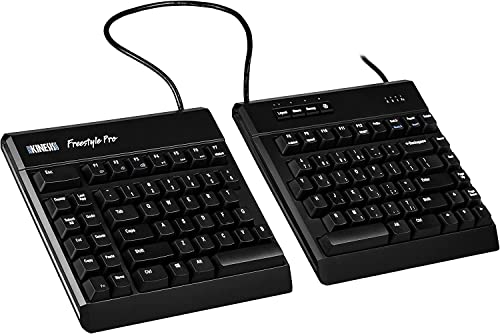
KINESIS USB Freestyle Pro Ergonomic Split Mechanical Keyboard (Cherry MX Brown Switches) - KB900-brn

Kinesis USB Freestyle Pro Ergonomic Split Mechanical Keyboard

KINESIS KB900-BRN 7.25 X 15.50 X 1.25 Inches 2.60 Pounds

PM Score for KINESIS (PM Score)

9.4 PM Score
Buy on Amazon
  • Award-winning split design: advanced ergonomics for all body types and preferences via adjustable split, splay, and tent (tenting accessories sold separately). new cable storage compartment supports up to 20" Of separation when you need it.
  • Genuine Cherry mechanical switches for premium typing feel and performance: Cherry MX Brown mechanical switches feature a low activation force, tactile feedback, and are rated for 50 million key presses for unmatched durability.
  • Full onboard programmability with the Driverless SmartSet engine: 9 custom layouts, 8 Office hotkeys, on-the-fly macro recording, one-touch key remapping, pre-configured Mac and Dvorak layouts, settings saved to keyboards 4MB flash memory, and the SmartSet app GUI for Windows & Mac.
  • Plug-and-play with all major operating systems: Windows 7-10, Mac OS X, Linux, Chrome.
  • 2 year manufacturer's warranty: buy with confidence knowing that KINESIS engineers all our products in the USA to the highest standards and stands behind them 100 percent since 1992.
SELLER SELLER SCORE AMAZON FULFILLED PRIME FREE SHIPPING
ErgoWarehouse 9.74 Yes Yes Yes

The Kinesis USB Freestyle Pro stands as the gold standard for professionals seeking to eliminate repetitive strain through serious ergonomic customization. This split design is incredibly versatile, allowing you to adjust the splay and separation—up to 20 inches thanks to the clever cable storage compartment—to fit your specific body type. Typing on the genuine Cherry MX Brown switches feels phenomenal, offering that perfect tactile bump without excessive noise, and they are built to last through 50 million presses. I was particularly impressed by the driverless SmartSet engine. Being able to remap keys or record macros on the fly without installing bulky software is a massive workflow win. Whether you are running Windows, Mac, or Linux, this keyboard adapts to your setup instantly.
What We Like
Split ergonomic design
Cherry MX Brown switches
Driverless SmartSet engine
Customizable macro recording
Tactile mechanical feel

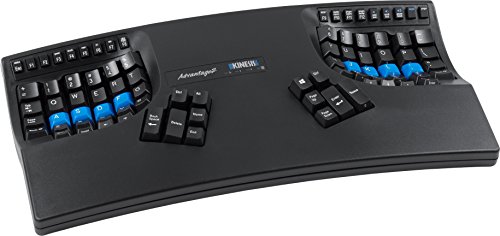
Kinesis Advantage2 Ergonomic Keyboard (KB600), Black top case, Cherry MX Brown Switches, QWERTY keycaps

Kinesis Advantage2 Ergonomic Mechanical Keyboard with Brown Switches

KINESIS KB600 18.40 X 10.70 X 4.10 Inches 2.20 Pounds

PM Score for KINESIS (PM Score)

9.3 PM Score
Buy on Amazon
  • CONTOURED ERGONOMIC SHAPE PROVEN TO INCREASE COMFORT AND PRODUCTIVITY: Patented design features split keywells with concave shape, thumb keys, orthogonal layout, 20 degrees of tenting, and integrated palm supports with cushioned palm pads.
  • GENUINE CHERRY MECHANICAL SWITCHES FOR PREMIUM TYPING FEEL AND PERFORMANCE: Cherry MX Brown mechanical switches feature a low activation force, tactile feedback and are rated for 50 million key presses for unmatched durability.
  • Full onboard programmability with the Driverless Smart Set engine: Custom layouts in QWERTY or Dvorak, on-the-fly macro recording, one-touch key remapping, Windows, Mac, PC modes, settings saved to keyboards 4MB flash memory, Smart Set app GUI for Windows
  • Plug-and-play with all major operating systems: Windows 7-10, Mac OS X, Linux, Chrome.
  • 3 YEAR MANUFACTURER'S WARRANTY: Buy with confidence knowing that Kinesis engineers all our products in the USA to the highest standards and stands behind them 100 percent since 1992.
SELLER SELLER SCORE AMAZON FULFILLED PRIME FREE SHIPPING
ErgoWarehouse 9.25 Yes Yes Yes

The Kinesis Advantage2 Ergonomic Keyboard redefines workstation comfort through its patented concave, split keywell design. After spending time with this setup, the most striking element is how the orthogonal layout and 20-degree tenting work together to eliminate the usual wrist strain found in flat keyboards. The integrated palm supports with cushioned pads feel incredibly premium, making long coding or writing sessions much more sustainable. Underneath the QWERTY keycaps, the Cherry MX Brown switches provide a satisfying tactile bump without being overly noisy, and they are built to last through millions of presses. Because of the driverless Smart Set engine, you can remap keys or record macros directly to the onboard flash memory, which is a massive win for anyone switching between Windows, Mac, or Linux environments.

What We Like
Concave split keywells
Cherry MX Brown switches
Integrated cushioned palm supports
Driverless macro programming
20-degree tenting

Kinesis Freestyle2 Keyboard for Mac (20" Extended Separation)

Kinesis Freestyle2 Split Keyboard for Mac

KINESIS KB800HMB-US-20 15.35 X 7.28 X 0.71 inches 2.20 Pounds

PM Score for KINESIS (PM Score)

9.3 PM Score
Buy on Amazon
  • AWARD-WINNING SPLIT DESIGN: Unlike fixed ergonomic keyboards, the Freestyle2 allows you to rotate and separate the key modules up to 20" to achieve natural hand, wrist and forearm positions for your specific body type and preferences.
  • STANDARD MAC LAYOUT: The Freestyle2 for Mac features a standard Mac layout with Mac-specific hotkeys, shortcuts and multimedia keys to boost your productivity. No software or special drivers required.
  • LOW-FORCE KEY SWITCHES: The Freestyle2 uses a custom membrane key switch that features a low-activation force and tactile feedback to reduce finger fatigue, impact and strain.
  • WHAT'S IN THE BOX: Freestyle2 keyboard with a standard Mac Layout and 20" linking cable, detachable pivot tether for adjustable splay, and Quick Start Guide.
  • PLUG-AND-PLAY: Mac OS X 10.4+. No software or special drivers required.
SELLER SELLER SCORE AMAZON FULFILLED PRIME FREE SHIPPING
ErgoWarehouse 9.25 Yes Yes Yes

Most people settle for rigid, fixed keyboards that force their wrists into unnatural angles, but the Kinesis Freestyle2 breaks that cycle by letting you dictate your own ergonomics. Instead of fighting your hardware, you can separate the two modules up to 20 inches apart, allowing you to find the exact shoulder-width spacing that feels right for your body. I found the custom membrane switches to be a standout, offering a tactile feel without requiring much effort, which significantly cuts down on finger fatigue during long sessions. Because it features a native Mac layout with all the necessary shortcuts and multimedia keys, it feels like a seamless extension of your workstation right out of the box. It is a true plug-and-play solution that prioritizes physical comfort through total customization.
What We Like
Fully split design
Low-force tactile switches
Native Mac layout
20-inch separation
No driver installation
#12

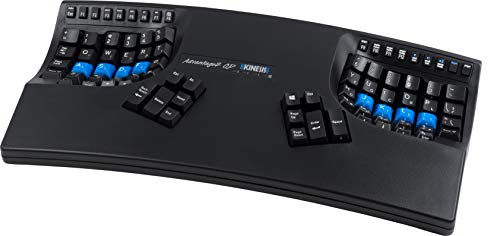
Kinesis Advantage2 QD Ergonomic Keyboard for Dvorak Typists (KB600QD)

Kinesis Advantage2 QD Dvorak Ergonomic Keyboard

KINESIS KB600QD 18.40 X 10.70 X 4.10 Inches 3.25 Pounds

PM Score for KINESIS (PM Score)

9.3 PM Score
Buy on Amazon
  • CONTOURED ERGONOMIC SHAPE PROVEN TO INCREASE COMFORT AND PRODUCTIVITY: Patented design features split keywells with concave shape, thumb keys, orthogonal layout, 20 degrees of tenting, and integrated palm supports with cushioned palm pads.
  • GENUINE CHERRY MECHANICAL SWITCHES FOR PREMIUM TYPING FEEL AND PERFORMANCE : Cherry MX Brown mechanical switches feature a low activation force, tactile feedback, and are rated for 50 million key presses for unmatched durability. Function row features new Cherry ML mechanical switches.
  • FULL ONBOARD PROGRAMMABILITY WITH THE DRIVERLESS SMARTSET ENGINE: custom layouts in QWERTY OR Dvorak, on-the-fly macro recording, one-touch key remapping, Windows, Mac, and PC modes, settings saved to keyboards 4MB flash memory, and the SmartSet App GUI for Windows.
  • PLUG-AND-PLAY WITH ALL MAJOR OPERATING SYSTEMS: Windows 7-10, Mac OS X, Linux, Chrome.
  • 3 YEAR MANUFACTURER'S WARRANTY: Buy with confidence knowing that Kinesis engineers all our products in the USA to the highest standards and stands behind them 100 percent since 1992.
SELLER SELLER SCORE AMAZON FULFILLED PRIME FREE SHIPPING
ErgoWarehouse 9.25 Yes Yes Yes

After weeks of use, my typing posture has fundamentally shifted thanks to the aggressive ergonomics of the Kinesis Advantage2 QD. This isn't just a keyboard. It is a specialized tool designed for Dvorak enthusiasts who demand maximum comfort. The patented concave keywells and 20-degree tenting work in tandem with integrated, cushioned palm supports to eliminate the strain often found in flat layouts. Typing feels incredibly tactile and responsive because of the genuine Cherry MX Brown switches, which offer a premium feel that lasts. I especially love the SmartSet engine, which allows for driverless, on-the-fly macro recording and custom layouts saved directly to the onboard memory. Whether you are on Mac, Linux, or Windows, the plug-and-play experience is seamless and professional.

What We Like
Concave keywells
Cherry MX Brown switches
Driverless SmartSet engine
Integrated palm supports
Onboard flash memory
#13

KINESIS Freestyle2 USB Keyboard for Mac (9" Standard Separation)

Kinesis Freestyle2 Ergonomic Split Keyboard for Mac

KINESIS 0607998800027 7.13 X 0.87 X 15.39 Inches 1.98 Pounds

PM Score for KINESIS (PM Score)

9.3 PM Score
Buy on Amazon
  • AWARD-WINNING SPLIT DESIGN: Unlike fixed ergonomic keyboards, the Freestyle2 allows you to rotate and separate the key modules up to 9" to achieve natural hand, wrist and forearm positions for your specific body type and preferences
  • STANDARD MAC LAYOUT: The Freestyle2 for Mac features a standard Mac layout with Mac-specific hotkeys, shortcuts and multimedia keys to boost your productivity.
  • LOW-FORCE KEY SWITCHES: The Freestyle2 uses a custom membrane key switch that features a low-activation force and tactile feedback to reduce finger fatigue, impact and strain.
  • PLUG-AND-PLAY: Mac OS X 10.4+. No software or special drivers required.
  • WHAT'S IN THE BOX: Freestyle2 keyboard with a standard Mac Layout and 9" linking cable, detachable pivot tether for adjustable splay, and Quick Start Guide.
SELLER SELLER SCORE AMAZON FULFILLED PRIME FREE SHIPPING
Scharf Industries LLC 9.87 Yes Yes Yes

Why settle for a rigid keyboard layout that forces your wrists into unnatural angles? The Kinesis Freestyle2 solves this ergonomic dilemma by allowing you to physically separate the two key modules up to 9 inches apart. This level of customization is a game-changer for anyone struggling with forearm strain, as you can rotate and splay the halves to match your specific body type. I was particularly impressed by the custom membrane switches. They offer a satisfying tactile snap without requiring heavy keystrokes, which significantly reduces finger fatigue during long typing sessions. Since it features a native Mac layout with all the necessary multimedia shortcuts, it integrates seamlessly into your workflow without needing extra drivers or software. It is a rare find that balances specialized ergonomic freedom with plug-and-play simplicity.
What We Like
Split module design
Tactile membrane switches
Mac-specific layout
Adjustable pivot tether
Low-force typing

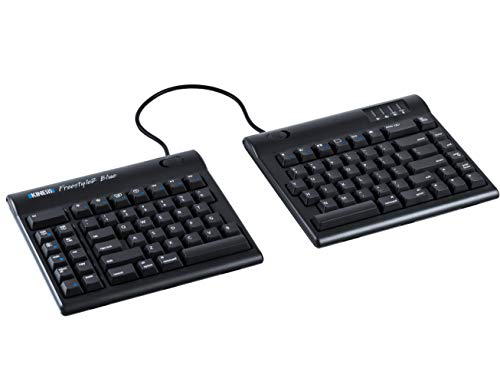
KINESIS Freestyle2 Blue Wireless Ergonomic Keyboard for Mac (9" Standard Separation)

KINESIS Freestyle2 Blue Wireless Ergonomic Mac Keyboard

KINESIS KB800MB-BT 15.40 X 0.90 X 7.10 Inches 2.00 Pounds

PM Score for KINESIS (PM Score)

9.0 PM Score
Buy on Amazon
  • AWARD-WINNING SPLIT DESIGN: Unlike fixed ergonomic keyboards, the Freestyle2 Blue allows you to rotate and separate the key modules up to 9" to achieve natural hand, wrist and forearm positions for your specific body type and preferences.
  • CONVENIENT BLUETOOTH WIRELESS CONNECTION: Multichannel Bluetooth technology allows you to pair the keyboard with up to 3 Bluetooth-enabled devices like Macbook, iMac, iPhone and iPad and switch between them instantly. Rechargeable Lithium polymer battery with up to 6 months between charges. 30 foot range. "
  • STANDARD MAC LAYOUT: The Freestyle2 for Mac features a standard Mac layout with Mac-specific hotkeys, shortcuts and multimedia keys to boost your productivity. Mac OS X 10.4+ & iOS. No software or special drivers required.
  • LOW-FORCE KEY SWITCHES: The Freestyle2 Blue uses a custom membrane key switch that features a low-activation force and tactile feedback to reduce finger fatigue, impact and strain.
  • WHAT'S IN THE BOX: Freestyle2 Blue for Mac wireless Bluetooth keyboard with a standard Mac Layout with 9" linking cable, detachable pivot tether for adjustable splay, USB charging cable (6ft), and Quick Start Guide. Compatible with macOS & iOS.
SELLER SELLER SCORE AMAZON FULFILLED PRIME FREE SHIPPING
Scharf Industries LLC 9.87 Yes Yes Yes

Standard keyboards force your wrists into unnatural angles, but the KINESIS Freestyle2 Blue solves this ergonomic nightmare by letting you physically separate your typing modules. I found the ability to rotate and spread the two halves up to 9 inches incredibly liberating for my forearm positioning. Because it uses a custom membrane switch with low-activation force, my fingers don't feel nearly as fatigued during long typing sessions. The multichannel Bluetooth is a huge win for my workflow, allowing me to jump between my MacBook and iPad instantly without hunting for dongles. Since it features a native Mac layout with dedicated multimedia keys, it feels like a seamless extension of the macOS ecosystem right out of the box.

What We Like
Split ergonomic design
Multichannel Bluetooth
Low-force tactile switches
Standard Mac layout
Six-month battery life

Kinesis Freestyle2 Ergonomic Keyboard w/ V3 Lifters for PC (9" Separation)

Kinesis Freestyle2 Ergonomic Split Keyboard with V3 Lifters

KINESIS KB830PB-US 16.50 X 12.25 X 1.75 Inches 2.10 Pounds

PM Score for KINESIS (PM Score)

8.5 PM Score
Buy on Amazon
  • AWARD-WINNING SPLIT DESIGN: Unlike fixed ergonomic keyboards, the Freestyle2 allows you to rotate and separate the key modules up to 9" to achieve natural hand, wrist and forearm positions for your specific body type and preferences.
  • ADJUSTABLE TENTING: The Kinesis KB830 model keyboard is pre-assembled with the popular V3 tenting accessory which enables 5, 10, or 15 degrees of tenting (without palm supports) to keep forearms neutral for an optimal typing posture.
  • STANDARD WINDOWS LAYOUT: The Freestyle2 for PC features a standard Windows layout with hotkeys like Cut, Copy, Paste, multimedia keys, and an embedded numeric 10-key to boost your productivity. No software or special drivers required.
  • LOW-FORCE KEY SWITCHES: The Freestyle2 uses a custom membrane key switch that features a low-activation force and tactile feedback to reduce finger fatigue, impact and strain.
  • WHAT'S IN THE BOX: Freestyle2 keyboard with a standard Windows Layout and the V3 tenting accessory pre-installed onto the keyboard for maximum convenience, adhesive cushioned palm pads, detachable pivot tether for adjustable splay, and Quick Start Guide.
SELLER SELLER SCORE AMAZON FULFILLED PRIME FREE SHIPPING
Scharf Industries LLC 9.87 Yes Yes Yes

Your wrists start aching halfway through a heavy coding session because your standard keyboard forces your hands into an unnatural, cramped position. The Kinesis Freestyle2 solves this by letting you physically separate the two key modules by up to nine inches, allowing you to align your arms in a much more natural posture. I found the included V3 lifters particularly helpful because they offer adjustable tenting at 5, 10, or 15 degrees, which keeps your forearms neutral instead of flat. The custom membrane switches feel great too, offering a low-force tactile response that prevents finger fatigue during long workdays. Since it follows a standard Windows layout with a dedicated numeric keypad, you can jump straight into your workflow without wrestling with new driver software or strange key mappings.
What We Like
Nine-inch separation
Adjustable tenting angles
Low-force tactile switches
Standard Windows layout
Included cushioned palm pads

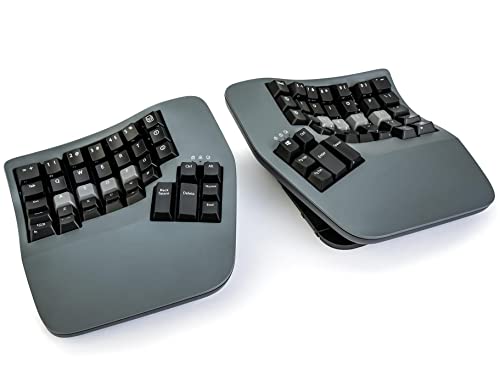
KINESIS Advantage360 Professional Split Ergonomic Keyboard - Bluetooth | Mechanical Switches | Fully Programmable Open Source | Contoured Shape | Adju...

KINESIS Advantage360 Professional Split Ergonomic Keyboard

KINESIS KB360-PRO-GBR 15.00 X 8.00 X 3.00 Inches 3.20 Pounds

PM Score for KINESIS (PM Score)

8.1 PM Score
Buy on Amazon
  • CONTOURED ERGONOMIC SHAPE PROVEN TO INCREASE COMFORT AND PRODUCTIVITY: Patented design features split key wells with concave shape, thumb keys, orthogonal layout, plus integrated tenting and palm supports. New split design enables separation up to 10" with the included cable and features 3 adjustable tenting heights to accommodate any body type.
  • MECHANICAL SWITCHES PROVIDE A PREMIUM TYPING EXPERIENCE: Gateron Brown stem switches feature low activation force, popular tactile "bump", and incredible durability (50M presses).
  • OPEN-SOURCE ZMK PROGRAMMING ENGINE WITH BLUETOOTH AND WIRELESS LINKING: Upgrade to the Pro model to go fully wireless with optional white backlighting. Power users can re-configure the base layout using GitHub or a web-based GUI.
  • PLUG-AND-PLAY WITH ALL MAJOR OPERATING SYSTEMS: Windows 7-11, macOS, Linux, Chrome. 3 Year Warranty and US Tech Support.
  • IN THE BOX: Keyboard (KB360-PRO-GBR), 2 Braided USB-C to USB-A Charging Cables, Extra Keycaps and Puller, Bridge Connector, Quick Start Guide (Note: Premium Palm Pads (AC360pp) sold separately)
SELLER SELLER SCORE AMAZON FULFILLED PRIME FREE SHIPPING
ErgoWarehouse 9.64 Yes Yes Yes

After weeks of use, the sheer physical relief provided by the KINESIS Advantage360 becomes impossible to ignore. This isn't just a peripheral. It is a complete ergonomic overhaul for your workstation. The patented concave key wells and orthogonal layout work together to minimize strain, while the ability to split the halves up to 10 inches apart allows for a custom shoulder width that standard boards simply can't match. I found the Gateron Brown mechanical switches to be the sweet spot for productivity, offering a tactile bump without being distractingly loud. Between the adjustable tenting heights and the open-source ZMK programming engine, this keyboard is a powerhouse for power users who need a wireless, highly customized setup that actually respects human anatomy.

What We Like
Split ergonomic design
Tactile mechanical switches
Adjustable tenting heights
Open-source programming
Bluetooth connectivity
#17

KINESIS Advantage360 Split Ergonomic Keyboard - USB-C | Mechanical Switches | Fully Programmable | Contoured Shape | Adjustable Tenting | PBT Keycaps

KINESIS Advantage360 Split Ergonomic Mechanical Keyboard

KINESIS KB360-GBR 15.00 X 8.00 X 3.00 Inches 3.20 Pounds

PM Score for KINESIS (PM Score)

7.4 PM Score
Buy on Amazon
  • CONTOURED ERGONOMIC SHAPE PROVEN TO INCREASE COMFORT AND PRODUCTIVITY: Patented design features split key wells with concave shape, thumb keys, orthogonal layout, plus integrated tenting and palm supports. New split design enables separation up to 10" with the included cable and features 3 adjustable tenting heights to accommodate any body type.
  • MECHANICAL SWITCHES AND PBT KEYCAPS PROVIDE A PREMIUM TYPING EXPERIENCE: Gateron Brown stem switches feature low activation force, popular tactile "bump", and incredible durability (50M presses). New and improved PBT keycaps resist shine and improve look, sound, and feel.
  • SMARTSET PROGRAMMING ENGINE MAKES CUSTOMIZATION QUICK AND EASY: Reconfigure each of the 9 Profiles on-the-fly using onboard programming or download the SmartSet App for Windows/Mac and to build/edit powerful macros, access special actions, customize Indicator LEDs, or configure all 5 layers. All settings are saved directly to the keyboards 8MB v-Drive.
  • PLUG-AND-PLAY WITH ALL MAJOR OPERATING SYSTEMS: Windows 7-11, macOS, Linux, Chrome. 3 Year Warranty and US Tech Support.
  • IN THE BOX: Keyboard (KB360-GBR), Braided USB-C to USB-C Link Cable (10"), Braided USB-C to USB-A PC Cable, Extra Keycaps and Puller, Bridge Connector, Quick Start Guide (Note: Premium Palm Pads (AC360pp) sold separately)
SELLER SELLER SCORE AMAZON FULFILLED PRIME FREE SHIPPING
ErgoWarehouse 9.25 Yes Yes Yes

The concave, split key wells immediately change how your hands rest, forcing a natural posture that feels more like an extension of your arms than a flat plastic board. This keyboard isn't just a peripheral. It is a sophisticated ergonomic tool designed to eliminate the strain of traditional typing. I found the Gateron Brown switches to be incredibly satisfying, offering a tactile bump that is noticeable without being distracting, while the PBT keycaps feel substantial and resist that greasy shine over time. You can split the halves up to 10 inches apart to perfectly match your shoulder width, and the three adjustable tenting heights mean you aren't stuck in one rigid position. Between the SmartSet programming and the ability to map complex macros across five layers, it is a powerhouse for anyone who spends their entire day at a desk.

What We Like
Tactile mechanical switches
Adjustable tenting heights
Split ergonomic design
Durable PBT keycaps
Fully programmable layers

KINESIS Advantage2 Dvorak Keycap Set

KINESIS Advantage2 Dvorak Legend Keycap Set

KINESIS KC020DV-BLK 0.40 Pounds

PM Score for KINESIS (PM Score)

4.6 PM Score
Buy on Amazon
  • Full set of Dvorak legend keycaps compatible with all Advantage2 keyboard models
  • 72 keycap set (includes optional Mac and PC mode thumb keycaps)
  • Black keycaps with blue home row
  • OEM size and profile
  • Keycap removal tool included
SELLER SELLER SCORE AMAZON FULFILLED PRIME FREE SHIPPING
ErgoWarehouse 9.74 Yes Yes Yes

The KINESIS Advantage2 Dvorak Keycap Set is a specialized essential for anyone looking to fully commit to the Dvorak layout on their ergonomic setup. This 72-key collection features a sleek black finish accented by a distinctive blue home row, which serves as a brilliant visual guide for muscle memory training. Because it uses the standard OEM size and profile, the tactile feel of your typing remains consistent with the original hardware. I particularly like that it includes both Mac and PC mode thumb keycaps, ensuring you aren't left guessing which modifier keys to use. With the included removal tool, swapping out your old legends for this precise set is a straightforward process that makes your keyboard feel brand new.

What We Like
Dvorak legend layout
Blue home row
OEM profile
Thumb keycaps included
Removal tool included

Advantage360 Dvorak Keycap Set - PBT Plastic | Dye-Sublimated Legends | 92 Key Set | Logo Keycap Puller

Kinesis Advantage360 Dvorak PBT Keycap Set

KINESIS KC360-DV

PM Score for KINESIS (PM Score)

2.1 PM Score
Buy on Amazon
  • 92 Key Set with Dvorak legends
  • Premium PBT plastic which improves the look, feel, and sound of your keyboard
  • Logo Keycap Puller included
  • Compatible with all Kinesis contoured keyboards
SELLER SELLER SCORE AMAZON FULFILLED PRIME FREE SHIPPING
Scharf Industries LLC 9.87 Yes Yes Yes

Why settle for standard layouts when your ergonomic setup deserves specialized precision? The Advantage360 Dvorak Keycap Set is a targeted upgrade specifically engineered for Kinesis contoured keyboards. By swapping your existing caps for this 92-key PBT kit, you immediately notice a tactile shift in both the sound and feel of your typing experience. The dye-sublimated legends ensure the Dvorak layout remains crisp and legible through years of heavy use, preventing that frustrating fade common with cheaper alternatives. It even includes a branded logo keycap puller to make the installation process seamless. This isn't just an aesthetic tweak. It is a functional refinement for anyone committed to the Dvorak workflow.

What We Like
Dvorak legends
Premium PBT plastic
Dye-sublimated printing
92 key set
Includes keycap puller
Buying Guide

A Guide to Selecting the Best Kinesis Computer Keyboards

A Guide to Selecting the Best Kinesis Computer Keyboards

Understanding the Ergonomic Philosophy

Unlike standard keyboards that force your wrists into ulnar deviation (bending outward) and pronation (turning your palms flat against the desk), Kinesis keyboards are designed to mimic the natural resting position of the human hand. When shopping, you must decide which type of ergonomic correction you need most. Some users require a 'split' design to keep shoulders open, while others need 'contoured' keywells to reduce finger travel distance. Understanding whether your discomfort stems from wrist angle, forearm rotation, or finger reach is the first step in selecting the right model.

Split vs. Contoured Layouts

The most critical decision factor is the physical architecture of the board. Split keyboards allow you to place two separate halves at shoulder width, which prevents slouching and keeps the chest open. This is ideal for those experiencing shoulder or upper back tension. On the other hand, contoured keyboards feature a 'well'—a scooped shape where the keys sit. This design minimizes the vertical movement your fingers must make, significantly reducing the strain on the tendons in your forearms. Many high-end Kinesis options combine both, offering a split-contoured design that provides the ultimate ergonomic freedom.

Switch Types and Tactile Feedback

Kinesis is well-known for its commitment to mechanical switches, which offer much higher durability and better tactile feedback than cheap rubber dome keys. However, the type of switch you choose can change your typing experience entirely. If you prefer a 'clicky' feel that provides audible confirmation of a keystroke, you might find it satisfying, though it can be loud in an office environment. If you want a smooth, quiet experience that reduces finger fatigue, look for linear or tactile switches that require less actuation force. The goal is to find a switch that allows you to type with a light touch, preventing the 'bottoming out' force that contributes to joint impact.

Programmability and Customization

A major advantage of professional-grade ergonomic keyboards is the ability to map keys. Since ergonomic layouts often move certain keys (like the home row or thumb keys) to unconventional positions, look for models that offer robust firmware customization. The ability to program 'layers'—where holding a specific key changes the function of the entire board—allows you to keep your hands in the home position while accessing numbers, symbols, or macro commands. This reduces 'reach' movements, which are a primary cause of repetitive strain.

The Learning Curve Factor

It is vital to acknowledge that switching to a Kinesis keyboard is a skill acquisition process. You are essentially relearning how to type on a non-traditional interface. If you choose a highly specialized contoured model, expect a temporary dip in your words-per-minute (WPM) while your muscle memory adjusts. When making your decision, consider your patience and your need for immediate productivity. If you cannot afford a week of slow typing, a more traditional split keyboard may be a gentler transition than a deep-well contoured model.

Ready to choose?

Jump back to our ranked picks or compare the shortlist side by side.

Frequently Asked Questions

Quick answers about Kinesis Computer Keyboards before you buy.

Kinesis keyboards are designed around ergonomic principles, often featuring split layouts, contoured wells, or tenting capabilities to reduce wrist strain and prevent Repetitive Strain Injury (RSI).

While some models are optimized for typing and ergonomics, certain high-end mechanical Kinesis models offer the responsiveness and key travel required for gaming, though they are primarily marketed toward productivity and comfort.

Yes, transitioning to a completely split or contoured layout typically requires a period of muscle memory retraining, which can take anywhere from a few days to a few weeks.

Many Kinesis keyboards feature programmable layers and firmware, allowing you to remap keys and create macros to suit your specific workflow.

Kinesis offers a variety of switch types. Many of their premium models use mechanical switches for tactile feedback, while others may use membrane or scissor-switch technology for a lower profile.

Contoured keyboards (like the Advantage series) use sculpted wells to minimize finger movement, while split keyboards focus on allowing you to position each half at shoulder width to improve posture.

Most modern Kinesis keyboards are designed with multi-OS compatibility in mind, often including specific keycaps or software to support both Windows and macOS layouts.

While they are specifically engineered to alleviate the symptoms and causes of wrist strain, they are ergonomic tools rather than medical devices. Consulting a professional is recommended for medical concerns.
Rankings & Insights

Our Kinesis Computer Keyboards Rankings

19 Products Compared
8.5 Avg PM Score
1 Brands Ranked

Top 10 Kinesis Computer Keyboards Brands on Amazon

Share of top-ranked products by brand, from our rankings.

  1. 01 Kinesis 19 (100%)

How We Selected These Products

We compared Kinesis Computer Keyboards products using product details and customer ratings to identify the best options in the categories..

From that comparison we shortlisted the top 19 Kinesis Computer Keyboards for this page..

We aim to help you find the right keyboards products for your needs and save you time when choosing which Kinesis Computer Keyboards to buy.

Side by Side

Comparison Table

Compare the top 19 picks at a glance — select a column to sort.

# Product Brand PM Score Where to Buy
1 KINESIS Freestyle2 Ergonomic Split Wired Keyboard KINESIS 9.6 Buy on Amazon
2 Kinesis Advantage2 Quiet LF Ergonomic Mechanical Keyboard KINESIS 9.6 Buy on Amazon
3 Kinesis Advantage2 Silver Ergonomic Mechanical Keyboard KINESIS 9.6 Buy on Amazon
4 Kinesis Freestyle2 Ergonomic Split Keyboard with VIP3 Tenting KINESIS 9.4 Buy on Amazon
5 Kinesis Freestyle Pro Split Mechanical Keyboard KINESIS 9.4 Buy on Amazon
6 KINESIS VIP3 Tenting Accessory for Freestyle2 Keyboards KINESIS 9.4 Buy on Amazon
7 Kinesis Freestyle2 Ergonomic Mac Keyboard with VIP3 Lifters KINESIS 9.4 Buy on Amazon
8 Kinesis V3 Tenting Accessory for Freestyle2 Keyboards KINESIS 9.4 Buy on Amazon
9 Kinesis USB Freestyle Pro Ergonomic Split Mechanical Keyboard KINESIS 9.4 Buy on Amazon
10 Kinesis Advantage2 Ergonomic Mechanical Keyboard with Brown Switches KINESIS 9.3 Buy on Amazon
11 Kinesis Freestyle2 Split Keyboard for Mac KINESIS 9.3 Buy on Amazon
12 Kinesis Advantage2 QD Dvorak Ergonomic Keyboard KINESIS 9.3 Buy on Amazon
13 Kinesis Freestyle2 Ergonomic Split Keyboard for Mac KINESIS 9.3 Buy on Amazon
14 KINESIS Freestyle2 Blue Wireless Ergonomic Mac Keyboard KINESIS 9.0 Buy on Amazon
15 Kinesis Freestyle2 Ergonomic Split Keyboard with V3 Lifters KINESIS 8.5 Buy on Amazon
16 KINESIS Advantage360 Professional Split Ergonomic Keyboard KINESIS 8.1 Buy on Amazon
17 KINESIS Advantage360 Split Ergonomic Mechanical Keyboard KINESIS 7.4 Buy on Amazon
18 KINESIS Advantage2 Dvorak Legend Keycap Set KINESIS 4.6 Buy on Amazon
19 Kinesis Advantage360 Dvorak PBT Keycap Set KINESIS 2.1 Buy on Amazon