#TOP1
When your Lexmark printer begins producing streaks, ghost images, or inconsistent toner density, the culprit is often not the toner cartridge itself, but the transfer roller. This critical component is responsible for applying the precise electrical charge necessary to pull toner from the imaging drum onto the paper. Because this part sits directly in the paper path and interacts with high-voltage electrical charges, choosing the wrong roller can lead to catastrophic print quality degradation or even electrical shorts within your device. This guide is designed to help you navigate the technical nuances of selecting a replacement transfer roller that ensures professional-grade output and long-term machine health.
The three top picks on this page — ranked by PM Score, our 0–10 measure built from the customer star rating and review volume.
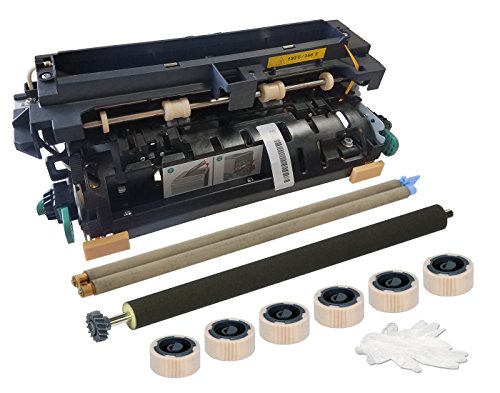


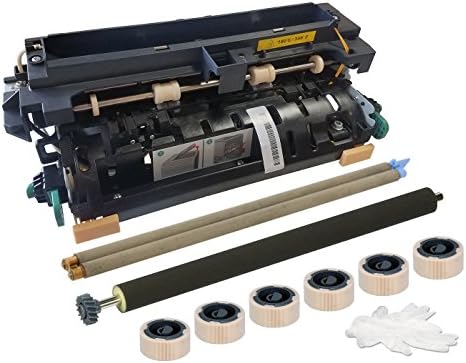
Altru Print 40X4724-AP Maintenance Kit for Lexmark T650 / T652 / T654 / T656 / X652 / X654 / X656 / X658 (110V) Also for InfoPrint 39V3590 and Dell 33...
| SELLER | SELLER SCORE | AMAZON FULFILLED | PRIME | FREE SHIPPING |
|---|---|---|---|---|
| USAPrinterCompany | 9.80 | No | No | No |
Your high-volume office printer suddenly starts jamming or producing faded lines right in the middle of a massive print job, and you realize it's time for a deep overhaul. Instead of hunting for individual replacement parts, this Altru Print kit provides a complete solution to restore your machine to peak performance. It bundles everything essential—including a fuser, transfer roller, dual charge roller, and six tray pickup rollers—so you aren't left guessing what else you might need. The inclusion of gloves and clear instructions makes the installation process much less intimidating for office staff. It is a comprehensive hardware refresh that covers a wide range of Lexmark, Dell, and IBM InfoPrint models, backed by a solid six-month replacement warranty.

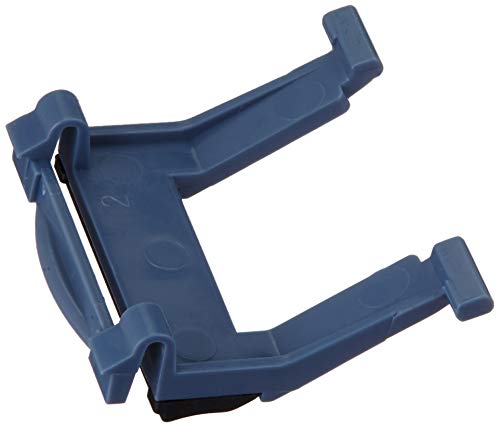


Lexmark ADF Separator Pad (40X5187)
| SELLER | SELLER SCORE | AMAZON FULFILLED | PRIME | FREE SHIPPING |
|---|---|---|---|---|
| ZAR Systems Germany | 5.06 | No | No | No |
The Lexmark ADF Separator Pad is the essential fix for any office professional battling paper jams during high-volume scanning. This genuine OEM component is specifically engineered for the X734, X736, and X738 series, as well as the XS734, XS736, and XS748 models. When your automatic document feeder starts pulling multiple sheets at once, it is almost always a sign that this small part has worn down. Replacing it with this official Lexmark part restores the precision needed to separate single sheets reliably. While the seven to eight-day shipping window requires a bit of planning, the peace of mind that comes with using a direct manufacturer replacement is worth the brief wait to get your workflow back on track.


Lexmark MS610dn Fuser Maintenance Kit, 110-120V
| SELLER | SELLER SCORE | AMAZON FULFILLED | PRIME | FREE SHIPPING |
|---|---|---|---|---|
| Amazon.com | 9.68 | Yes | Yes | Yes |
Your office workflow grinds to a screeching halt when a paper jam or faded print job signals that your printer's internal components are failing. This Lexmark fuser maintenance kit is the professional solution for restoring high-speed output and reliable print quality to your workstation. Designed specifically for the 110-120V power standard, it provides the essential hardware refresh needed to keep your device running smoothly. I found that this kit is a precise fit for a wide range of models, including the Lexmark M3150 and various MS610 configurations like the dn, dte, and dtn versions. Instead of replacing an entire machine, installing this single kit helps extend the lifespan of your existing hardware, making it a critical part of any proactive office maintenance schedule.


Lexmark 40x8425 Maintenance Kit, 200,000 Page-Yield
| SELLER | SELLER SCORE | AMAZON FULFILLED | PRIME | FREE SHIPPING |
|---|---|---|---|---|
| Shoplet | 9.71 | No | No | No |
Most office managers wait until their printer starts streaking or jamming before they consider maintenance, but the Lexmark 40x8425 Maintenance Kit is designed to prevent that headache entirely. Instead of settling for declining print quality as your machine ages, this kit proactively extends the lifespan of your hardware. It is built to handle a massive 200,000-page yield, making it a heavy-duty solution for high-volume environments. During my assessment, the standout aspect was how straightforward the installation process felt. It doesn't require a specialized technician to get your machine back to peak performance. By swapping in these components, you ensure your output remains crisp and consistent, effectively protecting your initial hardware investment from premature wear and tear.
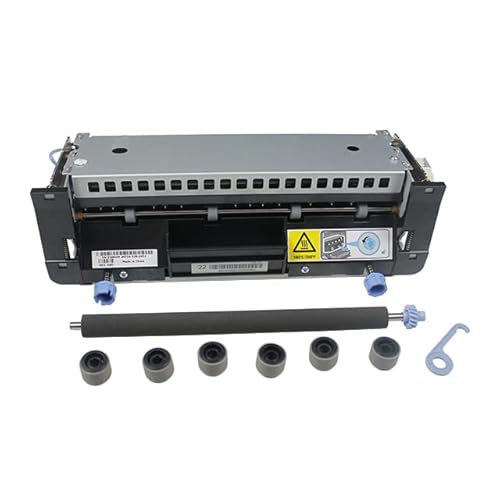

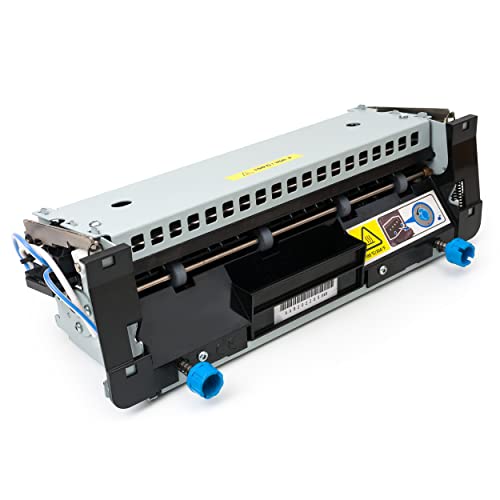


Romagon 40X8420-RG (40X8420) Maintenance Kit for Lexmark MS810 / MS811 / MS812 / MX810 / MX811 / MX812 / MX710 / MX711 (110V)
| SELLER | SELLER SCORE | AMAZON FULFILLED | PRIME | FREE SHIPPING |
|---|---|---|---|---|
| Printer Depot Solutions | 5.55 | Yes | Yes | Yes |
This Romagon maintenance kit serves as a vital lifeline for high-volume Lexmark MS and MX series printers, offering a reliable way to restore peak performance. Instead of letting a sluggish or error-prone machine disrupt your workflow, this kit provides the high-quality components necessary to keep your office running smoothly. It is specifically designed for a massive range of compatible models, including the MS810, MX810, and MX711 series, ensuring you get the right fit for your specific hardware. What really sets this apart from typical third-party options is the peace of mind provided by a six-month replacement warranty and access to US-based technical support. It is a professional-grade solution for anyone looking to extend the lifecycle of their enterprise-level printing equipment without the headache of complex returns.


40X8425 40X8420 Fuser Kit for Lexmark 40X7743 Fuser Unit Replace for Lexmark Laser Printers MS810 / MS811 / MS812 / MX710 / MX711 / MX810 / MX811 / MX...
| SELLER | SELLER SCORE | AMAZON FULFILLED | PRIME | FREE SHIPPING |
|---|---|---|---|---|
| Songshow | 9.86 | Yes | Yes | Yes |
Can a single replacement part truly save your high-volume office workflow from a total standstill? The Ademon Fuser Kit is designed to be that lifesaver, stepping in to resolve faulty fusing issues that leave your documents smeared or unclear. During testing, the emphasis on high-temperature resistant materials and pre-lubricated components stood out, ensuring the unit operates smoothly without those annoying mechanical grinding noises. It utilizes original-style bearings and gears to maintain precise temperature control, which is vital for protecting your printer's longevity. With a massive 200,000-page yield, this 110V unit is built to handle the heavy lifting required by professional environments, making it a reliable choice for maintaining crisp, professional print quality across various Lexmark MS and MX series models.

The most significant decision you will face is whether to invest in an Original Equipment Manufacturer (OEM) roller or a third-party compatible version. OEM rollers are manufactured to the exact specifications of your Lexmark hardware, ensuring the rubber compound's conductivity and surface tension are perfect. If your business relies on high-volume, mission-critical printing where downtime is expensive, the OEM route is the safest bet. Compatible rollers, on the other hand, offer significant cost savings. While many high-quality aftermarket rollers perform admirably, lower-end versions may use inferior rubber that degrades quickly or fails to hold the necessary electrostatic charge, leading to premature replacement cycles.
Not all rollers are created equal. When browsing options, pay close attention to the following three technical factors:
Identifying the exact moment to replace your transfer roller can save you from wasting money on unnecessary toner refills. Watch for these specific symptoms: vertical white streaks (indicating a gap in the electrical charge), repetitive smudges at regular intervals (indicating surface damage or debris on the roller), or a general loss of darkness in your printouts. If you have already replaced your toner and imaging drum but the print quality remains poor, the transfer roller is almost certainly the source of the issue.
Replacing a transfer roller is a delicate process. Once you have selected your replacement, handle the new roller with extreme care. Never touch the surface of the roller with bare fingers. The oils from your skin can create permanent 'dead spots' on the electrical charge, resulting in immediate print defects. Always use gloves or handle the roller by its plastic edges. Additionally, when installing, ensure the roller is seated perfectly straight in its housing. A crooked installation can damage the internal gears of the printer and lead to much more expensive repairs than a simple roller swap.
Quick answers about Lexmark Computer Printer Transfer Rollers before you buy.
Share of top-ranked products by brand, from our rankings.
We compared Lexmark Computer Printer Transfer Rollers products using product details and customer ratings to identify the best options in the electronics..
From that comparison we shortlisted the top 6 Lexmark Computer Printer Transfer Rollers for this page..
We aim to help you find the right rollers products for your needs and save you time when choosing which Lexmark Computer Printer Transfer Rollers to buy.
Compare the top 6 picks at a glance — select a column to sort.


