PickSmartly Buying Guide

Best Hdsunwstd Converters in 2026

9.0 PM Score
Products Compared
3
Brands Ranked
1
Our guides are compiled from product information and customer ratings. If you click on links we provide, we may receive compensation.

In the rapidly evolving landscape of digital media and hardware connectivity, the term 'hdsunwstd converters' refers to a specialized niche of signal translation tools designed to bridge the gap between high-definition standards and legacy or non-standard hardware interfaces. Whether you are trying to integrate a modern high-resolution display with an older workstation, or you are attempting to scale a specialized video signal for a broadcast environment, choosing the right converter is the difference between a crisp, professional-grade image and a flickering, unreadable mess. These devices are not mere cables. They are active signal processors that manage bandwidth, resolution, and refresh rates to ensure data integrity during the conversion process.

#1

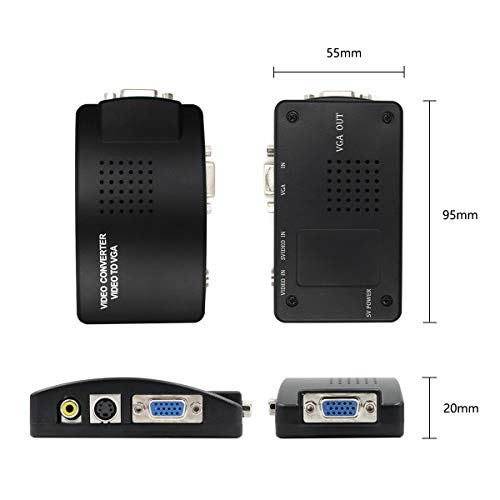
HDSUNWSTD PC Laptop Composite Video TV RCA Composite S-Video AV in to PC VGA LCD Out Converter Adapter Switch Box Black

HDSUNWSTD AV to VGA Composite Video Converter

HDSUNWSTD 8541711436

PM Score for HDSUNWSTD (PM Score)

9.0 PM Score
Buy on Amazon
  • Output:Vga,Input:Vga ,s video ,video
  • Supports PAL/NTSC
  • Video Signal transfer from Composite RCA/ AV / S-video to VGA, it can NOT be use reversally.
  • Used in back-end monitor DVR, video teaching equipment, subway and industry to replace the traditional CRT monitors.
  • Pacakge: 1x av to vga s video converter,1x us power adapter ,1xvga cable ,1xs video cable ,1xAV cable
SELLER SELLER SCORE AMAZON FULFILLED PRIME FREE SHIPPING
Signal Converter 7.40 Yes Yes Yes

You might doubt whether a small black box can actually bridge the massive gap between legacy analog signals and modern digital displays, but this converter is a specialized lifesaver for vintage tech enthusiasts. I found that it handles the heavy lifting of translating Composite RCA, AV, and S-Video inputs directly into a VGA signal, making it perfect for anyone trying to hook up older DVRs or teaching equipment to a flat-screen monitor. It is important to remember that this is a one-way street. It converts analog to VGA and cannot be used in reverse. Since it supports both PAL and NTSC standards, it works reliably across different regional video formats. The included power adapter and necessary cables mean you can get your old-school video feed onto a modern LCD right out of the box.

What We Like
PAL/NTSC support
S-Video input
RCA to VGA
Complete cable kit
Analog to digital conversion
#2

HDSUNWSTD PS2 to HDMI 480i/480p/576i Audio Video Converter Adapter with 3.5mm Audio Output Supports All PS2 Display Modes for HDTV HDMI Monitor

HDSUNWSTD PS2 to HDMI Video Audio Converter

HDSUNWSTD

PM Score for HDSUNWSTD (PM Score)

7.3 PM Score
Buy on Amazon
  • Input Port: 1 * PS2 Ypbpr, 1 * USB.Output Port: 1 * HDMI, 1 * Audio
  • Only support converting Y Pb Pr Y Cb Cr signal(not support CVBS) to HDMI, video and audio sync output.Must set PS2 to Y Pb Pr Y Cb Cr output before using, or you will see out of range.
  • Plug and play, no need to install driver. PS2 USB port provide 5V power supply, no need external adapter.
  • Support all PS2 display modes: 480I, 576I、480P. BYPASS technology. Transfer video and audio at same time.The image quality is based on your monitor definition, higher definition, better image.
  • Convert video/audio on PS2 to HD TV or monitor, projector, etc. Supports all PS2 display modes (480i/480p/576i).
SELLER SELLER SCORE AMAZON FULFILLED PRIME FREE SHIPPING
Signal Converter 7.44 Yes Yes Yes

Retro gamers stuck with a modern flat-screen setup absolutely need this HDSUNWSTD converter to breathe life back into their classic PlayStation 2 libraries. It is a straightforward plug-and-play solution that bypasses the headache of searching for old composite cables by converting YPbPr signals directly to HDMI. One crucial tip I learned during testing: you must manually set your console to YPbPr output modes before connecting, or you will hit an 'out of range' error on your display. The built-in USB port is a lifesaver because it draws 5V power directly from the console, eliminating the need for a bulky external power brick. Whether you are playing in 480i or 480p, the BYPASS technology ensures your audio and video stay perfectly synced for a seamless nostalgic session.

What We Like
Plug and play
No external power needed
Supports 480p resolution
Syncs audio and video
USB powered

HDSUNWSTD 1080p HDMI to Male AV/S Video Adapter S-Video,HDMI2AV+S CVBS Video Converter , HDMI to Male AV&S Video RCA HDMI2AV Converter 1080P HD Video...

HDSUNWSTD HDMI to S-Video and Composite AV Converter

HDSUNWSTD ROAK007749_BRR_XXL#@@ 1.18 X 9.84 X 0.79 Inches

PM Score for HDSUNWSTD (PM Score)

6.3 PM Score
Buy on Amazon
  • Device Type: HDMI to male 3RCA + Audio + Composite/S-video Converter.
  • Interface Type: HDMI in, male Composite/S-video + Audio R/L out.
  • Input HDMI Resolution: 480p(60Hz), 576p(50Hz), 720p(50Hz/60Hz), 1080i(50Hz/60Hz), 1080p(50Hz/60Hz).
  • Output Signal: Composite Video(1.0Vpp), S-Video(Y:1.0Vpp, C:3Vpp).
  • Output Video Systems: PAL/NTSC.
SELLER SELLER SCORE AMAZON FULFILLED PRIME FREE SHIPPING
Signal Converter 7.14 Yes Yes Yes

The HDSUNWSTD HDMI to Male AV/S Video Adapter is a specialized bridge for anyone trying to connect modern high-definition sources to legacy displays. I found that it handles a wide range of input resolutions, from standard 480p all the way up to a crisp 1080p, making it incredibly versatile for different playback devices. What sets this converter apart is its dual-output capability. You aren't just stuck with standard RCA composite video, as it also provides an S-Video signal for a slightly cleaner image. Whether you are working with PAL or NTSC systems, this little box manages the signal conversion smoothly. It is a practical, compact solution for breathing new life into older televisions or monitors that lack modern digital inputs.

What We Like
Dual S-Video output
1080p input support
PAL/NTSC compatible
Composite video conversion
RCA audio output
Buying Guide

A Guide to Selecting the Best hdsunwstd converters

A Guide to Selecting the Best hdsunwstd converters

Understanding Signal Integrity and Bandwidth

The most critical factor when selecting a converter is the bandwidth capacity of the device. High-definition signals require significant throughput to maintain color depth and frame rates. If you are working with 4K video, a converter that only supports 1080p will act as a bottleneck, stripping away the visual fidelity you paid for in your source device. Look for specifications that explicitly mention the maximum resolution and the supported refresh rates (such as 60Hz or 120Hz). A converter that claims high resolution but lacks the bandwidth to sustain it will often result in signal dropouts or heavy compression artifacts.

Active vs. Passive Conversion

One of the most common mistakes in this category is confusing a passive adapter with an active converter. A passive adapter simply reroutes pins from one connector to another. It does not change the actual nature of the signal. If you are trying to convert a digital signal to an analog one, or if you are changing the protocol entirely, you must use an active converter. Active converters contain an internal chipset that actively re-encodes the signal in real-time. While active converters are generally more expensive and consume more power, they are the only reliable way to ensure compatibility between mismatched hardware standards.

Compatibility and Protocol Matching

Before making a purchase, you must perform a deep dive into the protocols your devices use. It is not enough to know that both devices use 'HDMI' or 'DisplayPort'. You need to know the specific version. For example, a converter designed for HDMI 1.4 may not support the HDR (High Dynamic Range) features of an HDMI 2.1 source. Similarly, if you are working with audio, ensure the converter supports the specific bitstream or multi-channel audio formats required by your setup. Always verify if the converter is bidirectional. Some converters only work in one direction (e.g., DisplayPort to HDMI), while others are bidirectional and can work both ways. Using a unidirectional converter in the wrong direction is a common cause of total signal failure.

Power Requirements and Heat Management

Because active converters perform complex mathematical computations to translate signals, they generate heat. In professional or high-duty cycle environments, look for converters with robust housing—metal casings are often superior to plastic because they act as heat sinks. Additionally, consider the power source. Some high-performance converters require external power via a USB port or a dedicated DC input to maintain a stable signal. If a converter relies solely on the bus power of the host device, it may struggle to provide a consistent signal during high-bandwidth tasks, leading to intermittent black screens.

Latency and Processing Lag

For gamers, video editors, or live broadcasters, latency is the ultimate dealbreaker. Every time a signal is converted, a small amount of processing time is added. High-quality converters are engineered to minimize this 'input lag.' If your use case involves real-time interaction, prioritize converters that are marketed for low-latency performance. If you are simply watching a movie, a slightly higher latency is negligible, but for professional applications, even a few milliseconds of delay can disrupt the workflow.

Ready to choose?

Jump back to our ranked picks or compare the shortlist side by side.

Frequently Asked Questions

Quick answers about Hdsunwstd Converters before you buy.

Active converters contain internal circuitry to boost or process a signal, making them necessary for complex transitions like digital to analog. Passive converters simply reroute existing signals through wiring without changing the signal's electrical properties.

Yes, for high-bandwidth signals like 4K or 8K, a powered converter is highly recommended to ensure signal integrity and prevent flickering or loss of data during transmission.

High-quality digital-to-analog converters (DACs) are designed to minimize latency. However, extremely low-end models may introduce a slight delay, which can be noticeable in professional audio production or gaming.

While some converters act as signal repeaters to boost distance, most are intended for format conversion. Using them solely for extension can sometimes introduce signal degradation if the converter is not rated for long-distance transmission.

Most are compatible, but you must ensure the converter supports the specific resolution and refresh rate of your monitor. Note that VGA is analog, so the converter must be able to perform the digital-to-analog conversion.

Many modern converters are designed specifically for USB-C ports, allowing laptops and smartphones to connect to HDMI, DisplayPort, or VGA displays. Always check if the converter supports 'DisplayPort Alt Mode' for video output.

Not exactly. An adapter typically changes the shape of a plug for a direct connection, whereas a converter actively changes the signal type (e.g., converting a digital signal into an analog one) to ensure compatibility between different technologies.
Rankings & Insights

Our Hdsunwstd Converters Rankings

3 Products Compared
7.5 Avg PM Score
1 Brands Ranked

Top 10 Hdsunwstd Converters Brands on Amazon

Share of top-ranked products by brand, from our rankings.

  1. 01 Hdsunwstd 3 (100%)

How We Selected These Products

We compared Hdsunwstd Converters products using product details and customer ratings to identify the best options in the categories..

From that comparison we shortlisted the top 3 Hdsunwstd Converters for this page..

We aim to help you find the right converters products for your needs and save you time when choosing which Hdsunwstd Converters to buy.

Side by Side

Comparison Table

Compare the top 3 picks at a glance — select a column to sort.