#TOP1

In an era of rapid digital transformation, the transition from paper-based workflows to searchable, cloud-based archives is essential for productivity. LED document scanners have become the gold standard for professionals, students, and small business owners who require high-speed, reliable, and compact digitization tools. Unlike older lamp-based scanning technologies that require warm-up time and consume more power, LED-based scanners offer instantaneous activation, consistent light distribution, and a much slimmer profile. Whether you are digitizing a single stack of receipts or managing a high-volume legal practice, choosing the right scanner requires understanding the nuances of sensor technology, feeding mechanisms, and software integration.
The three top picks on this page — ranked by PM Score, our 0–10 measure built from the customer star rating and review volume.


Raven Pro Document Scanner - Huge Touchscreen, High Speed Color Duplex Feeder (ADF), Wireless Scan to Cloud, WiFi, Ethernet, USB, Home or Office Deskt...
| SELLER | SELLER SCORE | AMAZON FULFILLED | PRIME | FREE SHIPPING |
|---|---|---|---|---|
| Raven Scanner | 9.45 | Yes | Yes | Yes |
The Raven Pro Document Scanner redefines desktop efficiency with its massive 8-inch LED touchscreen that makes navigating complex workflows feel as intuitive as using a smartphone. I was particularly impressed by how this machine eliminates the need for a connected PC. You can scan directly to Google Drive, Dropbox, or QuickBooks Online via Wi-Fi or Ethernet. The 100-page automatic document feeder is a powerhouse, utilizing ultrasonic detection to prevent jams even when you are cycling through a thick stack of receipts or business cards. Because every scan undergoes OCR to create searchable PDFs, finding a specific handwritten note or printed line item is incredibly fast. It is a robust, standalone solution for anyone looking to digitize a high volume of paperwork without the tether of a computer.


CZUR Aura Pro Book & Document Scanner,Capture A3 & A4, Auto-Flatten & Deskew Powered by AI Technology, Foldable & Portable, Compatible with Windows &...
| SELLER | SELLER SCORE | AMAZON FULFILLED | PRIME | FREE SHIPPING |
|---|---|---|---|---|
| CZUR-US | 9.53 | Yes | Yes | Yes |
The CZUR Aura Pro transforms the tedious task of digitizing thick volumes into a seamless, high-speed workflow that feels like magic. By utilizing three embedded laser lines paired with a sophisticated AI algorithm, this device effectively flattens book curves and deskews pages without the need to unbind your precious hardcovers. It is incredibly fast, pulling off a two-second scan per page, and the built-in smart lamp provides glare-free, flicker-free illumination across four color temperatures. Whether you are working with A3 or A4 documents, the combination of 32 LEDs and supplemental side lighting ensures professional-grade clarity. It is a versatile powerhouse for researchers and archivists alike, offering a portable, foldable design that bridges the gap between a high-end scanner and a dedicated reading lamp.


CZUR Professional Document Scanner ET18-P, Fast Recognition Scanner, 18MP High Definition, A3 Size Capture, 186 Languages OCR, Patented “Laser-Based I...
| SELLER | SELLER SCORE | AMAZON FULFILLED | PRIME | FREE SHIPPING |
|---|---|---|---|---|
| No | No | No |
The CZUR Professional ET18-P stands as the definitive solution for archivists and researchers who need to digitize bound books without the destruction of unbinding them. I was particularly impressed by the patented laser-based image flattening technology, which solves the age-old problem of curved pages in thick volumes. With an 18MP high-definition sensor and a rapid scanning speed of 1.5 pages per second, this machine moves through heavy workloads with ease. The lighting setup is incredibly thoughtful, utilizing ten LEDs plus two supplemental lights to ensure your scans remain completely shadowless. Whether you are working on a Mac or a Windows machine, the ability to convert A3 documents into editable Word files or PDFs makes it a powerhouse for any professional office environment.


VIISAN S21 Large Format Book & Document Scanner, Capture A2, 27MP High Resolution, Auto-Flatten & Fingerprint Removal Technologies, Adjustable Height,...
| SELLER | SELLER SCORE | AMAZON FULFILLED | PRIME | FREE SHIPPING |
|---|---|---|---|---|
| Momentum-US | 5.68 | Yes | Yes | Yes |
Most people assume digitizing a massive, fragile map or an old manuscript requires a bulky flatbed, but the VIISAN S21 proves that an overhead approach is actually far more efficient. This scanner handles A2-sized documents with ease, thanks to an adjustable height design and a clever 90-degree foldable hinge. During my testing, the 27MP resolution captured incredibly fine details that standard office scanners often miss. What truly sets it apart is the intelligent software. It doesn't just take a picture, it actively fixes your work by flattening curved book pages, removing finger shadows, and even splitting double-page spreads into individual files. Whether you are archiving a library or using it as a high-quality webcam for remote collaboration, the integration feels seamless.


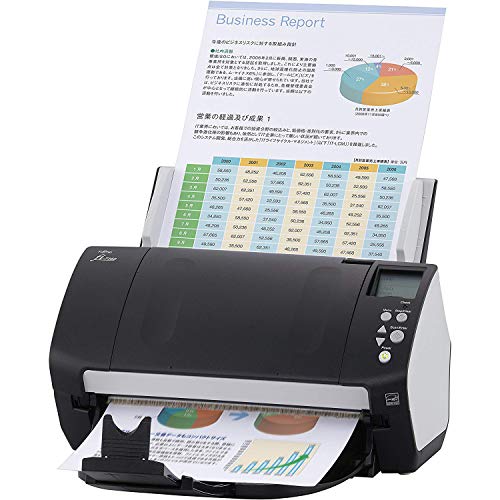

Fujitsu fi-7160 Color Duplex Document Scanner - Workgroup Series (2-Pack)
| SELLER | SELLER SCORE | AMAZON FULFILLED | PRIME | FREE SHIPPING |
|---|---|---|---|---|
| BecTech Global | 9.86 | No | No | No |
Your office mailroom is buried under a mountain of mixed media, ranging from fragile receipts to thick, embossed ID cards, and you need a solution that won't jam every five minutes. This Fujitsu two-pack is built specifically for those high-pressure workgroup environments where speed is non-negotiable. I found the 120 images per minute duplex scanning speed to be incredibly efficient for clearing out heavy document backlogs. What really sets this pair apart is the versatility. It handles everything from tiny 2-inch slips to long, continuous sheets without breaking a sweat. The inclusion of Intelligent Sonic paper protection and advanced feeding technology gives me peace of mind that delicate documents are safe, while the 80-sheet automatic feeder keeps the workflow moving continuously.

The primary advantage of an LED document scanner is the light source itself. Traditional scanners use CCFL (Cold Cathode Fluorescent Lamp) technology, which can flicker, degrade over time, and requires a warm-up period before the scan quality stabilizes. LED (Light Emitting Diode) technology provides a steady, uniform light across the entire scanning bed or feeder. This results in faster 'instant-on' capabilities and a significantly longer lifespan for the hardware. When shopping, look for scanners that emphasize LED illumination, as these are generally more energy-efficient and better suited for frequent, intermittent use throughout a workday.
When evaluating scanners, you must distinguish between 'scanning speed' and 'daily duty cycle.' Speed is typically measured in pages per minute (PPM) or images per minute (IPM). For a home office, 20–30 PPM is often sufficient. However, for enterprise environments, you should look for models exceeding 60 PPM. More importantly, check the daily duty cycle—this indicates how many pages the machine can reliably process in a single day without overheating or mechanical failure. A scanner with a high speed but a low duty cycle is a recipe for frustration in a high-volume environment.
The most common point of failure in document scanning is a paper jam. To avoid this, pay close attention to the Automatic Document Feeder (ADF) specifications. Look for features such as ultrasonic double-feed detection, which uses sound waves to sense if two pages are stuck together, preventing skipped documents. Additionally, consider the 'media versatility.' A high-quality scanner should handle various weights of paper, from thin thermal receipts to thick cardstock, and even fragile, aged documents. If you frequently scan double-sided documents, ensure the device features 'Single-Pass Duplex Scanning,' which scans both sides of a page simultaneously using two separate image sensors, rather than flipping the page manually.
While many manufacturers advertise high DPI (dots per inch) numbers, do not be misled by inflated marketing figures. For standard text documents, 300 to 600 DPI is more than enough. If you are digitizing high-resolution photographs or intricate architectural drawings, you may want to look for optical resolutions of 1200 DPI or higher. Beyond raw resolution, look for integrated software capabilities like Optical Character Recognition (OCR). OCR is the technology that converts your scanned images into searchable, editable text files (like PDFs or Word documents). A scanner is only as good as its ability to make your data usable. Therefore, prioritize models that include robust, easy-to-use OCR software suites.
Modern scanning is rarely a standalone activity. You need to consider how the scanner communicates with your ecosystem. USB connectivity is the standard for stability, but Wi-Fi or Ethernet options are vital if you need to scan directly to a network folder, a cloud service, or a mobile device. If your workflow involves frequent remote work, look for scanners that support direct-to-cloud uploading, allowing you to bypass the computer entirely and send files straight to your preferred storage provider.
Quick answers about Led Document Scanners before you buy.
Share of top-ranked products by brand, from our rankings.
We compared Led Document Scanners products using product details and customer ratings to identify the best options in the office electronics products..
From that comparison we shortlisted the top 5 Led Document Scanners for this page..
We aim to help you find the right scanners products for your needs and save you time when choosing which Led Document Scanners to buy.
Compare the top 5 picks at a glance — select a column to sort.


