#TOP1

When setting up a professional workspace, a retail kiosk, or a high-traffic digital signage environment, the stability of your hardware is just as critical as the quality of the screen itself. Displays2go electronics mounts are engineered to bridge the gap between expensive hardware and functional, ergonomic environments. Whether you are looking to clear desk space with a monitor arm, secure a tablet for customer interaction, or mount a large-format display on a wall, selecting the right mounting solution requires more than just matching a screen size. You must consider weight distribution, installation surface, and the specific mechanical movement required for your use case.
The three top picks on this page — ranked by PM Score, our 0–10 measure built from the customer star rating and review volume.


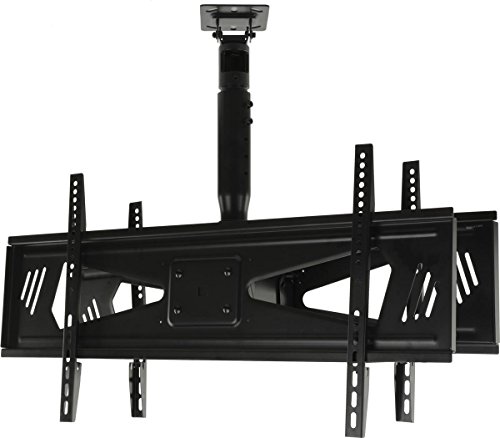


Displays 2go Dual Sided Ceiling TV Mount for 37" to 70" Flat Screen Monitors, Height Adjustable, Steel (Black)
| SELLER | SELLER SCORE | AMAZON FULFILLED | PRIME | FREE SHIPPING |
|---|---|---|---|---|
| Displays2Go | 9.67 | No | No | No |
Most commercial spaces settle for cluttered floor stands or single-screen setups that waste valuable real estate, but this dual-sided ceiling mount turns overhead space into a high-impact visual asset. We found that the ability to hang two large monitors—up to 70 inches each—makes it an incredible solution for high-traffic environments where visibility is everything. The height-adjustable post is a standout, allowing you to drop the screens anywhere from 19.5 to 59.5 inches to hit that perfect eye level. Even if your architecture is tricky, the swivel base handles tilted ceilings without issue, while the tilting brackets ensure you can eliminate glare from every angle. It is a robust, steel-constructed system that feels built for heavy-duty professional use.


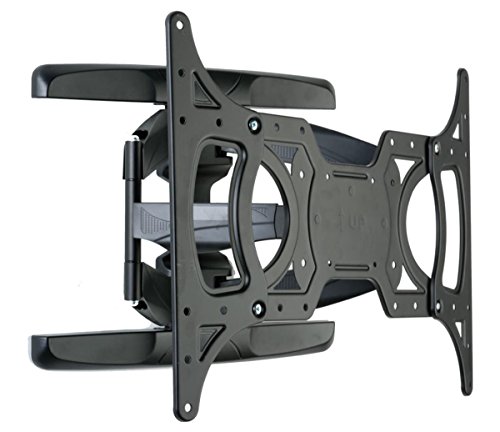


Full Motion TV Wall Mount for Flat Panel LCD Monitors Between 32" and 65", Tilting Bracket and Articulating Arm, Slim Profile, VESA-Compatible, Black,...
| SELLER | SELLER SCORE | AMAZON FULFILLED | PRIME | FREE SHIPPING |
|---|---|---|---|---|
| Displays2Go | 9.67 | No | No | No |
The Displays2go Full Motion TV Wall Mount offers unparalleled viewing flexibility through its robust articulating arm. After testing this steel bracket, the standout capability is how effortlessly it transitions from a slim, flush-to-wall profile to a fully extended position. Whether you are trying to dodge glare with the tilting mechanism or pull the screen closer for a better angle in a corner, the movement feels smooth and intentional. It supports a wide range of VESA patterns including 200x100 up to 600x400, making it a versatile choice for screens ranging from 32 to 65 inches. It is a heavy-duty solution that manages to stay unobtrusive when you aren't actively adjusting your display.


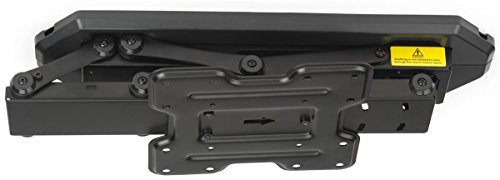


Displays2go Ceiling Mounted TV Bracket, Steel Build, Remote Control – Black Finish (LMCEMOT42)
| SELLER | SELLER SCORE | AMAZON FULFILLED | PRIME | FREE SHIPPING |
|---|---|---|---|---|
| Displays2Go | 9.67 | No | No | No |
The heavy-duty steel construction of this Displays2go mount gives you immediate peace of mind the moment you feel its solid weight. Whether you are setting up a digital signage display for a retail space or hanging a monitor for entertainment in a tight corner, this bracket handles screens from 23 to 42 inches with ease. The standout feature is the aggressive 75-degree tilt, which allows you to angle the screen perfectly toward your audience regardless of where the ceiling mount is positioned. I also found the integrated cable management to be a lifesaver for keeping installations looking professional and clutter-free. Plus, having a dedicated remote control included makes adjusting the viewing angle a breeze without needing a ladder every time.
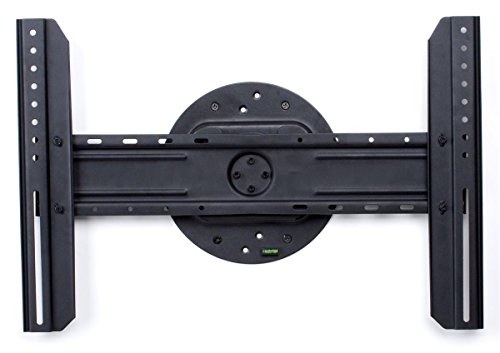


TV Wall Mount Fits 32" to 70" Monitors, Rotates 360 Degrees for Horizontal and Vertical Screens, Steel (Black)
| SELLER | SELLER SCORE | AMAZON FULFILLED | PRIME | FREE SHIPPING |
|---|---|---|---|---|
| Displays2Go | 9.67 | No | No | No |
Content creators and digital signage specialists require this specific mount to break free from the constraints of traditional landscape viewing. The Displays2go rotating steel mount is a game-changer for anyone needing to switch between horizontal and vertical orientations on the fly. Because it offers a full 360-degree rotation, you can pivot a large screen from a standard TV setup to a portrait-mode monitor with zero hassle. It maintains a sleek, low-profile look by keeping your display just 50mm from the wall, which prevents that bulky, protruding appearance. I particularly appreciate the built-in safety locking mechanism, as it provides genuine peace of mind when you are adjusting heavy screens between 32 and 70 inches. It is a robust, versatile solution for dynamic environments.


Ceiling Mount for Flat-Screen TV 37"-70", Height-Adjustable, with Tilting and Rotating Bracket, Steel (Black)
| SELLER | SELLER SCORE | AMAZON FULFILLED | PRIME | FREE SHIPPING |
|---|---|---|---|---|
| Displays2Go | 9.67 | No | No | No |
Imagine trying to host a high-stakes viewing party in a crowded lounge where the only clear view of the screen is blocked by heads and shoulders. This Displays2go ceiling mount solves that spatial headache by lifting your display out of the line of sight and into the perfect vantage point. The telescoping post is a game-changer, allowing you to drop the screen anywhere from 30 to 60 inches from the ceiling to suit your room's specific layout. It handles heavy-duty setups with ease, supporting screens up to 70 inches and 110 pounds. Because you can tilt and rotate the bracket, you aren't stuck with a static, awkward angle. You can actually dial in the viewing position for every seat in the house.


TV Stand with Wheels for 32" to 80" Flat Screen Monitors, Height Adjustable with 2 Shelves & Locking Wheels, Steel (Black)
| SELLER | SELLER SCORE | AMAZON FULFILLED | PRIME | FREE SHIPPING |
|---|---|---|---|---|
| Displays2Go | 9.67 | No | No | No |
Most people assume a mobile TV stand is just a glorified metal pole, but this Displays2go unit actually functions as a complete, mobile media workstation. While testing its stability with larger screens, I found that the steel construction handles monitors up to 80 inches with surprising ease, provided you stay under the 110-pound limit. The height adjustment is a standout, offering three distinct fixed positions between 45.5" and 63.5" to ensure your viewing angle is perfect whether you are sitting or standing. I especially appreciated the two integrated shelves, which provide a dedicated spot for a wireless keyboard and mouse or other essential AV components. With its locking wheels and wide VESA compatibility, it transforms a stationary living room setup into a versatile, professional-grade display solution.

The first decision in selecting a mount is determining where the device will live. Wall mounts are the gold standard for saving floor space and creating a clean, minimalist aesthetic, but they require a solid substrate—ideally studs or masonry—to ensure the weight of the electronics doesn't cause the mount to sag or pull away from the wall. If you are in a temporary setting or a rented office, floor stands or mobile cart mounts offer much-needed flexibility. Mobile carts are particularly effective for collaborative spaces where screens need to move between meeting rooms. Before purchasing, verify if your mounting solution uses a standard VESA pattern, which is the universal hole pattern on the back of most displays, or if it requires a specialized bracket for proprietary hardware.
One of the most common mistakes in selecting electronics mounts is focusing solely on screen size while ignoring weight. A 50-inch display that is ultra-thin might weigh significantly less than a 32-inch professional-grade monitor designed for heavy-duty use. Always check the maximum load capacity of the mount. If you are choosing a gas-spring monitor arm for ergonomic adjustments, ensure the weight of your monitor falls within the arm's specific tension range. If the monitor is too light, the arm will constantly spring upward, and if it is too heavy, it will sag. For large-scale signage, look for heavy-duty steel construction that prioritizes center-of-gravity stability to prevent tipping.
Think about how the user will interact with the screen. If the display is for a single employee at a desk, look for articulating arms that offer tilt, swivel, and rotation (portrait to landscape). This allows for better ergonomic positioning to prevent neck strain. However, if the mount is for a retail kiosk or a digital menu board, you likely want a fixed mount that minimizes movement to prevent tampering or accidental misalignment. For touchscreens, ensure the mount allows for a slight tilt toward the user to improve viewing angles and reduce glare from overhead lighting.
In a professional environment, visible cables are more than just an eyesore—they are a safety hazard and a distraction. High-quality mounts often feature integrated cable management channels, such as clips, sleeves, or hollowed-out arms, to route power and data cables neatly. This is especially important for mobile carts, where dangling wires can become caught in wheels. When choosing a mount, prioritize models that allow you to tuck the wiring away, ensuring the final setup looks integrated and intentional rather than cluttered.
Consider the environment where the mount will be deployed. In a high-traffic retail area, a mount needs to be robust enough to withstand occasional bumps from customers or cleaning equipment. If the display is being used in a commercial kitchen or a semi-outdoor space, look for mounting solutions that offer enhanced stability and perhaps even more ruggedized materials. A mount that is built for a quiet office may not survive the rigors of a busy warehouse or a public-facing information hub.
Quick answers about Displays2Go Electronics Mounts before you buy.
Share of top-ranked products by brand, from our rankings.
We compared Displays2Go Electronics Mounts products using product details and customer ratings to identify the best options in the videogames..
From that comparison we shortlisted the top 6 Displays2Go Electronics Mounts for this page..
We aim to help you find the right mounts products for your needs and save you time when choosing which Displays2Go Electronics Mounts to buy.
Compare the top 6 picks at a glance — select a column to sort.


