#TOP1

As modern gaming titles push the boundaries of visual fidelity and world scale, the storage limitations of standard console hardware have become a significant bottleneck for enthusiasts. While internal storage is vital, the sheer size of contemporary AAA titles means that a high-performance external solid-state drive (SSD) is no longer a luxury—it is a necessity for anyone looking to build an expansive digital library without the constant headache of deleting old favorites to make room for new releases. However, not all external drives are created equal. Plugging a standard portable SSD into a gaming console won't always yield the seamless, high-speed loading experience you expect. To get the most out of your hardware, you need to understand the nuances of interface speeds, thermal management, and compatibility requirements.
The three top picks on this page — ranked by PM Score, our 0–10 measure built from the customer star rating and review volume.


ADATA Entry Series SD600Q: 240GB Black External SSD USB 3.1 Gaming Console Compatible
| SELLER | SELLER SCORE | AMAZON FULFILLED | PRIME | FREE SHIPPING |
|---|---|---|---|---|
| ZAR Systems Germany | 9.44 | No | No | No |
The ADATA SD600Q 240GB External SSD is a compact storage powerhouse designed specifically to bridge the gap between your PC and gaming consoles. I found that this entry-series drive offers a surprisingly streamlined way to expand your digital library without breaking the bank. At a price point, it serves as a practical solution for gamers who need extra space for titles that demand quick access via USB 3.1. While you might have to wait about a week for shipping, the portability and console compatibility make it a solid choice for anyone looking to declutter their internal storage. It is a straightforward, no-frills tool that gets the job done for budget-conscious users.
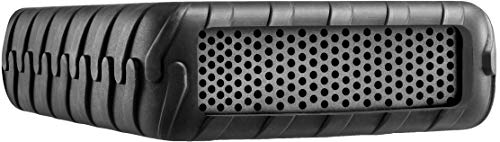


Glyph BlackBox Pro External Hard Drive 7200 RPM, USB-C (3.1,Gen2) (8TB)
| SELLER | SELLER SCORE | AMAZON FULFILLED | PRIME | FREE SHIPPING |
|---|---|---|---|---|
| Safe Harbor Computers, NLE, Post, 3D & Broadcast | 9.04 | Yes | Yes | Yes |
The Glyph BlackBox Pro stands as a heavy-duty storage powerhouse for professionals needing massive capacity without the fragility of a portable drive. While many modern solutions lean toward smaller SSDs, this 8TB beast utilizes a high-performance 7200 RPM spindle to provide a massive digital vault for your most critical projects. The USB-C Gen2 connectivity ensures you aren't bottlenecked during transfers, even though the mechanical nature of the drive keeps speeds around 140 MB/s. I particularly like that Glyph includes both USB-C and USB 3.0 cables in the box, making it versatile for both high-end workstations and older hardware. It feels like a reliable, desktop-centric workhorse that prioritizes data security through its comprehensive warranty and data recovery options.


ADATA SC680-960GB External Solid State Drive with USB 3.2 Gen.2 Type-C 2.5" Black ASC680-960GU32G2-CBK
| SELLER | SELLER SCORE | AMAZON FULFILLED | PRIME | FREE SHIPPING |
|---|---|---|---|---|
| JAPAN<Express shipping | 6.66 | No | No | No |
Most people assume that high-speed storage requires a bulky, heavy enclosure, but the ADATA SC680 completely defies that expectation. At just 35 grams and roughly the thickness of a smartphone, this drive is so lightweight it practically disappears in your pocket during travel. I found the USB-C connectivity to be a massive quality-of-life upgrade, as you never have to fumble with orientation to get a successful connection. It functions as a seamless bridge between Windows, Mac OS, and Android devices through simple plug-and-play. Beyond just moving files, the lack of mechanical moving parts makes it much more resilient to the bumps and vibrations of life on the go compared to traditional hard drives. It even cuts down those frustratingly long console game loading screens.


Addlink External Portable SSD 2TB P20 USB 3.2 Gen2 up to 1050MB/s, 3D TLC USB C Solid State Drive, for PC Laptop Mac Windows Linux Android PS4 PS5 Xbo...
| SELLER | SELLER SCORE | AMAZON FULFILLED | PRIME | FREE SHIPPING |
|---|---|---|---|---|
| addlink technology USA | 8.27 | Yes | Yes | Yes |
After weeks of use, the sheer speed of the Addlink P20 has become an indispensable part of my daily workflow. Moving large video files or game libraries is incredibly efficient thanks to the 1050MB/s read/write speeds, which easily outpace traditional external hard drives. It is impressively tiny, measuring just 102 x 33 x 11 mm and weighing a mere 58g, making it easy to slip into a pocket. The metal casing isn't just for a premium feel. It provides excellent cooling and vital shock resistance for life on the go. Whether I am plugging it into a MacBook, a Windows laptop, or even a PS5, the included USB-C to C and USB-C to A cables ensure I am always ready to go. It is a reliable, high-performance storage solution that actually keeps up with modern demands.

The most critical factor in selecting a gaming SSD is the data transfer rate. If you are playing on a current-generation console, you are likely looking for a drive that can handle high-speed throughput to minimize load times. While many external drives are marketed with impressive 'read speeds,' what actually matters for gaming is sustained performance. You want a drive that utilizes a high-bandwidth connection—typically USB 3.2 Gen 2 or higher—to ensure the data can move from the drive to the console's processor without a bottleneck. If you are using the drive to store games that you intend to play directly from the external media (common on older consoles), speed is everything. If you are using it as an archive for current-gen games to move them back to internal storage later, you can prioritize capacity over raw speed.
When choosing a capacity, you must look beyond the simple number on the box. Modern gaming files are massive, often exceeding 100GB to 150GB per title. A 500GB drive may seem substantial, but after the operating system and basic file overhead, your actual usable space will be significantly less. For a meaningful expansion, we recommend aiming for a minimum of 1TB or 2TB. A 2TB drive offers the best 'price-per-gigabyte' value in the current market and provides enough headroom to house a diverse library of both indie titles and massive open-world epics without requiring constant management.
Gaming is a continuous, high-load activity that generates significant heat. When an SSD gets too hot, it engages in 'thermal throttling,' which drastically reduces its speed to protect the hardware. This results in stuttering, long loading screens, or even game crashes. Look for drives that feature robust thermal solutions, such as integrated heat sinks or high-quality aluminum enclosures that act as passive coolers. Additionally, consider your setup's physical layout. A compact, ruggedized drive is great for portability, but if your console sits in a ventilated media center, a slightly larger drive with superior cooling fins will provide much more consistent performance during marathon gaming sessions.
Before purchasing, confirm exactly how you intend to use the drive. Most current-generation consoles have specific rules regarding external storage: you can often store and play older-generation games directly from an external SSD, but newer-generation titles usually require the drive to act as a 'storage vault.' This means you store the files on the external SSD to save space, but must move them to the console's internal NVMe slot to actually play them. If you are a PC gamer using the same drive for your console, ensure the drive is formatted correctly and supports the file systems required by both platforms. Always prioritize drives that explicitly mention compatibility with gaming ecosystems to avoid driver or handshake issues.
Quick answers about Gaming Console External Solid State Drives before you buy.
Share of top-ranked products by brand, from our rankings.
We compared Gaming Console External Solid State Drives products using product details and customer ratings to identify the best options in the categories..
From that comparison we shortlisted the top 4 Gaming Console External Solid State Drives for this page..
We aim to help you find the right drives products for your needs and save you time when choosing which Gaming Console External Solid State Drives to buy.
Compare the top 4 picks at a glance — select a column to sort.
| # | Product | Brand | PM Score | Where to Buy |
|---|---|---|---|---|
| 1 |
 ADATA SD600Q 240GB External SSD |
ADATA | 9.6 | Buy on Amazon |
| 2 |
 Glyph BlackBox Pro 8TB External Hard Drive |
Glyph Production Technologies | 9.4 | Buy on Amazon |
| 3 |
 ADATA SC680 Portable External Solid State Drive |
ADATA | 7.5 | Buy on Amazon |
| 4 |
 Addlink P20 Portable 2TB External SSD |
Addlink | 4.1 | Buy on Amazon |

