PickSmartly Buying Guide

Best Arm Home Printer Stands in 2026

9.8 PM Score
Products Compared
3
Brands Ranked
3
Our guides are compiled from product information and customer ratings. If you click on links we provide, we may receive compensation.

For many home office setups, the printer is the most awkward piece of equipment to house. Unlike a monitor or a keyboard, a printer is often heavy, bulky, and requires specific clearance for paper trays and scanning lids. A standard desk often lacks the surface area to accommodate both a computer and a printer, leading to cluttered workspaces and ergonomic nightmares. This is where a dedicated arm home printer stand becomes an essential organizational tool. Rather than simply acting as a pedestal, these stands—particularly those with articulated arms or adjustable mounting systems—allow you to reclaim desk real estate by lifting the device off the primary work surface, positioning it at an optimal height for easy access without sacrificing precious elbow room.

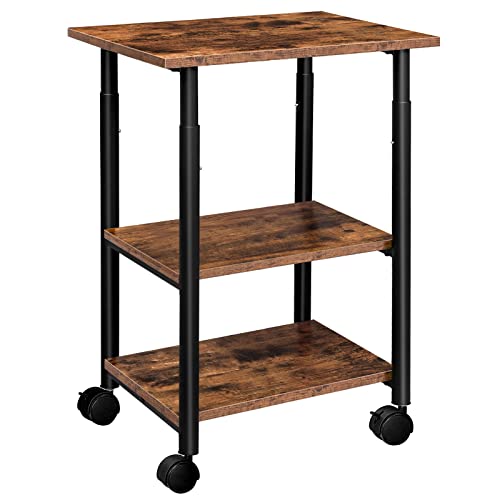
HOOBRO Printer Stand,3-Tier Adjustable Table Printer Cart on Wheels, Heavy Duty Storage Machine Rack for Home Office, Rustic Brown and Black BF03PS01

HOOBRO Three-Tier Adjustable Printer Stand with Wheels

HOOBRO HOOBRO 19.09 X 15.75 X 29.92 Inches 15.43 Pounds

PM Score for HOOBRO (PM Score)

9.8 PM Score
Buy on Amazon
  • Adjustable Height: The printer table comes with the adjustable table top,you get a flexible space with a lower height at 26.4” or a higher height at 29.9”.The adjustable height makes for a good range of use options and allows you to have it lower or higher for your wrist/arm to be more comfortable
  • Office Efficiency: Scan, Copy, or print will be done when sitting at the desk as the scanner, copier or laser printer is placed on the stand next to you. It is the right printer stand for the job!
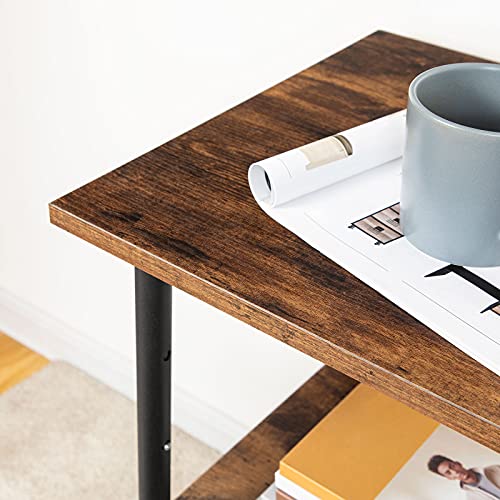
  • Durable & Stable: A combination of well made iron frame and P2 chipboard panels gives the printer cart great durability, with its thick black metal legs and under-shelf support rods guarantees its stability
  • 3-Level Structure: Printer stand dimensions: 19.1” x 15.1” x 26.4” (L x W x H). The upper shelf easily bears 88 lb and reliably holds a printer. And the bottom two-layer panel bears 33 lb. The height perfectly matches the desk and makes office supplies easy to access
  • Fixed or Mobile: The printer table is equipped with 2 lockable wheels so you can move it easily without having to lift it, thus saving energy and protecting the floor. Of course, if you want it to stay where it is, just lock the wheels
SELLER SELLER SCORE AMAZON FULFILLED PRIME FREE SHIPPING
Hoobro 9.90 Yes Yes Yes

The rustic brown finish and matte black iron frame instantly give any workspace a polished, industrial edge. This printer cart is a total game-changer for anyone struggling with a cluttered desk, as it brings your scanner or laser printer right to your side for seamless copying and printing. I found the adjustable height feature particularly clever. You can set it at 26.4” or 29.9” to ensure your wrists stay at a comfortable angle while working. It feels incredibly sturdy thanks to the thick metal legs and under-shelf support rods, easily handling a heavy printer on the top tier. Plus, the lockable wheels make it effortless to glide across the floor when you need to rearrange your office, yet they keep everything rock-solid once you're in position.
What We Like
Adjustable height levels
Lockable caster wheels
Heavy duty iron frame
Three-tier storage
Sturdy chipboard panels

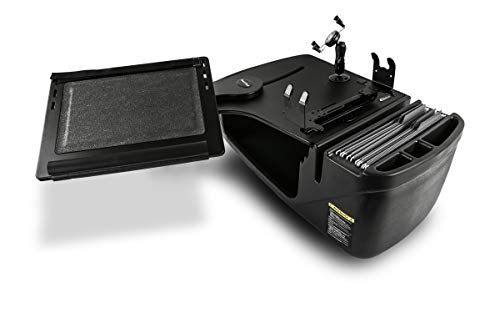
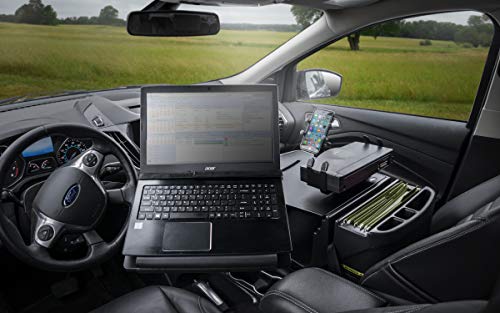
AutoExec AUE10325 Reach Front Seat Car Desk Black Finish with Phone Mount and Printer Stand

AutoExec Reach Front Seat Car Desk

AUTOEXEC AUE10325 0.00 X 0.00 X 0.00 Inches 24.00 Pounds

PM Score for AUTOEXEC (PM Score)

6.5 PM Score
Buy on Amazon
  • This desk has a slide out arm that extends the work tray another 23" from the edge of the desk, providing an extra long "reach" over to the mobile worker for an ergonomic solution.
  • The tray comes with a non-slip pad, providing extra security so the laptop or tablet with keyboard won't move around while working.
  • Keep all of your valuables safe with the hidden storage space located beneath the desk work surface.
  • Helps you stay organized and secure loose items to improve productivity and reduce distractions.
  • Includes phone mount and printer stand
SELLER SELLER SCORE AMAZON FULFILLED PRIME FREE SHIPPING
Amazon.com 9.68 Yes Yes Yes

Mobile professionals who treat their vehicle as a primary office cannot afford to settle for cramped, uncomfortable workspaces. The AutoExec Reach Front Seat Car Desk solves the ergonomics problem by utilizing a clever slide-out arm that extends your workspace an additional 23 inches toward the driver, bringing your laptop directly to you rather than forcing you to hunch over. I was particularly impressed by the integrated non-slip pad, which keeps your tablet or keyboard perfectly steady even during transit. Beyond just a surface, this setup functions as a complete command center with a dedicated printer stand, a phone mount, and a hidden storage compartment to keep your valuables tucked away and out of sight. It is a sophisticated, high-utility solution for anyone needing to maintain peak productivity while on the road.

What We Like
Extended reach arm
Non-slip surface pad
Integrated phone mount
Built-in printer stand
Hidden storage space

Mount-It! Printer Pole Mount for Thermal Label Printers, Full Motion Arm with Rotating Tray, Holds up to 11 lbs, Swivel, Rotate and Tilt, Clamp Connec...

Mount-It! Full Motion Thermal Label Printer Pole Mount

MOUNT-IT! MI-3799

PM Score for MOUNT-IT! (PM Score)

5.1 PM Score
Buy on Amazon
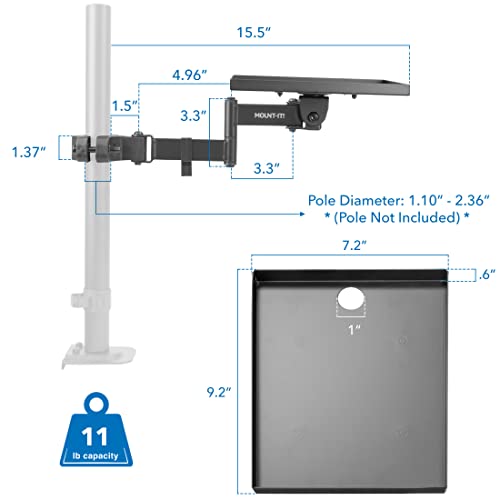
  • ORGANIZE YOUR WORKSPACE: Elevate your label printer and free up valuable workspace in your shipping area with this motion arm mount with 7.2" x 9.2" tray and cable management
  • LABEL PRINTER COMPATIBILITY: The rectangular tray with 11 lbs weight capacity makes this printer mount ideal for common thermal printers such as Brother QL 800, Brother QL 600, Soonmark, iDPRT, Vretti, HotLabel S8, Honeywell PC42t, Zebra MZ320
  • FLEXIBLE ADJUSTMENT: The adjustable motion arm allows you to swivel 180° and rotate 360° around the pole - the tray can be tilted up to 90° up and 75° down and extends up to 15.5" from the pole
  • SIMPLE SETUP: The label printer arm mount can be quickly installed in four easy steps to any pole 1.1" to 2.36" in diameter (*pole not included*) such as a monitor desk mount pole
  • QUALITY PROMISE: This Mount-It! label printer pole mount for desks comes with a Lifetime warranty and our knowledgeable and responsive US-based customer support team is available to answer any questions you may have during standard business hours
SELLER SELLER SCORE AMAZON FULFILLED PRIME FREE SHIPPING
Value Max 9.86 Yes Yes Yes

The Mount-It! thermal printer pole mount is the definitive workspace solution for high-volume shipping stations looking to reclaim precious desk real estate. Instead of letting a bulky label maker clutter your packing area, this mount lifts the device onto a sturdy 7.2" x 9.2" tray that extends up to 15.5" from your pole. I found the range of motion particularly impressive. You can swivel it 180°, rotate it 360°, and tilt the tray anywhere from 90° up to 75° down. It handles up to 11 lbs with ease, making it a perfect fit for heavy-duty units like the Zebra MZ320 or Brother QL series. Setup is straightforward on any pole between 1.1" and 2.36" in diameter, effectively turning a static workstation into a highly ergonomic, organized shipping hub.

What We Like
Full motion arm
11 lbs capacity
360 degree rotation
Integrated cable management
Adjustable tilt tray
Buying Guide

A Guide to Selecting the Best Arm Home Printer Stands

A Guide to Selecting the Best Arm Home Printer Stands

Prioritize Weight Capacity and Structural Stability

The most critical factor when selecting an arm-based printer stand is the weight rating. Printers are deceptively heavy, especially all-in-one models that include scanners, ink reservoirs, and heavy-duty rollers. If you choose a stand with an arm mechanism that is not rated for your specific device's weight, you risk the arm sagging, tilting, or even collapsing entirely. Before purchasing, weigh your printer and look for a stand with a significant safety margin. You want a base or a mounting system that feels grounded. A lightweight, flimsy stand will cause the printer to wobble every time the print head moves rapidly, which can lead to mechanical errors or even hardware damage over time.

Evaluate the Articulation and Range of Motion

The primary benefit of an 'arm' style stand is its ability to move. When shopping, consider how much movement you actually need. Do you need a fixed pedestal stand that simply raises the printer to eye level for scanning, or do you need a fully articulated arm that can swing the printer out of the way when you are working? If you have a small desk, a stand with a multi-axis swivel arm is superior because it allows you to tuck the printer underneath the desk plane or swing it to the side when the scanner lid needs to be fully opened. Pay close attention to the 'clearance radius'—ensure the arm can move far enough to allow you to access the paper trays and the rear access panels for maintenance.

Consider the Mounting Interface and Footprint

There are two main types of arm stands: those that clamp to the edge of your existing desk and those that stand independently on the floor. Clamp-on arms are excellent for maximizing space, but they require a desk with a sturdy, thick enough edge to grip. If you have a glass desk or a thin laminate tabletop, a clamp-on arm might be risky. Conversely, floor-standing arm stands offer much higher weight capacities and stability but occupy more floor space. If you are mounting the arm to a wall or a dedicated workstation, ensure the mounting hardware is compatible with your wall type (drywall vs. studs) to prevent the weight of the printer from pulling the stand away from the surface.

Functionality: Scanning vs. Printing Needs

Think about how you interact with your printer. If your primary use is scanning documents, you need a stand that allows the printer to be positioned at a height where you can comfortably reach the glass without hunching over. If you primarily print large documents, you need a stand that provides easy access to the paper input trays. Some advanced stands even feature pull-out trays or tiered shelving, which can be a lifesaver if you manage multiple types of media, such as photo paper and standard letter sheets. Always check if the stand's design interferes with the opening of the scanner lid. A stand that holds the printer perfectly but prevents the lid from tilting back fully is a useless investment.

Ready to choose?

Jump back to our ranked picks or compare the shortlist side by side.

Frequently Asked Questions

Quick answers about Arm Home Printer Stands before you buy.

A standard printer stand is a stationary piece of furniture designed to hold weight, whereas a printer arm is typically a mounting bracket or adjustable limb that attaches to a desk or wall to suspend the printer in mid-air, saving floor space.

Weight capacity varies significantly by model. Always check the specific load rating of the stand. Heavy laser printers generally require reinforced steel frames or heavy-duty wood bases rather than lightweight adjustable arms.

Most printer arms are designed to hold the base of the unit, but if the arm clamps too high on the chassis, it may obstruct the vertical clearance needed to open the scanner lid. Look for low-profile mounting designs.

It depends on the mounting style. C-clamp arms attach to the edge of an existing desk without drilling, while wall-mounted or grommet-mount arms require permanent installation into a wall or through a desk hole.

Printers create vibrations during operation. To minimize shaking, choose a stand with a wide footprint, heavy-duty materials like solid metal, and non-slip rubber feet to dampen movement.

Yes, but ensure the stand is deep enough. MFPs often have a larger footprint due to paper trays and scanning components, so measuring the depth of the printer is more critical than measuring the width.

If mobility is a priority, look for stands equipped with locking casters. This allows you to roll the printer to a different part of the room while ensuring it stays securely in place once positioned.
Rankings & Insights

Our Arm Home Printer Stands Rankings

3 Products Compared
7.1 Avg PM Score
3 Brands Ranked

Top 10 Arm Home Printer Stands Brands on Amazon

Share of top-ranked products by brand, from our rankings.

  1. 01 Autoexec 1 (33.3%)
  2. 02 Hoobro 1 (33.3%)
  3. 03 Mount-It! 1 (33.3%)

How We Selected These Products

We compared Arm Home Printer Stands products using product details and customer ratings to identify the best options in the office furniture & lighting..

From that comparison we shortlisted the top 3 Arm Home Printer Stands for this page..

We aim to help you find the right stands products for your needs and save you time when choosing which Arm Home Printer Stands to buy.

Side by Side

Comparison Table

Compare the top 3 picks at a glance — select a column to sort.