#TOP1

In the modern workspace, the demand for seamless multitasking has outpaced the physical space available on most desks. Whether you are a creative professional toggling between a high-performance workstation and a laptop, or a developer managing multiple server racks, the ability to control several computers with a single set of peripherals is essential. KVM (Keyboard, Video, Mouse) switches serve as the central nervous system of a streamlined desktop, allowing you to bypass the frustration of unplugging cables and swapping hardware every time you switch tasks. Selecting the right switch is not just about finding a box with enough ports. It is about ensuring signal integrity, latency-free input, and compatibility with your specific display and peripheral ecosystem.
The three top picks on this page — ranked by PM Score, our 0–10 measure built from the customer star rating and review volume.


VGA KVM Switch 2 Port with Remote Switch Button, 2048x1536 Resolution, 2-Port USB VGA Cable Switch for 2 Computers 1 Monitor, USB Powered, Keyboard Ho...
| SELLER | SELLER SCORE | AMAZON FULFILLED | PRIME | FREE SHIPPING |
|---|---|---|---|---|
| Shenzhen Kinan Technology Co., Ltd | 5.62 | Yes | Yes | Yes |
Your desk is currently a chaotic mess of two separate keyboards and mice, but this Kinan KVM switch instantly cleans up the clutter. I spent some time testing how it handles the transition between a Windows workstation and a Linux machine, and the switching is remarkably seamless. You can toggle between systems by simply double-clicking the Scroll-Lock hotkey or using the included remote button, which is a lifesaver when your hardware is tucked away under a desk. The video output remains crisp, supporting up to 2048x1536 resolution, so you won't see that annoying pixelation often found in cheaper switches. Since it draws power directly from a USB port, you don't have to hunt for an extra wall outlet to get your dual-computer setup running.


16-Port Rackmount KVM Console with 19'' Rack Mount Monitor and Keyboard, VGA KVM Switch for 1U Server Rack, 19 Inch LCD KVM Drawer 1280x1024 60Hz, 16...
| SELLER | SELLER SCORE | AMAZON FULFILLED | PRIME | FREE SHIPPING |
|---|---|---|---|---|
| Shenzhen Kinan Technology Co., Ltd | 5.62 | Yes | Yes | Yes |
The Kinan 16-Port Rackmount KVM Console is a space-saving powerhouse that consolidates sixteen separate servers into a single, sleek 1U drawer. I found the integrated 19-inch TFT LCD monitor and keyboard combo to be incredibly efficient for dense server environments, especially with the 1280x1024 resolution providing clear visibility for management tasks. Switching between machines is seamless whether you prefer using the physical push buttons with LED indicators, quick keyboard hotkeys, or the on-screen display. The auto-lock slide rails feel robust and reliable, ensuring the unit stays put when pulled out but slides back into the rack effortlessly once you are done. It is a professional-grade solution for anyone needing to centralize control without sacrificing valuable rack real estate.


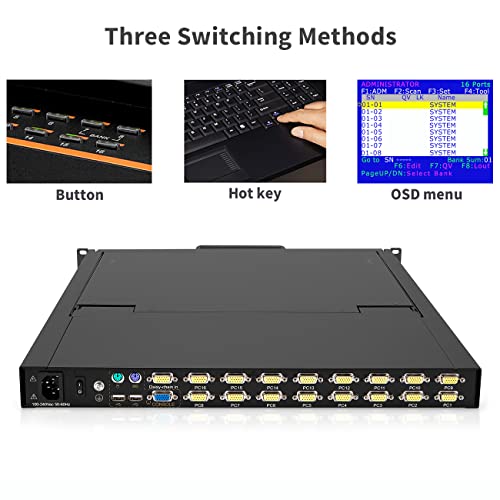


16 Port Rack Mount KVM Console with 17'' Rackmount Monitor and Keyboard, Rack Mounted 16 Port VGA KVM Switch, 1U Server KVM with 17 Inch LCD Drawer 12...
| SELLER | SELLER SCORE | AMAZON FULFILLED | PRIME | FREE SHIPPING |
|---|---|---|---|---|
| Shenzhen Kinan Technology Co., Ltd | 5.62 | Yes | Yes | Yes |
The Kinan 16-Port KVM Console stands as a vital centerpiece for any data center professional managing high-density server environments. By condensing a 17-inch LCD monitor, keyboard, touchpad, and a 16-port VGA switch into a slim 1U drawer design, it effectively eliminates rack clutter while maximizing control. The 1280x1024 resolution provides a crisp, clear view of your systems, and switching between machines is incredibly fluid whether you prefer using the physical push buttons, quick keyboard hotkeys, or the on-screen display. It is a robust, space-saving solution that comes ready to deploy with 16 VGA cables included. For anyone needing to oversee a large array of computers from a single workstation, this setup offers the reliability and streamlined access required for professional server management.


8-Port Rack Mount KVM Console, Integrated VGA KVM Switch with 17" Rackmount Monitor and Keyboard, 1U Server Rack Mount Monitor 1280×1024@60Hz Resoluti...
| SELLER | SELLER SCORE | AMAZON FULFILLED | PRIME | FREE SHIPPING |
|---|---|---|---|---|
| Shenzhen Kinan Technology Co., Ltd | 5.62 | Yes | Yes | Yes |
System administrators managing dense server environments absolutely require the Kinan 8-Port Rack Mount KVM Console to reclaim precious rack space and sanity. Instead of cluttering your server room with multiple peripherals, this 1U drawer-style unit integrates a 17-inch LCD monitor, keyboard, and touchpad into one sleek footprint. I found the switching versatility particularly impressive. You can jump between eight different computers using physical push buttons with LED indicators, quick keyboard hotkeys, or the on-screen display. The 1280x1024 resolution delivers sharp visuals with a solid 1000:1 contrast ratio, making text easy to read during long maintenance sessions. It even includes eight VGA cables in the box, which is a massive time-saver for immediate deployment. For anyone needing reliable, centralized control over multiple machines, this setup is a professional-grade necessity.


DVI USB KVM Extender 100m(328ft) Over Single Cat5e/Cat6 Cable, 1920x1200@60Hz EDID, Extends Video Audio USB, RS-232 Signals, Point to Point, Zero Late...
| SELLER | SELLER SCORE | AMAZON FULFILLED | PRIME | FREE SHIPPING |
|---|---|---|---|---|
| Shenzhen Kinan Technology Co., Ltd | 5.62 | Yes | Yes | Yes |
Server rooms are notoriously loud and heat-intensive, making it nearly impossible to work directly next to your hardware without losing focus. The Kinan KED102s solves this by allowing you to relocate your workstation up to 328 feet away from the source using a single network cable. During testing, the 1920x1200 resolution remained crisp and stable, providing a genuine FHD experience that doesn't feel compromised by the distance. I found the transparent USB 2.0 integration particularly impressive. It handles everything from standard mice to mass storage devices without noticeable lag. Because it uses a simple point-to-point setup via Cat5e or Cat6, the installation is straightforward, and the inclusion of audio support through the 3.5mm port makes it a versatile hub for remote management.


8-Port KVM Console Full HD 17.3 Inch, Integrated HDMI KVM Switch with 17.3" Rackmount Monitor and Keyboard, 1U Server Rack Mount Monitor 1920x1080 Res...
| SELLER | SELLER SCORE | AMAZON FULFILLED | PRIME | FREE SHIPPING |
|---|---|---|---|---|
| Shenzhen Kinan Technology Co., Ltd | 5.62 | Yes | Yes | Yes |
Most server administrators assume that saving rack space means sacrificing screen clarity, but the Kinan LH1708 proves that a 1U footprint can still deliver a crisp Full HD experience. This integrated unit packs a 17.3-inch widescreen monitor, a keyboard, and a touchpad into a single drawer, effectively replacing a cluttered mess of individual peripherals. The 1920x1080 resolution is surprisingly sharp for a rackmount component, making text-heavy server management much easier on the eyes. I particularly like the versatility of the switching methods. You can toggle between the eight HDMI ports using physical front-panel buttons, quick keyboard hotkeys, or the on-screen display. With the auto-lock slide rails and the inclusion of eight HDMI cables, it feels like a complete, deployment-ready solution for any standard 19-inch rack.

The first step in your selection process is defining the scope of your setup. KVM switches are categorized by the number of 'computer inputs' they support. A 2-port switch is ideal for a dual-setup (such as a desktop and a laptop), while 4-port or 8-port models are designed for more complex environments like home labs or professional production studios. When calculating your needs, always account for future growth. If you currently use two machines but anticipate adding a third, investing in a 4-port model now prevents the need for a complete hardware overhaul later. Remember that each computer input requires a dedicated set of connection cables for video, keyboard, and mouse.
The most common mistake in KVM selection is overlooking the bandwidth requirements of the monitor. A switch that works perfectly for a standard 1080p monitor may fail catastrophically if you attempt to connect it to a 4K display. If you are a gamer or a video editor, you must look specifically at the supported refresh rates. A switch supporting 4K at 60Hz is standard for productivity, but if you require high-fidelity motion, you should seek out models that support 4K at 120Hz or even 144Hz. Pay close attention to the interface type—HDMI, DisplayPort, or VGA. DisplayPort is generally preferred for high-end computing due to its superior bandwidth, while HDMI is the universal standard for most consumer electronics and media setups.
A KVM switch is only as good as the peripherals it controls. Basic models are designed to pass through simple signals for standard keyboards and mice. However, if you use high-performance gaming mice with high polling rates, or specialized mechanical keyboards with complex lighting profiles, you need a switch with robust USB throughput. Furthermore, consider whether you need 'USB Hub' functionality. Many advanced switches include additional USB ports that allow you to plug in webcams, external hard drives, or MIDI controllers. If you intend to use these high-bandwidth devices, ensure the switch supports USB 3.0 or higher to prevent data bottlenecks and lag.
How you actually trigger the switch between computers significantly impacts your workflow. Some models utilize a physical button on the device itself, which is reliable but requires physical access. Others offer remote desktop switches—small wired buttons that can be tucked under your desk or taped to your monitor stand for discreet, ergonomic switching. Some high-end models even support hotkey switching, allowing you to change inputs using a specific key combination on your keyboard without ever touching the hardware. For those in high-pressure environments, the speed of the transition is critical. Look for switches that minimize the 'blackout' period when switching video signals to maintain your focus.
Finally, consider the physical implementation of the switch. High-quality KVMs are designed to maintain signal integrity over longer distances. If your computers are housed in a separate cabinet or a different part of the room, look for switches that support extended cable lengths without signal degradation. Integrated cable management or modular designs can also help keep a cluttered desk organized, which is vital for long-term productivity and mental clarity in a professional workspace.
Quick answers about Kinan Kvm Switches before you buy.
Share of top-ranked products by brand, from our rankings.
We compared Kinan Kvm Switches products using product details and customer ratings to identify the best options in the computers & accessories..
From that comparison we shortlisted the top 6 Kinan Kvm Switches for this page..
We aim to help you find the right switches products for your needs and save you time when choosing which Kinan Kvm Switches to buy.
Compare the top 6 picks at a glance — select a column to sort.
| # | Product | Brand | PM Score | Where to Buy |
|---|---|---|---|---|
| 1 |
 Kinan 2-Port USB VGA KVM Switch |
Kinan | 5.9 | Buy on Amazon |
| 2 |
 Kinan 16-Port Rackmount KVM Console with 19-Inch LCD |
Kinan | 5.2 | Buy on Amazon |
| 3 |
 Kinan 16-Port 1U Rack Mount KVM Console |
Kinan | 5.1 | Buy on Amazon |
| 4 |
 Kinan 8-Port Rack Mount VGA KVM Console |
Kinan | 1.1 | Buy on Amazon |
| 5 |
 Kinan DVI USB KVM Extender over Cat5e/Cat6 |
Kinan | 0.0 | Buy on Amazon |
| 6 |
 Kinan 8-Port HDMI Rackmount KVM Console |
Kinan | 0.0 | Buy on Amazon |

