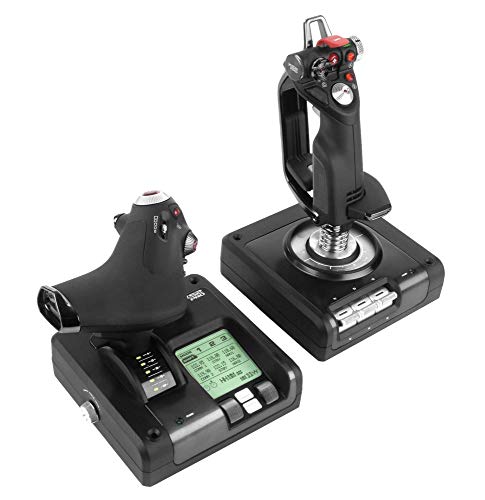
PickSmartly Buying Guide

Best Logitech Pc Game Flight Controls in 2026

9.8 PM Score
Products Compared
21
Brands Ranked
6
Our guides are compiled from product information and customer ratings. If you click on links we provide, we may receive compensation.

For flight simulation enthusiasts, the leap from a keyboard and mouse to dedicated flight controls is the single most impactful upgrade you can make. Logitech has long been a cornerstone of the simulation community, providing hardware that bridges the gap between casual hobbyists and dedicated virtual pilots. Whether you are navigating a commercial airliner through heavy turbulence or engaging in high-G dogfights in a fighter jet, the tactile feedback and precision of your input devices dictate the realism of the experience. This guide focuses on navigating the specific ecosystem of Logitech flight hardware to ensure your next purchase elevates your immersion rather than hindering your skill.

Editor's Choice

Our Top Picks for Logitech Pc Game Flight Controls

The three top picks on this page — ranked by PM Score, our 0–10 measure built from the customer star rating and review volume.
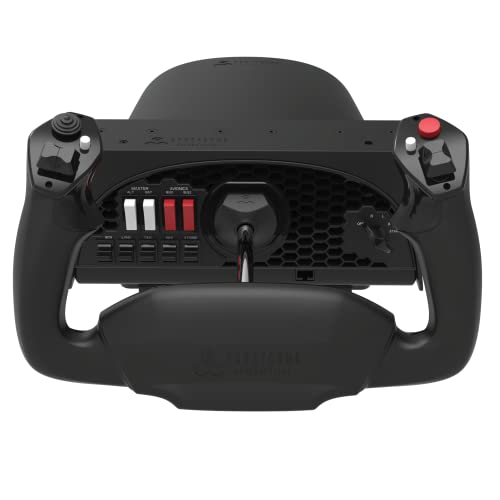
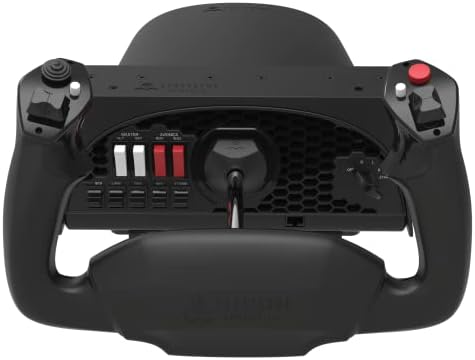
Honeycomb Aeronautical Alpha Flight Yoke & Switch Panel - Aviation Control System for Fight Simulation - Home Cockpit for Sim Enthusiasts &, Aspiring...

Honeycomb Aeronautical Alpha Flight Yoke and Switch Panel

HONEYCOMB AERONAUTICAL SB003011 19.00 X 13.10 X 10.30 Inches 14.25 Pounds
  • THE MOST ADVANCED FLIGHT SIMULATION SYSTEM FOR SIMMERS, FLIGHT STUDENTS, AND PILOTS. The yoke has a realistic full 180° yoke rotation and a solid steel shaft with dual linear ball bearings that provide smooth control
  • DAMPENED, SELF-CENTERING MECHANISM WITH NO CENTER DETENT OR MINIMAL TO NO DEAD ZONE. The base includes a Switch Panel with master, alternator, avionics, and light switches, as well as a 5-position ignition switch
  • THE LEFT AND RIGHT HANDLES FEATURE ONE 8-WAY HAT SWITCH, two vertical and two horizontal 2-way rocker switches, three buttons, and a push to talk button
  • DUAL MOUNTING SOLUTION ALLOWS FOR FULL USE WITH OR WITHOUT CLAMPS. The yoke comes with two steel heavy-duty clamps, which you can attach firmly and secure the yoke. For thicker tabletops, a large 3M Micro-Suction Pad that produces 40lbs of tensile strength can be used for a clamp-free solution
  • DESIGNED AND DEVELOPED IN CALIFORNIA BY PILOTS AND AEROSPACE ENGINEERS to ensure the most realistic flight simulation experience possible
SELLER SELLER SCORE AMAZON FULFILLED PRIME FREE SHIPPING
Gulf Coast Avionics Corp. 9.84 No No No

The Honeycomb Aeronautical Alpha Flight Yoke delivers an incredibly smooth 180-degree rotation that sets a new standard for home cockpits. After testing the hardware, the first thing you notice is the premium feel of the solid steel shaft and the dual linear ball bearings, which eliminate that annoying dead zone found in cheaper gear. It feels less like a toy and more like actual flight equipment. The integrated switch panel, complete with a five-position ignition and master switches, adds a layer of immersion that is hard to beat. Whether you use the heavy-duty steel clamps or the high-strength 3M micro-suction pad for a clamp-free setup, the stability is impressive. It is clearly a tool designed by aerospace engineers who actually understand the nuances of flight.
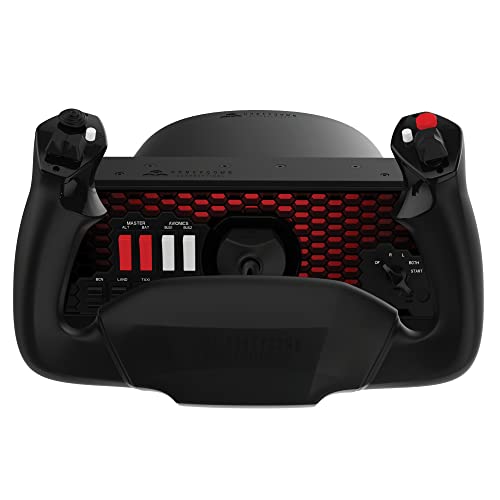
What We Like
180-degree rotation
Solid steel shaft
Integrated switch panel
Dual mounting options
Smooth ball bearings

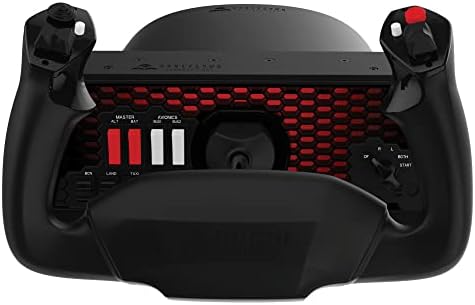
Honeycomb Aeronautical XPC Alpha Yoke & Switch Panel - Aviation Quality for Flight Simulators – Complete Home Cockpit Control System for Student Pilot...

Honeycomb Aeronautical XPC Alpha Yoke and Switch Panel

HONEYCOMB AERONAUTICAL HC003653 1.30 X 0.94 X 1.81 Inches 0.66 Pounds
  • THE MOST ADVANCED FLIGHT SIMULATION SYSTEM FOR SIMMERS, FLIGHT STUDENTS, AND PILOTS. The yoke has a realistic full 180° yoke rotation and a solid steel shaft with dual linear ball bearings that provide smooth control
  • DAMPENED, SELF-CENTERING MECHANISM WITH NO CENTER DETENT OR MINIMAL TO NO DEAD ZONE. The base includes a Switch Panel with master, alternator, avionics, and light switches, as well as a 5-position ignition switch
  • THE LEFT AND RIGHT HANDLES FEATURE ONE 8-WAY HAT SWITCH, two vertical and two horizontal 2-way rocker switches, three buttons, and a push to talk button
  • DUAL MOUNTING SOLUTION ALLOWS FOR FULL USE WITH OR WITHOUT CLAMPS. The yoke comes with two steel heavy-duty clamps, which you can attach firmly and secure the yoke. For thicker tabletops, a large 3M Micro-Suction Pad that produces 40lbs of tensile strength can be used for a clamp-free solution
  • DESIGNED AND DEVELOPED IN CALIFORNIA BY PILOTS AND AEROSPACE ENGINEERS to ensure the most realistic flight simulation experience possible
SELLER SELLER SCORE AMAZON FULFILLED PRIME FREE SHIPPING
Gulf Coast Avionics Corp. 9.84 No No No

Most flight sim enthusiasts settle for flimsy plastic controllers that lack the tactile feedback of a real cockpit, but the Honeycomb Aeronautical XPC Alpha changes that dynamic entirely. Developed by aerospace engineers, this system feels incredibly substantial thanks to its solid steel shaft and dual linear ball bearings. The 180-degree rotation is remarkably smooth, and the dampened, self-centering mechanism eliminates the annoying dead zones found in cheaper alternatives. I was particularly impressed by the integrated switch panel, which features everything from master and avionics switches to a five-position ignition. Whether you use the heavy-duty steel clamps or the high-strength 3M Micro-Suction Pad for a clamp-free setup, this yoke provides a professional-grade foundation for any serious home cockpit.

What We Like
Steel shaft construction
Full 180° rotation
Integrated switch panel
Dual mounting options
Eight-way hat switches
#3

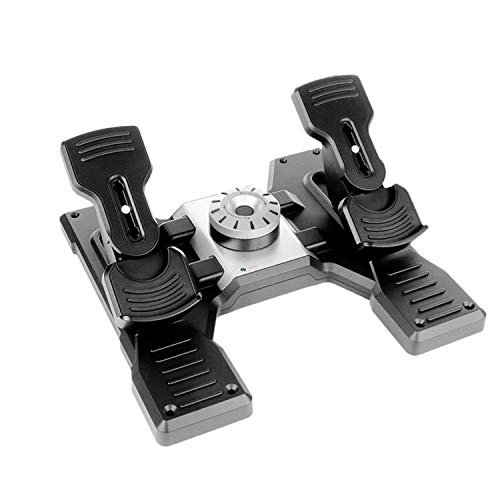
Logitech G USB PRO Flight Rudder Pedals

Logitech G USB PRO Flight Rudder Pedals

LOGITECH G 945-000024 12.20 X 15.87 X 6.61 inches 5.18 Pounds

PM Score for LOGITECH G (PM Score)

9.7 PM Score
Buy on Amazon
  • Self-centering pedals with adjustable damping / Foot rests adjust to fit all sizes and include non-slip materials
  • Precise rudder and braking control / Tension adjustment - choose resistance to suit the way you fly
  • Partial metal construction for long life. Cable Length  (Power/Charging) - 1.8 meter
  • Saitek Smart Technology programming software allows gamers to configure their controls to suit their preferred gaming style for flight and space sim
  • Connectivity: USB 2.0 Works with: Windows XP, XP64 and Vista (all versions) Windows 7, Windows 8.1, Windows 10
SELLER SELLER SCORE AMAZON FULFILLED PRIME FREE SHIPPING
High Desert Distribution 6.40 No No No

Most flight sim enthusiasts focus entirely on their joystick, yet the real magic of smooth landings happens under your feet. The Logitech G USB PRO Flight Rudder Pedals offer a level of tactile precision that transforms a basic setup into a legitimate cockpit experience. I was particularly impressed by the adjustable damping and tension settings, which let you dial in exactly how much resistance you want when banking or braking. The partial metal construction gives them a sturdy, premium feel that suggests they can handle years of intense sessions. Between the non-slip foot rests and the ability to customize controls via Saitek Smart Technology software, these pedals feel less like a peripheral and more like a specialized instrument designed for serious space and flight simulation.

What We Like
Adjustable tension resistance
Partial metal construction
Self-centering pedals
Non-slip foot rests
Customizable software programming

Logitech Pro Flight Throttle Quadrant & Extreme 3D Pro Joystick for Windows - Black/Silver

Logitech G Flight Simulation Controller Bundle

LOGITECH G

PM Score for LOGITECH G (PM Score)

9.7 PM Score
Buy on Amazon
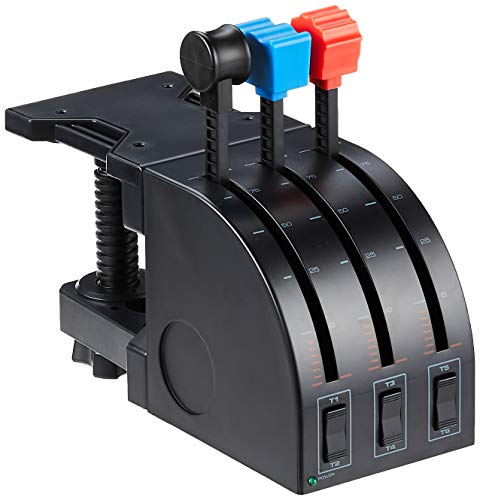
  • Product 1: 3 axis levers add even more options for control in your favorite flight simulation
  • Product 1: 3 two way rocker switches add further controls to your simulation setup
  • Product 1: Quadrant can be mounted either on top or in front of your desk, pilot or co pilot side so that the controls are always where you want them
  • Product 1: Additional quadrant lever heads let you create your preferred configuration of throttle, flaps, mixture and prop pitch
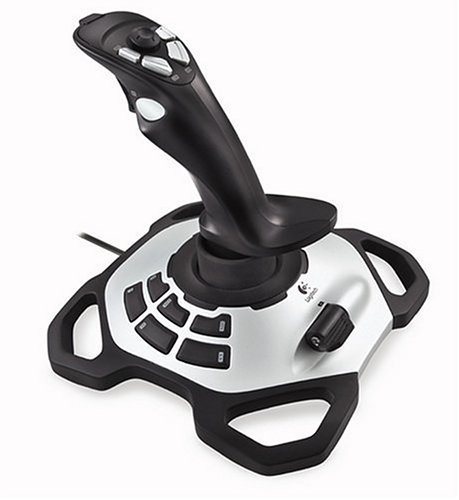
  • Product 2: Logitech Exreme 3D Pro Joystick, Take Control: With advanced controls and a custom twist-handle rudder, this joystick is stable and precise whether you’re dropping bombs or firing guns
  • Product 2: 12 Programmable Buttons: Easily configure each button of this controller to execute simple single commands or intricate macros involving multiple keystrokes, mouse events and more
  • Product 2: 8-way Hat Switch: The Logitech Extreme 3D Pro Precision Fightstick is designed to accurately capture specialised input specific to flight sims
  • Product 2: Rapid-fire Trigger: Lock on and let loose. Pull the trigger as fast as you want, confident that every twitch of your finger will be captured without missing a beat
SELLER SELLER SCORE AMAZON FULFILLED PRIME FREE SHIPPING
Amazon.com 9.68 Yes Yes No

The cockpit comes alive the moment you bank a heavy transport plane through a storm, feeling every subtle adjustment through the precision of the Extreme 3D Pro joystick. This bundle pairs a highly responsive flightstick with a versatile throttle quadrant that truly elevates the immersion. I found the three-axis levers and two-way rocker switches incredibly useful for managing complex engine settings, while the joystick's custom twist-handle rudder provides the stability needed for tight maneuvers. With twelve programmable buttons and an eight-way hat switch, you can map intricate macros to keep your hands on the controls. Whether you mount the quadrant on your desk or in front of it, the setup adapts perfectly to your specific pilot or co-pilot configuration.
What We Like
Three axis levers
Twist-handle rudder
Twelve programmable buttons
Eight-way hat switch
Rapid-fire trigger
#5

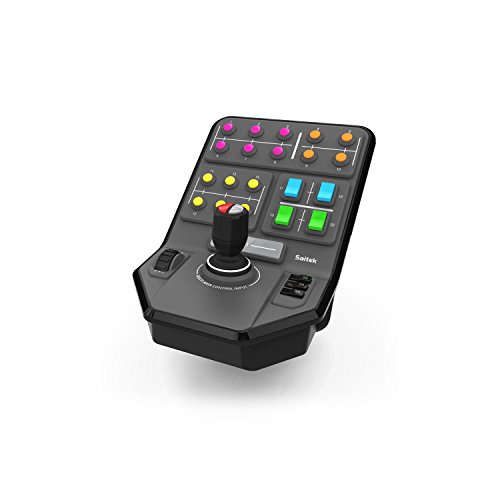
Logitech USB G PC Farm Sim Vehicle Side Panel

Logitech G PC Farm Sim Vehicle Side Panel

LOGITECH G 945-000031 6.60 X 13.30 X 7.60 Inches 2.56 Pounds

PM Score for LOGITECH G (PM Score)

9.6 PM Score
Buy on Amazon
  • Side panel loader control Stick, with 6 axes TO operate so that even complex logging machines are rendered simple to operate
  • Set and forget cruise control speed dial and 37 programmable buttons, give you the flexibility to control your entire farm from just the one controller
  • Durable clamp featuring saitek's proven screw-thread adjustment, ensuring your controllers stay locked in place on your desk
  • Open game compatibility offers the ability to use the side panel in more than just farming simulator. Elite dangerous, Star citizen, Euro truck simulator – just A few of the other titles in which you can easily use the side panel for control.
SELLER SELLER SCORE AMAZON FULFILLED PRIME FREE SHIPPING
Dave Parkers 9.85 No No No

The heavy-duty screw-thread clamp provides an immediate sense of stability, locking this controller to your desk so it won't budge during intense maneuvers. This side panel is a massive upgrade for anyone tired of fighting a keyboard while managing complex machinery. The six-axis loader control stick makes operating intricate logging equipment feel intuitive rather than a struggle, while the dedicated cruise control speed dial lets you set your pace and focus on the task at hand. With 37 programmable buttons, you essentially have a command center at your fingertips. While it is built for farming, the open compatibility means it functions beautifully in space sims like Elite Dangerous or Star Citizen, making it a versatile powerhouse for any serious flight or driving enthusiast.

What We Like
Six-axis control stick
37 programmable buttons
Cruise control dial
Durable screw-thread clamp
Multi-game compatibility

Logitech G Pro Flight Multi Panel & G Pro Flight Throttle Quadrant

Logitech G Pro Flight Multi Panel and Throttle Quadrant

LOGITECH G

PM Score for LOGITECH G (PM Score)

9.5 PM Score
Buy on Amazon
  • Product 1: A set of switches and LED display for use in controlling various aspects of flight simulation
  • Product 1: Works with Microsoft Flight Simulator X and 2004
  • Product 1: Mounts onto the Pro Flight Yoke System (sold separately) or into your own home cockpit setup
  • Product 1: Compatible: Windows 7, 8, 8.1 and 10 or newer
  • Product 2: 3 axis levers add even more options for control in your favorite flight simulation
  • Product 2: 3 two way rocker switches add further controls to your simulation setup
  • Product 2: Quadrant can be mounted either on top or in front of your desk, pilot or co pilot side so that the controls are always where you want them
  • Product 2: Additional quadrant lever heads let you create your preferred configuration of throttle, flaps, mixture and prop pitch
SELLER SELLER SCORE AMAZON FULFILLED PRIME FREE SHIPPING
Amazon.com 9.68 Yes Yes No

Most flight sim enthusiasts eventually grow tired of fumbling with keyboard shortcuts and mouse clicks when they should be focused on the horizon. This Logitech G Pro Flight bundle changes the game by bringing tactile, physical precision to your cockpit. The multi-panel provides essential switches and an LED display for real-time monitoring, while the throttle quadrant offers three-axis levers and rocker switches for nuanced engine control. I love how versatile the quadrant is. You can mount it on your desk or integrate it into a custom home cockpit, and even swap lever heads to customize your throttle, flaps, or mixture settings. It works seamlessly with Microsoft Flight Simulator X and 2004 on Windows, making it a reliable cornerstone for any serious simulation setup.

What We Like
Three-axis levers
Integrated LED display
Customizable lever heads
Versatile mounting options
Tactile rocker switches

Hikig 2 Pack Desk Mount Hotas Mount Joystick Mount Compatible With Logitech X52/X52 Pro/X56/X56 Rhino Hotas, Thrustmaster T. Flight Hotas/T.16000M FCS...

Hikig Dual Desk Mount Joystick Controller Set

HIKIG

PM Score for HIKIG (PM Score)

9.3 PM Score
Buy on Amazon
  • WIDE ADAPTABILITY-Fully Support With Almost All of Flight Game Hand-Control Devices. Hikig Hotas Table Mount support X56/X56 Rhino/X55/x52/X52 Pro/T.16000M/TCA Officer Pack Airbus/Warthog Stick(not long for throttle) /VKB Gunfighter Mk.lll/VKB Gladiator/Pro/Airrow/VPC Mongoos T-50 Throttle/ Saitek X65F/T.Flight Hotas 4/TSSH Handbrake/TH8A Shifter/ClubShifter SQ V 1.5/Logitech Pro Flight Throttle Quadrant and so on
  • Excellent Stability: Hikig Heavy and Strong Desk Mount Stably Hold Your Equipment In The Best Position.
  • Excellent Compatibility: Fully Support With Almost All of Flight Game Hand-Control Devices.
  • Game Comfortably: Control your plane with comfort and ergonomics. This joystick desk mount is stable when set up and can be installed easily.
  • Prepare For Gaming: Ready Your Cockpit And Take Flight.The Hikig Flight Joystick Controller Mount Is The Ideal Addition To Your Battle Station For That Immersive Flight Simulation Gaming Experience.
SELLER SELLER SCORE AMAZON FULFILLED PRIME FREE SHIPPING
Hikig Online 9.22 Yes Yes Yes

Serious flight sim enthusiasts need the Hikig 2 Pack Desk Mounts to finally reclaim their desk real estate and stop fighting with sliding controllers. This setup transforms a standard desk into a legitimate cockpit by providing a heavy, stable foundation for your gear. Whether you are rocking a Logitech X56, a Thrustmaster T.16000M, or high-end VKB hardware, these mounts offer the ergonomic positioning required for precision maneuvers. I found that the stability is a game-changer for immersion, preventing the jitter often caused by mounting directly to a hollow desk. It is a straightforward, rugged solution for anyone looking to bridge the gap between a casual setup and a professional battle station.
What We Like
Universal device compatibility
Heavy duty stability
Ergonomic cockpit positioning
Easy installation
Two pack set

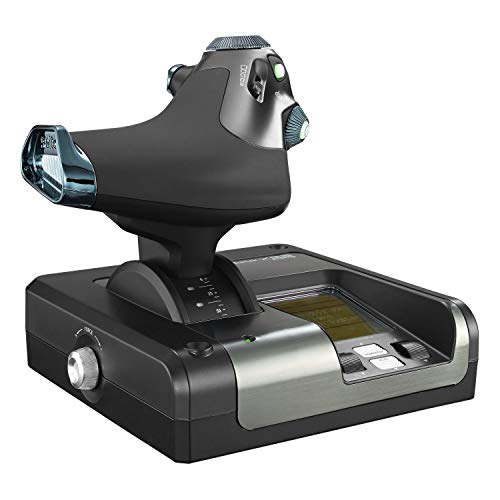
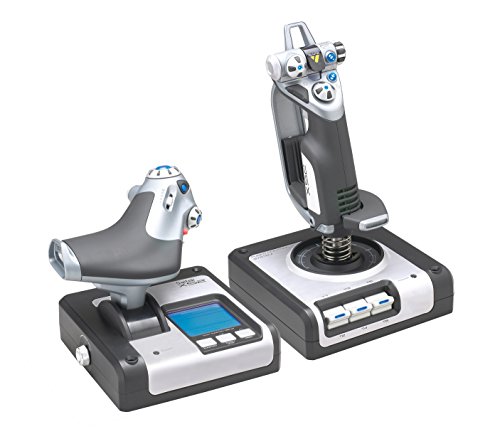
Logitech G X52 Flight Control System

Logitech G X52 Flight Control System

LOGITECH G 945-000022 14.33 X 10.04 X 8.98 Inches 4.85 Pounds

PM Score for LOGITECH G (PM Score)

9.3 PM Score
Buy on Amazon
  • Advanced multi-function display (mfd) for real flying interaction. 2 dedicated mfd buttons and 2 rotary dials with in-built buttons to control additional game functionality
  • Joystick with precision centering mechanism, non-contact technology on x and Y axes and constant spring force
  • Progressive throttle with tension adjustment, detents for Afterburner and Idle. 2 Fire buttons
  • Works with: Windows XP, XP64 and Vista (all versions) and Windows 7, Windows 8.1, Windows 10 or newer
  • Stick dimensions is 6.7 long x 6.7 wide x: 10.9 high in inches, weight is 2.3 pounds and cable length is 4.6 feet. Throttle dimensions is 6.7 long x 6.7 wide x 7.5 high in inches, weight is 1.6 pounds and cable length is 4.6 feet
SELLER SELLER SCORE AMAZON FULFILLED PRIME FREE SHIPPING
RTA LLC 9.20 Yes Yes Yes

You are banking hard through a heavy cloud layer, fighting turbulence, and suddenly need to toggle your landing gear without ever taking your hands off the primary controls. The Logitech G X52 Flight Control System makes this kind of high-stakes maneuvering feel natural thanks to its advanced multi-function display. I found the two dedicated MFD buttons and rotary dials incredibly helpful for managing complex game functions on the fly. The joystick itself feels remarkably smooth because of the non-contact technology on the X and Y axes, providing a precision centering mechanism that doesn't feel jittery. On the throttle side, the progressive tension adjustment and those tactile detents for idle and afterburner give you a physical sense of engine power that most entry-level setups lack.

What We Like
Multi-function display
Non-contact axis technology
Progressive throttle tension
Tactile engine detents
Precision centering mechanism

Logitech G Saitek X52 Pro Flight Control System, Controller and Joystick Simulator, LCD Display, Illuminated Buttons, 2xUSB, PC - Black/Silver

Logitech G Saitek X52 Pro Flight Control System

LOGITECH G 945-000022 14.57 X 9.84 X 9.06 Inches 5.10 Pounds

PM Score for LOGITECH G (PM Score)

9.2 PM Score
Buy on Amazon
  • Illuminated buttons and enhanced gameplay through intuitive LCD multi-function display
  • Progressive throttle with resistance adjustment and detents for Afterburner and Idle
  • Precision centering mechanism. No contact Technology on x and Y axes and constant spring force improve control
  • Program your controller for each game using the powerful smart technology software. System requirements: Windows 10, Windows 8.1, Windows 7, 2-usb 2.0 port, internet connection for optional software download
  • 5 position handle adjustment system to suit all hand sizes with soft-touch, contoured grip for maximum gaming comfort
SELLER SELLER SCORE AMAZON FULFILLED PRIME FREE SHIPPING
IPC-STORE✅ 9.84 No No No

Serious flight simulator enthusiasts require the Logitech G Saitek X52 Pro to bridge the gap between casual gaming and true cockpit immersion. This setup stands out immediately because of its intuitive LCD multi-function display and illuminated buttons, which provide real-time feedback right at your fingertips. The precision is genuinely impressive. Thanks to the No Contact Technology on the X and Y axes combined with a constant spring force, you get incredibly smooth, centered movement without the wear and tear of traditional sensors. I particularly enjoyed the progressive throttle, which features adjustable resistance and physical detents for idle and afterburner settings. With a five-position handle adjustment system and a contoured, soft-touch grip, it accommodates almost any hand size while maintaining comfort during long sorties.

What We Like
LCD multi-function display
No Contact Technology
Progressive throttle detents
Illuminated buttons
Adjustable handle position
#10

logitech Saitek G Pro Flight X56 Rhino HOTAS (Renewed)

Logitech Saitek G Pro Flight X56 Rhino HOTAS

LOGITECH 945-000021-CR 7.30 X 8.90 X 10.50 Inches

PM Score for LOGITECH (PM Score)

9.1 PM Score
Buy on Amazon
  • Military-grade Space and Flight Sim Precision: The X-56 Rhino delivers a multitude of customizable options including all the control surface options required to achieve the exact level of performance that aspiring combat pilots demand
  • New Mini Analog Stick Control Surfaces: Control pitch, roll, yaw, backwards, forwards, up, down, left and right as well as gimballed weapons that are controlled separately from the space craft
  • RGB Backlighting: Many PC peripherals now feature RGB backlighting and the X-56 is no exception. Use the software to set the color of the lighting to match the rest of your gaming rig
  • Ideal for VR: The X-56 places controls perfectly under your fingers where subtle distinctions in button feel and shape help you navigate the control set with ease.
SELLER SELLER SCORE AMAZON FULFILLED PRIME FREE SHIPPING
SpaceBound 9.79 No No No

Standard gamepads and basic joysticks simply fail to provide the granular control required for high-stakes combat maneuvers. The X-56 Rhino solves this by offering military-grade precision that puts every necessary control surface right at your fingertips. During testing, the new mini analog stick surfaces were a standout, allowing for seamless management of pitch, roll, and yaw alongside independent gimballed weapon controls. This level of separation is a game-changer for complex flight sims. The tactile distinction between buttons makes it an ideal companion for VR users who need to navigate controls by feel rather than sight. Plus, the customizable RGB backlighting ensures your cockpit setup looks as professional as it performs.

What We Like
Military-grade precision
Mini analog sticks
Customizable RGB lighting
VR optimized design
Gimballed weapon control
#11

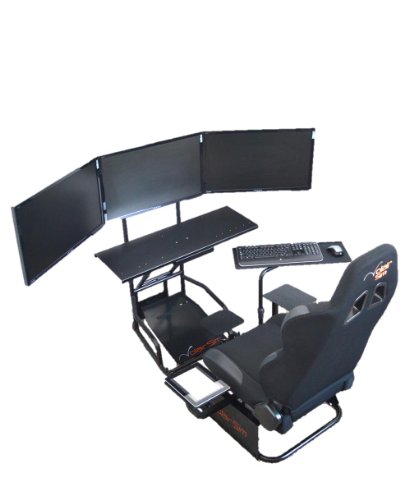
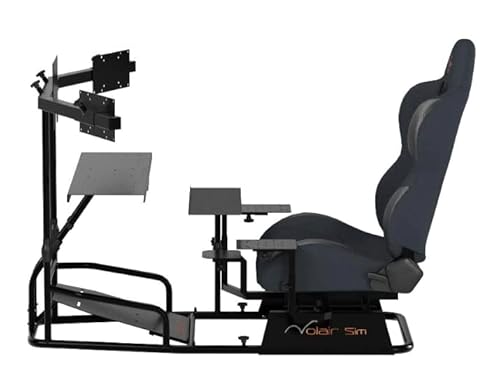
Volair Sim Universal Flight or Racing Simulation Cockpit Chassis with Triple Monitor Mounts

Volair Sim Universal Flight and Racing Cockpit

VOLAIR SIM VS-01-2 41.00 X 25.00 X 25.00 Inches 127.98 Pounds

PM Score for VOLAIR SIM (PM Score)

8.5 PM Score
Buy on Amazon
  • Durable steel frame with a fully-adjustable genuine racing seat with OPTIONAL arm rests (sold separately).
  • Monitor mounts for single (up to 50") or triple monitor (up to 32") set-up
  • Dual left and right yoke/shifter mounts pre-drilled for Logitech throttle quadrant(s), trim wheel, Logitech X-52 and X-56, Thrustmaster HOTAS Warthog, Logitech G27 shifter, or Fanatec ClubSport shifter SQ
  • Universal yoke/steering wheel/avionics table pre-drilled for Logitech Pro Flight yoke and avionics, Logitech G27/G29/G920 and Thrustmaster T500RS racing wheels and a fully-adjustable articulated and padded keyboard and mouse tray
  • Center stick mount predrilled for Logitech X-52, Thrustmaster HOTAS Warthog, and an adjustable rudder/racing pedal base pre-drilled for Logitech G27/G29/G920 racing pedals or Fanatec ClubSport Pedals
SELLER SELLER SCORE AMAZON FULFILLED PRIME FREE SHIPPING
Volair Sim 7.37 No No No

Serious sim enthusiasts who refuse to choose between the cockpit of a fighter jet and a GT racer need the Volair Sim Universal Chassis to unify their setup. This steel-frame powerhouse eliminates the clutter of separate rigs by offering pre-drilled mounting points that accommodate everything from Logitech throttle quadrants and Thrustmaster Warthog HOTAS systems to Fanatec ClubSport shifters. The versatility is staggering. You can transition from a triple 32-inch monitor racing array to a single 50-inch flight display without breaking a sweat. I love how the adjustable genuine racing seat provides a professional feel, while the articulated keyboard and mouse tray keeps your controls within reach. It is a heavy-duty, all-in-one solution for anyone building a high-end, multi-discipline simulation sanctuary.

What We Like
Durable steel frame
Adjustable racing seat
Triple monitor mounts
Pre-drilled mounting points
Articulated keyboard tray

Logitech G X56 H.O.T.A.S Throttle and Joystick Flight Simulator Game Controller, 4 Spring Options, +189 Programmable Controls, RGB Lighting, 2x USB, P...

Logitech G X56 H.O.T.A.S. Flight Simulator Controller

LOGITECH 945-000058-CR 11.40 X 6.69 X 7.08 Inches 6.24 Pounds

PM Score for LOGITECH (PM Score)

7.7 PM Score
Buy on Amazon
  • Military-grade Space and Flight Sim Precision. Customizable options including all the control surface options required to achieve the exact level of performance that aspiring combat pilots demand
  • New Mini Analog Stick Control Surfaces: Control pitch, roll, yaw, backwards, forwards, up, down, left and right as well as gimballed weapons that are controlled separately from the space craft
  • RGB Backlighting: Many PC peripherals now feature RGB backlighting and the X-56 is no exception. Use the software to set the color of the lighting to match the rest of your gaming rig
  • Ideal for VR: The X-56 places controls perfectly under your fingers where subtle distinctions in button feel and shape help you navigate the control set with ease
  • Fully Featured HOTAS: Accurate 16-bit aileron and elevator axis with hall-effect sensors. Adjustable Stick Force via Advanced 4-Spring System. Twin Throttles with Friction Adjuster and Throttle Lock
SELLER SELLER SCORE AMAZON FULFILLED PRIME FREE SHIPPING
No No No

Can a single hardware upgrade truly bridge the gap between a casual gamer and a precision combat pilot? The Logitech G X56 H.O.T.A.S. aims to do exactly that by providing military-grade precision through high-accuracy 16-bit hall-effect sensors. During testing, the tactile distinction of the buttons made navigating the complex layout effortless, which is a massive advantage when you are immersed in a VR cockpit. I found the advanced four-spring system particularly impressive, allowing you to dial in the exact stick tension your flight style requires. With twin throttles featuring friction adjusters and a massive array of over 189 programmable controls, this setup gives you total mastery over everything from pitch and roll to independent gimballed weapons.

What We Like
Hall-effect sensors
Four-spring tension system
189 programmable controls
Customizable RGB lighting
Twin friction throttles
#13

Logitech 945-000028 - G Saitek Pro Flight Multi Panel (Black) (Renewed)

Logitech G Saitek Pro Flight Multi Panel

LOGITECH G 945-000028-CR 11.10 X 2.24 X 3.31 Inches 0.92 Pounds

PM Score for LOGITECH G (PM Score)

6.1 PM Score
Buy on Amazon
  • A set of switches and LED display for use in controlling various aspects of flight simulation
  • Works with Microsoft Flight Simulator X and 2004
  • Mounts onto the Pro Flight Yoke System (sold separately) or into your own home cockpit setup
  • Compatible: Windows 7, 8, 8.1 and 10 or newer
  • Full Autopilot panel with associated setting controls
SELLER SELLER SCORE AMAZON FULFILLED PRIME FREE SHIPPING
Triplenet Pricing INC 9.81 No No No

After weeks of use, the sheer immersion provided by this flight simulation control center becomes impossible to ignore. This panel acts as the tactile heart of a home cockpit, offering a dedicated full autopilot suite and a series of essential switches that move you away from clunky keyboard commands. The integrated LED displays provide much-needed visual feedback, making it feel like you are sitting in a real cockpit rather than just staring at a monitor. While it is designed to mount seamlessly onto the Pro Flight Yoke System, its versatility allows it to fit into almost any custom flight rig. It remains a reliable staple for anyone serious about Microsoft Flight Simulator X or 2004, bridging the gap between software and physical sensation.

What We Like
Full autopilot panel
Integrated LED displays
Tactile switch controls
Custom cockpit mounting
Flight simulation specialized

Logitech G Saitek X52 Pro USB Flight Contol System (Renewed) compatible with Windows

Logitech G Saitek X52 Pro Flight Control System

LOGITECH 945-000022-CR 14.57 X 9.84 X 9.06 Inches

PM Score for LOGITECH (PM Score)

5.6 PM Score
Buy on Amazon
  • Illuminated buttons and enhanced gameplay through intuitive LCD Multi-Function Display
  • Progressive throttle with resistance adjustment and detents for afterburner and idle
  • Precision centering mechanism. No contact technology on X and Y axes and constant spring force improve control
  • Program your controller for each game using the powerful Smart Technology software. System Requirements : Windows 10, Windows 8.1, Windows 7, 2-USB 2.0 Port, Internet connection for optional software download
  • 5 position handle adjustment system to suit all hand sizes with soft-touch, contoured grip for maximum gaming comfort
SELLER SELLER SCORE AMAZON FULFILLED PRIME FREE SHIPPING
BHHT Deals 9.20 Yes Yes Yes

You are deep in a dogfight, banking hard through a cloud bank, and suddenly that intuitive LCD Multi-Function Display gives you the exact telemetry you need to stay in the fight. The Logitech G Saitek X52 Pro isn't just a peripheral. It is a tactile extension of your cockpit. I found the precision centering mechanism particularly impressive, as the no-contact technology on the X and Y axes prevents the dreaded stick drift common in lesser controllers. The progressive throttle feels incredibly realistic with its adjustable resistance and dedicated detents for afterburner and idle settings. Even during marathon sessions, the five-position handle adjustment and soft-touch contoured grips ensure your hands don't fatigue, making this a professional-grade setup for any serious flight sim enthusiast.

What We Like
LCD Multi-Function Display
Adjustable progressive throttle
No-contact axis technology
Five-position handle adjustment
Illuminated control buttons
#15

Logitech G Saitek X52 Flight Control System (Renewed)

Logitech G Saitek X52 Flight Control System

LOGITECH 945-000022-CR 14.33 X 10.04 X 8.98 Inches

PM Score for LOGITECH (PM Score)

5.4 PM Score
Buy on Amazon
  • This Certified Refurbished product is tested and certified to look and work like new. The refurbishing process includes functionality testing, basic cleaning, inspection, and repackaging. The product ships with all relevant accessories, a minimum 90-day warranty, and may arrive in a generic box. Only select sellers who maintain a high performance bar may offer Certified Refurbished products on Amazon.com
  • Advanced Multi-Function Display (MFD) for real flying interaction
  • 2 dedicated MFD buttons and 2 rotary dials with in-built buttons to control additional game functionality
  • Joystick with precision centering mechanism, non-contact technology on X and Y axes and constant spring force
  • Progressive throttle with tension adjustment, detents for afterburner and idle. 2 fire buttons
SELLER SELLER SCORE AMAZON FULFILLED PRIME FREE SHIPPING
GEEKDEAL 9.76 Yes Yes Yes

The Logitech G Saitek X52 Flight Control System brings unparalleled immersion to your cockpit through its advanced Multi-Function Display. This setup feels incredibly tactile, especially with the progressive throttle that features dedicated detents for idle and afterburner settings. I was impressed by the precision centering mechanism on the joystick. The non-contact technology on the X and Y axes ensures smooth, consistent movement without the wear of traditional sensors. Even as a certified refurbished unit, the hardware arrives feeling nearly new thanks to rigorous functionality testing and cleaning. Having two dedicated MFD buttons and rotary dials right at your fingertips allows for seamless interaction during intense flight simulations, making every maneuver feel much more intentional and realistic.

What We Like
Multi-Function Display
Precision centering mechanism
Progressive throttle
Non-contact axis technology
Adjustable throttle tension
#16

Minneer T-Flight Hotas One Racing/Flying Simulation Cockpit, 40MM Square Tube Can be Retrofitted With Warthog Console And Multi-angle Support Adjustme...

Minneer T-Flight Racing and Flight Simulation Cockpit

MINNEER BLACK-49

PM Score for MINNEER (PM Score)

5.2 PM Score
Buy on Amazon
  • 【Solid and durable】 Racing simulation cockpit overall use of alloy steel plate CNC machining, bolts used in industrial grade 8.8 hardness, surface galvanization, not easy to dirty hands corrosion resistance, shift lever platform can bear a weight of 50kg!
  • 【Compatibility】 Shift lever left console is compatible with X52/X52PRO/X56 throttle controller, Tumaster A10 throttle controller, right console is compatible with Logitech X52/X56, and for G29/G920/T150, etc.
  • 【Adjustable】Left and right console can be adjusted before and after, the height of the bracket can be adjusted, the pedal and steering wheel mounting plate angle can be adjusted, the seat can be adjusted before and after the maximum degree of adaptation to the human body structure.
  • 【Support modification】With parts beyond the installation itself, engineers full guidance available for DIY transformation, and can contact customer service to add warthog control platform.
  • 【After-sales guarantee】Easy to install, and with installation video, provide lifelong technical support, if you have any questions, please contact us, we will respond within 24 hours.
  • 【Special emphasis】This product only includes the bracket part (excluding the warthog platform) and the seat part, not including the steering wheel pedal handbrake shift lever.
SELLER SELLER SCORE AMAZON FULFILLED PRIME FREE SHIPPING
Minneer Store 5.15 No No No

Hardcore sim racers and flight enthusiasts demand a rigid foundation that won't buckle under intense maneuvers, and the Minneer T-Flight delivers exactly that level of industrial stability. Built with CNC-machined alloy steel plates and high-hardness 8.8 grade bolts, this cockpit feels incredibly substantial, even supporting up to 50kg on the shift lever platform. What sets this apart is the sheer versatility. You can fine-tune the height, angles, and seat position to match your body perfectly, making it a highly customizable command center. It is specifically engineered to play nice with high-end gear like the X52/X56 series or Logitech racing wheels. Just keep in mind that this is a specialized bracket and seat setup, so you'll need to provide your own peripherals to complete the rig.
What We Like
CNC alloy steel
Highly adjustable geometry
Industrial grade bolts
Multi-device compatibility
Warthog retrofit support

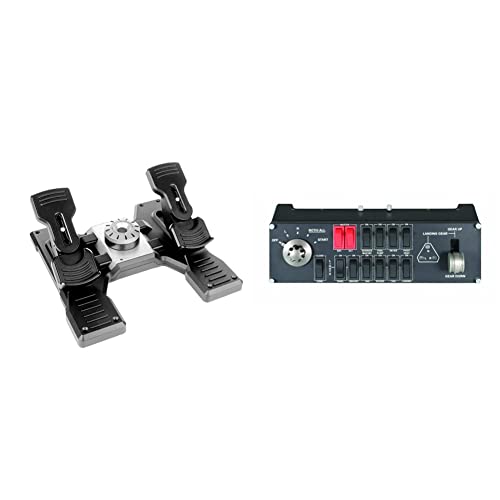
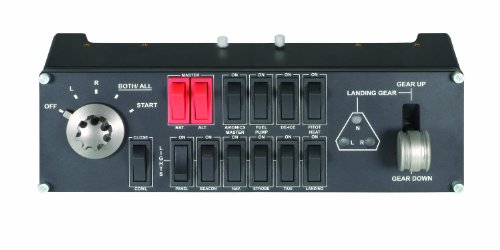
Logitech Pro Flight Rudder Pedals & Pro Flight Switch Panel, WHITE

Logitech G Pro Flight Rudder Pedals and Switch Panel

LOGITECH G

PM Score for LOGITECH G (PM Score)

5.1 PM Score
Buy on Amazon
  • Product 1: Smooth and accurate self-centering rudder pedals add another layer of realistic control to your flight simulation setup
  • Product 1: Whether you prefer the lighter response of a small aircraft or the more robust feel of a heavy jet, a simple twist of the Adjustable Tension Dial will have you flying your way.
  • Product 1: Differential Toe Brakes deliver the full control you need when bringing your aircraft up to its stand on the runway
  • Product 2: Realistic landing gear control with LEDs indicating actual gear status from Microsoft FSX. Fully Customizable for All Flying Conditions.
  • Product 2: Start your aircraft engines and access other cockpit functions with ease. Compatible with most major simulation software and games, including:Flight Simulator X,Prepar3D 2.2+,X-Plane 10
  • Product 2: Modular and interchangeable. Saitek's range of Instrument Panels can be situated one on top of another or side-by-side. Want the Multi Panel above the Radio Panel? Done. Want your Switch Panel to the left of your Yoke? Go for it. Easy-to-use mounting brackets provide the means to arrange your flight simulation setup in a configuration only limited by your imagination.
  • Product 2: Compatible: Windows 7, 8, 8.1 and 10 or newer
SELLER SELLER SCORE AMAZON FULFILLED PRIME FREE SHIPPING
Amazon.com 9.68 Yes Yes No

The tactile click of the toggle switches provides an immediate sense of cockpit immersion that transforms your desk into a real flight deck. This white Logitech G bundle pairs high-precision rudder pedals with a versatile switch panel to bridge the gap between gaming and true simulation. I found the adjustable tension dial incredibly useful. You can easily swap from the light touch required for small aircraft to the heavy, robust resistance of a commercial jet. The differential toe brakes offer surgical precision during runway taxiing, while the switch panel handles engine starts and landing gear management with integrated LEDs that sync with software like Microsoft FSX. Because the panels are modular, you can stack or side-mount them to build a custom cockpit layout that fits your specific flight style.

What We Like
Adjustable tension dial
Differential toe brakes
Modular panel design
LED status indicators
Smooth self-centering

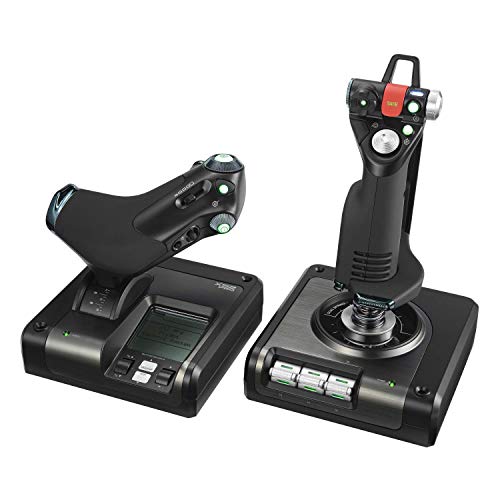
Logitech X52 Pro Flight Control System & Flight Rudder Pedals

Logitech G X52 Pro Flight Control System and Rudder Pedals

LOGITECH G

PM Score for LOGITECH G (PM Score)

5.1 PM Score
Buy on Amazon
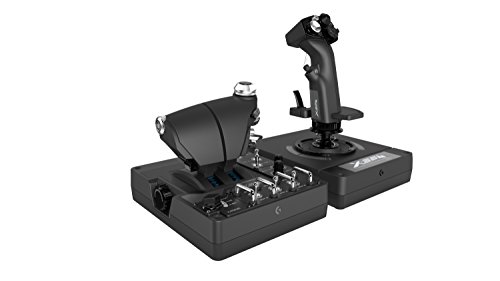
  • Product 1: Magnetic non-contact X and Y axis sensors provide enhanced longevity and improved accuracy. A dual spring centering mechanism provides a progressive, smooth movement that further aids your control.
  • Product 1: Multifunction LCD Display affords even greater control of your navigation within Flight Simulator X, thanks to direct control of the simulation’s radio panel functionality.
  • Product 1: 3D Twist with Rudder Lock, essential for simulation control. For those that already have rudder pedals, you can lock off the axis in order to prevent accidental activation.
  • Product 1: 5-position Grip System: Maintain excellent ergonomic comfort with no need to stretch to reach buttons
  • Product 2: Smooth and accurate self-centering rudder pedals add another layer of realistic control to your flight simulation setup
  • Product 2: Whether you prefer the lighter response of a small aircraft or the more robust feel of a heavy jet, a simple twist of the Adjustable Tension Dial will have you flying your way.
  • Product 2: Differential Toe Brakes deliver the full control you need when bringing your aircraft up to its stand on the runway
SELLER SELLER SCORE AMAZON FULFILLED PRIME FREE SHIPPING
Amazon.com 9.68 Yes Yes No

The Logitech G X52 Pro Flight Control System and Rudder Pedals redefine cockpit immersion through high-precision magnetic sensors. Testing this setup feels remarkably natural because the magnetic non-contact X and Y axis sensors offer incredible longevity and pinpoint accuracy. I was particularly impressed by the multifunction LCD display, which lets you manage radio panel functions directly without breaking your flight flow. The ergonomic 5-position grip ensures you never have to overreach during intense maneuvers, while the 3D twist includes a rudder lock feature for those who prefer using dedicated pedals. When paired with the self-centering rudder pedals, the experience is seamless. You can even use the adjustable tension dial to switch between the light touch of a small plane and the heavy resistance of a jet, making the entire simulation feel incredibly tactile.

What We Like
Magnetic axis sensors
Multifunction LCD display
Ergonomic 5-position grip
Adjustable tension dial
Differential toe brakes

logitech G X56 H.O.T.A.S Throttle and Joystick Flight Simulator Game Controller, 4 Spring Options, 189 Programmable Controls, RGB Lighting, 2x USB, PC...

Logitech G X56 H.O.T.A.S. Flight Simulator System

LOGITECH G

PM Score for LOGITECH G (PM Score)

4.7 PM Score
Buy on Amazon
  • Product 1: Military-grade Space and Flight Sim Precision. Customizable options including all the control surface options required to achieve the exact level of performance that aspiring combat pilots demand
  • Product 1: New Mini Analog Stick Control Surfaces: Control pitch, roll, yaw, backwards, forwards, up, down, left and right as well as gimballed weapons that are controlled separately from the space craft
  • Product 1: RGB Backlighting: Many PC peripherals now feature RGB backlighting and the X-56 is no exception. Use the software to set the color of the lighting to match the rest of your gaming rig
  • Product 1: Ideal for VR: The X-56 places controls perfectly under your fingers where subtle distinctions in button feel and shape help you navigate the control set with ease
  • Product 2: Smooth and accurate self-centering rudder pedals add another layer of realistic control to your flight simulation setup
  • Product 2: Whether you prefer the lighter response of a small aircraft or the more robust feel of a heavy jet, a simple twist of the Adjustable Tension Dial will have you flying your way.
  • Product 2: Differential Toe Brakes deliver the full control you need when bringing your aircraft up to its stand on the runway
SELLER SELLER SCORE AMAZON FULFILLED PRIME FREE SHIPPING
Amazon.com 9.68 Yes Yes No

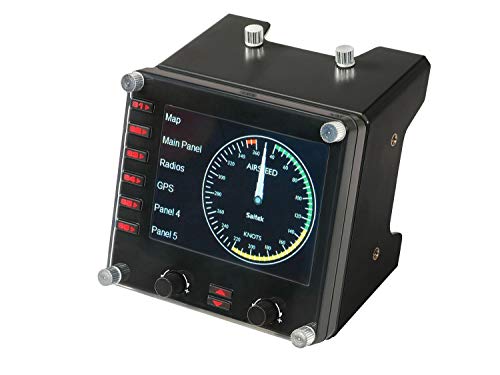
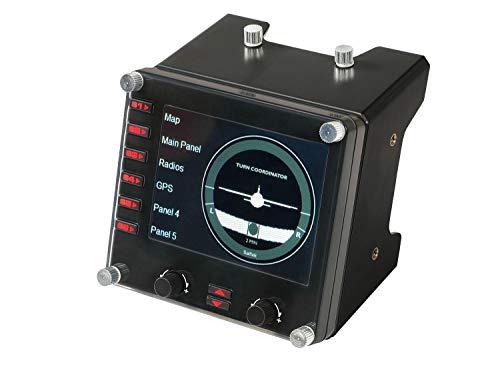
Aspiring combat pilots who refuse to compromise on precision need the Logitech G X56 to bridge the gap between a desk and a cockpit. This setup delivers military-grade space and flight simulation accuracy, especially with the addition of the smooth, self-centering rudder pedals. I found the mini analog stick control surfaces particularly impressive, as they allow for independent gimballed weapon control separate from your primary flight path. Whether you are navigating a VR environment or managing complex maneuvers, the tactile button shapes ensure you never lose your place. You can even customize the tension with an adjustable dial to mimic anything from a light aircraft to a heavy jet, all while matching the RGB lighting to your specific gaming rig.
What We Like
Military-grade precision
Adjustable tension dial
Programmable RGB lighting
Differential toe brakes
Mini analog sticks
#20

Logitech G Pro Flight Instrument Panel (Black) (Renewed)

Logitech G Pro Flight Instrument Panel

LOGITECH G 945 - 000027 - CR 5.71 X 4.65 X 3.94 Inches

PM Score for LOGITECH G (PM Score)

3.9 PM Score
Buy on Amazon
  • Pro flight information panel is a true multi-functional device
  • Colorful 3.5-inch LCD screen seamlessly integrates into flight sim software. The Instrument Panel
  • automatically updates and reacts to software events, giving accurate, real-time access to important flight and aircraft information
  • Works with flight simulator software to display real time cockpit instrument information
SELLER SELLER SCORE AMAZON FULFILLED PRIME FREE SHIPPING
Eight Enterprise inc 6.44 Yes Yes Yes

Most flight sim enthusiasts spend hundreds on complex physical switches, yet the most critical data often remains trapped behind a digital screen. This Logitech G Pro Flight Instrument Panel changes that dynamic by bringing a dedicated 3.5-inch colorful LCD directly into your physical cockpit setup. It isn't just a static display. The panel acts as a living extension of your software, reacting instantly to real-time aircraft events. As you maneuver through a flight, the screen updates automatically to provide the exact telemetry and instrument information you need without forcing you to hunt through menus. It turns a standard simulation into a much more immersive, data-driven experience by bridging the gap between your software and your hands.

What We Like
3.5-inch LCD screen
Real-time data updates
Seamless software integration
Multi-functional flight display

Honeycomb Bravo Flight Simulator Throttle Quadrant - Trim, Gear, Flaps, Autopilot, Radio Switch Panel - 6 Interchangeable Levers – Desk Clamps Include...

Honeycomb Aeronautical Bravo Flight Simulator Throttle Quadrant

HONEYCOMB AERONAUTICAL AER-HONEYQUAD 7.87 X 9.45 X 9.06 Inches 6.61 Pounds
  • ALL-IN-ONE COCKPIT SYSTEM FEATURING A CONFIGURABLE THROTTLE SETUP for single-engine general aviation to four-engine commercial aircraft. Configuration options for piston and jet engines
  • FEATURES MULTIPLE COCKPIT COMPONENTS including autopilot, annunciator panel, gear, and flap lever with trim wheel. Thrust reverser for two- and four-engine aircraft.
  • THE MOST VERSATILE FLIGHT SIMULATION EXPERIENCE POSSIBLE. Customize your throttle, switches, and indicator lights to simulate multiple aircraft. 7 programmable keys.
  • GEAR LEVER WITH RED/GREEN LED landing gear indicator lights. Annunciator Panel with 7 two-way programmable switches and 14 warning lights
  • COMPATIBLE WITH MICROSOFT FLIGHT SIMULATOR 2020, Flight Simulator X, XPlane 11, Prepar3D, Flight Sim World.
SELLER SELLER SCORE AMAZON FULFILLED PRIME FREE SHIPPING
Gulf Coast Avionics Corp. 9.84 No No No

The Honeycomb Bravo is the definitive centerpiece for any serious flight sim pilot looking to bridge the gap between a controller and a real cockpit. What makes this unit stand out is its incredible modularity. By swapping the six interchangeable levers, you can transition from a single-engine piston plane to a complex four-engine jet in minutes. The integration of an annunciator panel with 14 warning lights and a dedicated gear lever with LED indicators adds a level of tactile immersion that software alone simply cannot replicate. Whether you are managing flaps and trim or programming the seven custom keys for specific aircraft functions, the hardware feels purposeful and professional. It is a versatile, all-in-one solution that scales alongside your growing virtual hangar.

What We Like
Six interchangeable levers
Programmable autopilot switches
LED gear indicators
Versatile engine configurations
Integrated trim wheel
Buying Guide

A Guide to Selecting the Best Logitech PC Game Flight Controls

A Guide to Selecting the Best Logitech PC Game Flight Controls

Understanding the Control Ecosystem

When shopping for Logitech flight controls, you aren't just buying a peripheral. You are building a cockpit. Logitech typically categorizes their flight gear into two primary formats: Joysticks and Yokes. Joysticks are the standard for combat flight simulators and general aviation, offering 360-degree movement and high-precision axes. Yokes, on the other hand, are designed to mimic the control wheels found in most civilian aircraft, providing a more stable and traditional feel for those focusing on airliner simulation. Before purchasing, determine which flight genre you gravitate toward, as mixing these control types can lead to a cluttered and non-intuitive workspace.

Key Decision Factors: Axis Count and Precision

The most critical technical specification to evaluate is the number of axes. A standard joystick provides at least two axes (X and Y for pitch and roll), but for a truly immersive experience, you should look for hardware that includes a Z-axis (twist) for rudder control. Without a twist axis, you will be forced to use your feet on rudder pedals, which adds cost and complexity. Furthermore, pay attention to the sensitivity and deadzones. High-quality Logitech controllers are prized for their smooth, progressive input, meaning the movement feels organic rather than digital or 'notchy.' If you plan on performing precision landings or delicate aerial maneuvers, prioritize controllers with high-resolution sensors that can detect even the slightest movement.

Ergonomics and Button Layout

In the heat of a simulated dogfight or during a complex approach into a busy airport, you cannot afford to hunt for buttons. A high-quality flight controller should feature a customizable array of buttons, hat switches, and triggers. Hat switches are particularly vital, as they allow you to control camera views or trim settings without taking your hand off the main stick. Consider the grip ergonomics as well. If you plan on long-haul flight sessions, a stick that supports a natural hand position will prevent fatigue. Look for hardware that allows for easy access to secondary functions via programmable buttons, reducing the need to reach for a keyboard.

Compatibility and Scalability

One of the greatest strengths of the Logitech ecosystem is its ability to scale. If you are starting on a budget, a single, high-quality joystick is a perfect entry point. However, as your passion grows, you may want to integrate throttle quadrants or rudder pedals. When selecting your initial controller, consider how it will play with future additions. Ensure the software ecosystem is robust, allowing you to map complex macros and custom curves across multiple devices. A smart purchase today is one that serves as the foundation for a full-scale desktop cockpit tomorrow.

Final Recommendation Logic

To make your final decision, follow this logic: If you want to fly fighter jets or combat sims, prioritize a joystick with a strong twist axis and plenty of trigger-based buttons. If your goal is to master the art of commercial aviation, invest in a yoke-based system paired with a dedicated throttle quadrant. If you are a beginner, start with a versatile joystick that offers a balance of precision and price, leaving room in your budget to add rudder pedals later.

Ready to choose?

Jump back to our ranked picks or compare the shortlist side by side.

Frequently Asked Questions

Quick answers about Logitech Pc Game Flight Controls before you buy.

Most Logitech flight control peripherals are designed primarily for Windows PC environments to ensure full driver support for flight simulation software, though basic plug-and-play functionality may exist on macOS.

Yes, to access advanced button mapping, sensitivity calibration, and precision tuning, you should download the specific Logitech gaming software suite designed for your hardware model.

Absolutely. Logitech controls are industry standards for flight simulation and are natively recognized by major titles like Microsoft Flight Simulator and X-Plane.

A joystick is a single handheld controller, whereas HOTAS (Hands On Throttle-And-Stick) is a dual-component system consisting of a dedicated throttle quadrant and a joystick for more immersive control.

Standard joysticks have a small footprint, but if you opt for a HOTAS setup, you will need significant desk real estate to accommodate both the throttle and the stick base.

Yes, Logitech is highly recommended for beginners because their entry-level sticks offer a balance of durability and intuitive layouts without the steep learning curve of high-end professional gear.

Yes, you can typically connect a joystick and a throttle quadrant simultaneously via USB to create a complete flight control station.

Most consumer-grade Logitech flight sticks focus on high-precision centering springs rather than active force feedback, providing a consistent and predictable tactile feel.
Rankings & Insights

Our Logitech Pc Game Flight Controls Rankings

21 Products Compared
7.2 Avg PM Score
6 Brands Ranked

Top 10 Logitech Pc Game Flight Controls Brands on Amazon

Share of top-ranked products by brand, from our rankings.

  1. 01 Logitech G 11 (52.4%)
  2. 02 Logitech 4 (19%)
  3. 03 Honeycomb Aeronautical 3 (14.3%)
  4. 04 Hikig 1 (4.8%)
  5. 05 Minneer 1 (4.8%)
  6. 06 Volair Sim 1 (4.8%)

How We Selected These Products

We compared Logitech Pc Game Flight Controls products using product details and customer ratings to identify the best options in the pc games & accessories..

From that comparison we shortlisted the top 21 Logitech Pc Game Flight Controls for this page..

We aim to help you find the right controls products for your needs and save you time when choosing which Logitech Pc Game Flight Controls to buy.

Side by Side

Comparison Table

Compare the top 21 picks at a glance — select a column to sort.

# Product Brand PM Score Where to Buy
1 Honeycomb Aeronautical Alpha Flight Yoke and Switch Panel Honeycomb Aeronautical 9.8 Buy on Amazon
2 Honeycomb Aeronautical XPC Alpha Yoke and Switch Panel Honeycomb Aeronautical 9.8 Buy on Amazon
3 Logitech G USB PRO Flight Rudder Pedals Logitech G 9.7 Buy on Amazon
4 Logitech G Flight Simulation Controller Bundle Logitech G 9.7 Buy on Amazon
5 Logitech G PC Farm Sim Vehicle Side Panel Logitech G 9.6 Buy on Amazon
6 Logitech G Pro Flight Multi Panel and Throttle Quadrant Logitech G 9.5 Buy on Amazon
7 Hikig Dual Desk Mount Joystick Controller Set Hikig 9.3 Buy on Amazon
8 Logitech G X52 Flight Control System Logitech G 9.3 Buy on Amazon
9 Logitech G Saitek X52 Pro Flight Control System Logitech G 9.2 Buy on Amazon
10 Logitech Saitek G Pro Flight X56 Rhino HOTAS Logitech 9.1 Buy on Amazon
11 Volair Sim Universal Flight and Racing Cockpit Volair Sim 8.5 Buy on Amazon
12 Logitech G X56 H.O.T.A.S. Flight Simulator Controller Logitech 7.7 Buy on Amazon
13 Logitech G Saitek Pro Flight Multi Panel Logitech G 6.1 Buy on Amazon
14 Logitech G Saitek X52 Pro Flight Control System Logitech 5.6 Buy on Amazon
15 Logitech G Saitek X52 Flight Control System Logitech 5.4 Buy on Amazon
16 Minneer T-Flight Racing and Flight Simulation Cockpit Minneer 5.2 Buy on Amazon
17 Logitech G Pro Flight Rudder Pedals and Switch Panel logitech G 5.1 Buy on Amazon
18 Logitech G X52 Pro Flight Control System and Rudder Pedals Logitech G 5.1 Buy on Amazon
19 Logitech G X56 H.O.T.A.S. Flight Simulator System logitech G 4.7 Buy on Amazon
20 Logitech G Pro Flight Instrument Panel Logitech G 3.9 Buy on Amazon
21 Honeycomb Aeronautical Bravo Flight Simulator Throttle Quadrant Honeycomb Aeronautical 0.0 Buy on Amazon