PickSmartly Buying Guide

Best Ckl Plug In Switches in 2026

9.2 PM Score
Products Compared
6
Brands Ranked
1
Our guides are compiled from product information and customer ratings. If you click on links we provide, we may receive compensation.

When you need to control electrical devices without rewiring your entire home or tampering with permanent wall installations, plug-in switches offer a seamless, non-invasive solution. These compact devices act as intermediaries between your power outlet and your appliance, allowing you to toggle power on or off with a physical button or a remote interface. Whether you are looking to manage decorative lighting, small household appliances, or specialized equipment, selecting the right plug-in switch is critical for both convenience and electrical safety. This guide will help you navigate the technical nuances of these devices to ensure your selection matches your specific power requirements and environmental needs.

Editor's Choice

Our Top Picks for Ckl Plug In Switches

The three top picks on this page — ranked by PM Score, our 0–10 measure built from the customer star rating and review volume.

CKL Triple Monitor HDMI KVM Switch 2 Port with Audio and USB 2.0 HUB, PC Monitor Keyboard Mouse Switcher Box Mirrored or Extended Display 4K@30Hz for...

CKL Triple Monitor HDMI KVM Switch with Audio

CKL CKL-923HUA 5.10 X 3.00 X 2.50 Inches

PM Score for CKL (PM Score)

9.2 PM Score
Buy on Amazon
  • 【2 in 3 out Triple Monitor KVM Switch HDMI】Control 2 computers or Laptops from one set of keyboard, mouse with 3 monitor outputs for extended or mirrored display. Premium solution for consolidating 2 computers and get multiple tasks done easier. With separate speaker and microphone output.
  • 【Support Triple HDMI/ VGA/ DVI/ DisplayPort Computers & Laptops】 Perfect for computers with 3 HDMI graphic outputs. Also support HDMI/ VGA/ DVI/ DP video output mixture devices but need reliable adapters (not included), Please be aware of this before purchasing and reach out to CKL support for reference.
  • 【Cross support multiple platform and devices, Plug and play with no driver needed】 fully compatible with Windows 10/7/2000/XP/ and Mac. Also support HDMI devices like webcam, hard disk player, game console, DVR, NVR etc. With an extra USB 2. 0 port for sharing USB printers, scanners and Jump drives. Support most wireless keyboard and Mouse.
  • 【User-friendly switching modes】 1. Mouse click switch: 2. Hot key switching on keyboards that support all operation systems. 3. Button selection on front panel. 4. Auto scan switch with adjustable interval time between 8 to 999 seconds.5. Wired remote switch.
  • 【Enjoy high resolution with built-in EDID】 supports 4K@30Hz (3840*2160@30HZ) and compatible downwards, also support 4K@60Hz monitor but output 4K@30Hz for with EDID to adapt proper resolutions.
SELLER SELLER SCORE AMAZON FULFILLED PRIME FREE SHIPPING
Amazon.com 9.68 Yes Yes Yes

After weeks of use, my cluttered desk setup finally feels like a professional workstation rather than a chaotic web of cables. This CKL KVM switch is a powerhouse for anyone managing two computers across a triple-monitor array, allowing you to toggle between systems without losing your flow. I love that it handles extended or mirrored displays seamlessly, and the built-in EDID ensures your resolutions stay stable even when switching. Beyond just video, the dedicated audio outputs for speakers and microphones, plus the extra USB 2.0 hub for printers or drives, make it a true command center. Whether you prefer clicking a button, using hotkeys, or a wired remote, the switching is snappy and intuitive across Windows and Mac environments.
What We Like
Triple monitor support
4K resolution compatibility
Integrated audio outputs
USB 2.0 hub
Multiple switching modes

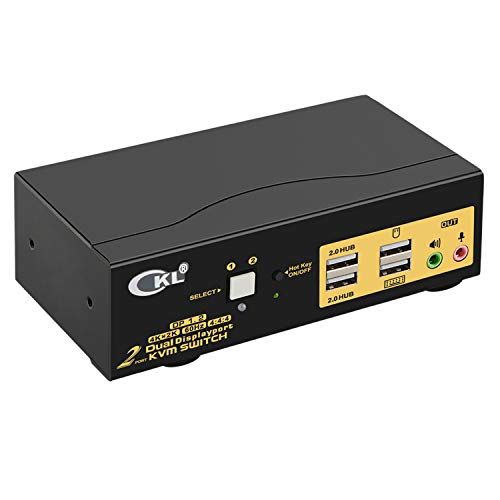
CKL KVM Switch Dual Monitor DisplayPort 2 Port 4K 60Hz 4:4:4, 2x2 DP KVM Switch with Audio and USB 2.0 HUBs (CKL-622DP)

CKL Dual Monitor DisplayPort KVM Switch

CKL CKL-622DP 5.10 X 3.00 X 2.00 Inches 0.91 Pounds

PM Score for CKL (PM Score)

9.2 PM Score
Buy on Amazon
  • DUAL MONITOR KVM SWITCH DISPLAYPORT 2 IN 2 OUT: Controls 2 Dual DP interfaced computers or laptops from one set of USB or wireless keyboard, mouse and 2 Display Port monitors for extended or mirrored display. Docking station or reliable adapters is needed for Non-DP video in/out, please be aware of this before ordering.
  • DP KVM SWITCH FOR ULTRA HIGH 4K RESOLUTION: Supports max resolution up to 4096x2160@60Hz 4:4:4, compatible with 3840x2160@60hz, 1080P, 1080P 3D, 1080I, 720P, 576P, 576I, 480P, 480I. Supports HDCP 2.2, HDR10. 16:9 widescreen and 21:9 ultra-wide monitors.
  • EASY SETUP & EASY SWITCH : Comes with all cables needed except cable for monitors, allows you to switch between home desktop, work laptop and gaming machines using keyboard hotkey, mouse click, front toggle button and wired remoter for different scenarios, also with auto scan function for monitoring multiple computers / DVR / NVR.
  • CROSS SUPPORT MOST MAJOR OPERATION SYSTEMS: Compatible with Windows 10/7/2000/XP/Vista, Linux, Mac, Debian, Ubuntu, Fedora, Raspbian and Ubuntu. Plug and Play without any software needed.
  • WITH AUDIO, MIC. OUTPUT AND EXTRA 2 USB 2.0 HUBS: Supports separate audio and microphone output, and 2 USB 2.0 HUBs for connecting different USB peripherals like webcam, headset, flash drives, printers and scanners for easy editing between different computers.
SELLER SELLER SCORE AMAZON FULFILLED PRIME FREE SHIPPING
Amazon.com 9.68 Yes Yes Yes

Why settle for a cluttered desk when you can control two high-performance machines with a single set of peripherals? The CKL Dual Monitor DisplayPort KVM Switch is a powerhouse for anyone juggling a work laptop and a gaming rig. It handles ultra-high 4K resolution at 60Hz with 4:4:4 chroma subsampling, ensuring your visuals remain crisp and professional. I love the versatility of the switching methods. Whether you prefer keyboard hotkeys, a mouse click, or the handy front toggle, the transition is seamless. It even includes dedicated audio and microphone outputs alongside two USB 2.0 hubs for your webcams or printers. Just remember that if your computers don't natively use DisplayPort, you'll need reliable adapters to get everything running smoothly.

What We Like
Dual DisplayPort support
4K 60Hz resolution
Integrated USB hubs
Audio and mic ports
Hotkey switching

HDMI + VGA KVM Switch Dual Monitor Extended Display 2 Port with Audio and USB 2.0 HUB, CKL Dual View PC Monitor Keyboard Mouse Selector Box for Comput...

CKL Dual Monitor HDMI and VGA KVM Switch

CKL

PM Score for CKL (PM Score)

9.2 PM Score
Buy on Amazon
  • 【KVM Switch Dual Monitor 2 Port】 Control up to 2 computers or Laptops from one set of keyboard, mouse and 2 monitors which supports dual monitor extended display or duplicated. It requires each computer and laptop has HDMI and VGA output interfaces and support extended display.
  • 【VGA + HDMI KVM Switch Dual Display】 Switch conveniently between Your Home, Work and Gaming PCs and drag images between 2 monitors freely. Ideal for home and office worker, graphic designer, software engineer, IT specialist etc., who need to work with multiple computers and monitors in an easier way.
  • 【Cross Support Multiple Platform and Devices, Plug and Play with No Driver Needed】Fully compatible with Windows 10/7/2000/XP/ and Mac. Also support HDMI devices like webcam, hard disk player, game console, DVR, NVR etc. With an extra USB 2.0 port for sharing USB printers, scanners and Jump drives. Support most wireless keyboard and Mouse.
  • 【HDMI & VGA Switch with Convenient Switch Modes】: 1. Hot key switching on keyboards that support all operation system. 2. Switch via Mouse Click (Industry Leading Technology). 3. Toggle selection on front panel. 4. Auto scan switch with adjustable interval (8-999 second). 5. Wired remote switch
  • 【Enjoy High Resolution with Auto EDID and Audio Support】Supports 4K@30Hz (3840*2160@30Hz) for HDMI and 2048*1536@45oMHz for VGA high quality pictures, also support 4K@60Hz monitor but output 4K@30Hz with Auto EDID button. With separate audio and microphone output.
SELLER SELLER SCORE AMAZON FULFILLED PRIME FREE SHIPPING
CKL Electronics 7.13 Yes Yes Yes

You might assume that managing two different computers with a single set of peripherals is a recipe for cable chaos and lag, but this CKL KVM switch actually streamlines the entire workflow. I found that being able to toggle between a work laptop and a gaming rig using just one keyboard and mouse is a massive desk-space saver. The hybrid HDMI and VGA support is a lifesaver for those of us stuck with a mix of legacy and modern hardware. It handles 4K resolution smoothly through the HDMI port and even includes a dedicated USB 2.0 hub for sharing printers or thumb drives. Whether you prefer switching via hotkeys, a mouse click, or the included wired remote, the transition between extended displays feels seamless and professional.

What We Like
Dual monitor support
HDMI and VGA
USB 2.0 hub
Four switching modes
4K resolution support

CKL HDMI KVM Switch 2 Port Dual Monitor Extended Display, USB KVM Switch HDMI 2 in 2 Out with Audio Microphone Output and USB 2.0 Hub, PC Monitor Keyb...

CKL Dual Monitor 2 Port HDMI KVM Switch

CKL CKL-922HUA 5.12 X 2.95 X 1.65 Inches

PM Score for CKL (PM Score)

9.2 PM Score
Buy on Amazon
  • 【Dual Monitor KVM Switch HDMI 2 Port】: Consoles control up to 2 computers or laptops with 1 independent set of USB keyboard, mouse and monitor or 2 monitors extended or duplicated display with dual head input. The best KVM Switch to make your work space tidy and efficient, also a premium choice for working from home.
  • 【USB HDMI KVM WITH WIDE COMPATIBILITY】: Cross support multiple operation systems & devices: Fully compatible with Windows 10/7/2000/XP/ and Mac. Also support HDMI devices like webcam, hard disk player, game console, DVR, NVR etc.
  • 【HDMI SWITCH BOX WITH CONVENIENT SWITCH MODES】: 1. Hot key switching on keyboards that support all operation system. 2. Switch via Mouse Click (Industry Leading Technology). 3. Toggle selection on front panel. 4. Auto scan switch with adjustable interval (8-999 second). 5. Wired remote switch (one-touch switch)
  • 【DRIVER FREE KVM HDMI SWITCH WITH USB 2.0 HUB】:Plug and play with no driver needed: include all cables and DC 5V power adapter, with extra USB 2.0 port for sharing USB printers, scanners and jump drives, wireless and gaming keyboard mouse. Note, please use USB 2.0 port on computers to connect USB of A cables, USB 3.0 port may not work.
  • 【4K HDMI KVM SUPPORT AUDIO MIC. AND AUTO EDID】Enjoy high definition picture up to 4K@30Hz built-in Auto EDID, supports separate audio and microphone output. Heavy weight high-end anti interference metal design to ensure sturdiness. Buy now and see the difference!
SELLER SELLER SCORE AMAZON FULFILLED PRIME FREE SHIPPING
CKL Electronics 7.13 Yes Yes Yes

The CKL HDMI KVM Switch is a workspace game-changer for anyone needing to manage two computers with a single, streamlined setup. By supporting dual-monitor extended or duplicated displays, it effectively eliminates the desk clutter caused by multiple keyboards and mice. I was particularly impressed by the versatile switching options. You can jump between machines using hotkeys, a mouse click, the front panel, or even a wired remote. It delivers sharp 4K@30Hz visuals and includes dedicated audio and microphone outputs, which is a massive plus for video calls. The build feels substantial thanks to its anti-interference metal design, and the included USB 2.0 hub makes sharing peripherals like printers or scanners incredibly simple. It is a plug-and-play solution that truly simplifies a complex professional workstation.

What We Like
Dual monitor support
4K@30Hz resolution
Mouse click switching
Integrated USB hub
Metal anti-interference design
#5

HDMI KVM Switch 4 Port Dual Monitor Extended Display, CKL USB KVM Switch HDMI 4 in 2 Out with Audio Microphone Output and USB 2.0 Hub, PC Monitor Keyb...

CKL 4-Port Dual Monitor HDMI KVM Switch

CKL 4 PORT DUAL HDMI KVM 7.87 X 2.95 X 1.65 Inches

PM Score for CKL (PM Score)

9.2 PM Score
Buy on Amazon
  • 【Dual Monitor KVM Switch HDMI 4 Port】: Consoles control up to 4 computers or laptops with 1 independent set of USB keyboard, mouse and monitor or 2 monitors extended or duplicated display with dual head input. The best KVM Switch to make your work space tidy and efficient, also a premium choice for working from home.
  • 【USB HDMI KVM WITH WIDE COMPATIBILITY】: Cross support multiple operation systems & devices: Fully compatible with Windows 10/7/2000/XP/ and Mac. Also support HDMI devices like webcam, hard disk player, game console, DVR, NVR etc.
  • 【HDMI SWITCH BOX WITH CONVENIENT SWITCH MODES】: 1. Hot key switching on keyboards that support all operation system. 2. Switch via Mouse Click (Industry Leading Technology). 3. Toggle selection on front panel. 4. Auto scan switch with adjustable interval (8-999 second). 5. Wired remote switch (one-touch switch)
  • 【DRIVER FREE KVM HDMI SWITCH WITH USB 2.0 HUB】:Plug and play with no driver needed: include all cables and DC 5V power adapter, with extra USB 2.0 port for sharing USB printers, scanners and jump drives, wireless and gaming keyboard mouse. Note, please use USB 2.0 port on computers to connect USB of A cables, USB 3.0 port may not work.
  • 【4K HDMI KVM SUPPORT AUDIO MIC. AND AUTO EDID】Enjoy high definition picture up to 4K@30Hz built-in Auto EDID, supports separate audio and microphone output. Heavy weight high-end anti interference metal design to ensure sturdiness. Buy now and see the difference!
SELLER SELLER SCORE AMAZON FULFILLED PRIME FREE SHIPPING
CKL Electronics 6.83 Yes Yes Yes

Power users juggling a complex multi-computer workstation will find this CKL KVM switch to be an absolute desk-clearing essential. Instead of hunting for different peripherals, you can manage four distinct computers through a single high-end keyboard, mouse, and dual-monitor setup. I was particularly impressed by the sheer flexibility of the switching methods. You can jump between machines using hotkeys, a simple mouse click, or even a dedicated wired remote. The build quality feels substantial thanks to the anti-interference metal chassis, and the inclusion of a USB 2.0 hub for printers or scanners makes it a true command center. While it caps at 4K@30Hz, the integrated Auto EDID and dedicated audio/mic outputs ensure your high-definition workflow remains seamless and professional.

What We Like
Dual monitor support
Four computer inputs
Mouse click switching
Built-in USB hub
Sturdy metal design

CKL KVM Switch Triple Monitor DisplayPort 2 Port 4K 60Hz 4:4:4, 2x3 DP KVM Switch with Audio and USB 2.0 HUBs, Model Number: CKL-623DP

CKL Triple Monitor DisplayPort KVM Switch

CKL CKL-623DP 5.10 X 2.95 X 2.48 Inches 1.36 Pounds

PM Score for CKL (PM Score)

5.9 PM Score
Buy on Amazon
  • TRIPLE MONITOR KVM SWITCH DISPLAYPORT 2 IN 3 OUT: Controls 2 Dual DP interfaced computers or laptops from one set of USB or wireless keyboard, mouse and 2 Display Port monitors for extended or mirrored display. Docking station or reliable adapter is needed for Non-DP video in/out, please be aware of this before ordering.
  • KVM SWITCH 3 MONITORS FOR ULTRA HIGH 4K RESOLUTION: Supports max resolution up to 4096x2160@60Hz 4:4:4, compatible with 3840x2160@60hz, 1080P, 1080P 3D, 1080I, 720P, 576P, 576I, 480P, 480I. Supports HDCP 2.2, HDR10. 16:9 widescreen and 21:9 ultra-wide monitors.
  • EASY SETUP & EASY SWITCH : Comes with all cables needed except cable for monitors, allows you to switch between home desktop, work laptop and gaming machines using keyboard hotkey, mouse click, front toggle button and wired remoter for different scenarios, also with auto scan function for monitoring different multiple coputers / DVR / NVR.
  • CROSS SUPPORT MOST MAJOR OPERATION SYSTEMS: Compatible with Windows 10/7/2000/XP/Vista, Linux, Mac, Debian, Ubuntu, Fedora, Raspbian and Ubuntu. Plug and Play without any software needed.
  • WITH AUDIO, MIC. OUTPUT AND EXTRA 2 USB 2.0 HUBS: Supports separate audio and microphone output, and 2 USB 2.0 HUBs for connecting different USB peripherals like webcam, headset, flash drives, printers and scanners for easy editing between different computers.
SELLER SELLER SCORE AMAZON FULFILLED PRIME FREE SHIPPING
Amazon.com 9.68 Yes Yes Yes

Your desk is currently a chaotic battlefield of tangled cables and disconnected peripherals as you jump between your high-end gaming rig and your professional work laptop. This CKL KVM switch finally solves that headache by centralizing two DisplayPort-interfaced computers into a single, streamlined command center. I was particularly impressed by how it handles ultra-high 4K resolution at 60Hz with 4:4:4 chroma subsampling, ensuring your triple-monitor setup stays crisp and color-accurate whether you are editing video or gaming. Switching is seamless thanks to the variety of options, ranging from quick keyboard hotkeys to a handy wired remote. With dedicated audio, mic ports, and extra USB 2.0 hubs for your webcam or printer, it transforms a cluttered workstation into a professional-grade multi-computer hub.

What We Like
Triple monitor support
4K 60Hz resolution
DisplayPort connectivity
Integrated USB hubs
Hotkey switching
Buying Guide

A Guide to Selecting the Best ckl plug in switches

A Guide to Selecting the Best ckl plug in switches

Understanding Load Capacity and Amperage

The most critical factor in choosing a plug-in switch is the electrical load it can safely handle. Every switch has a maximum amperage rating, typically measured in Amps (A). If you attempt to plug a high-draw device, such as a space heater or a large vacuum cleaner, into a switch rated only for low-power electronics, you risk overheating the internal components, melting the casing, or even causing an electrical fire. Always check the wattage and amperage of the device you intend to control. For simple lamps or fans, a standard low-load switch is sufficient. However, for anything involving heating elements or large motors, you must opt for a heavy-duty model designed to manage higher current without degradation.

Control Method: Manual vs. Remote vs. Smart

How you intend to interact with the switch will dictate which category of product you should purchase. There are three primary control archetypes:

  • Manual Toggle Switches: These are the simplest form. They feature a physical button or rocker that you press by hand. They are ideal for areas where you don't need complex automation and simply want to avoid reaching behind furniture to unplug a cord.
  • Remote-Controlled Switches: These come with a dedicated RF (Radio Frequency) or IR (Infrared) remote. They are perfect for controlling lights or fans from across a room or from a seated position without needing a smartphone.
  • Smart Plug-in Switches: These connect to your home Wi-Fi or a dedicated hub. They offer the highest level of utility, allowing for scheduling, voice control via smart assistants, and remote management via an app. If you want your lights to turn on automatically at sunset, a smart switch is your best investment.

Connectivity and Range Considerations

If you are opting for remote or smart versions, connectivity is paramount. RF-based remote switches generally offer better range and can penetrate walls more effectively than IR-based models, which require a direct line of sight. For smart switches, consider the protocol used. Wi-Fi models are easy to set up because they connect directly to your router, but having too many of them can congest your network. Zigbee or Z-Wave models are more robust for large-scale automation but require a compatible hub to function. Always evaluate the signal strength in the room where the switch will be installed to prevent dropped connections or unresponsive commands.

Safety Certifications and Build Quality

Because these devices sit directly in your power path, never compromise on safety. Look for products that have undergone rigorous testing and hold recognized safety certifications. A high-quality plug-in switch should feature flame-retardant housing and internal surge protection to shield your connected devices from unexpected voltage spikes. Furthermore, check the physical build. A switch that feels flimsy or has loose connections at the plug interface is a red flag for potential arcing or poor electrical contact.

Recommendation Logic

To make your final decision, follow this logic: Start by identifying your device's power draw. If it is high-wattage, prioritize amperage rating above all else. Next, define your use case: if you want convenience without tech setup, go manual. If you want comfort from a distance, choose RF remote. If you want full automation and scheduling, invest in a smart switch. Finally, ensure the connectivity method matches your existing home infrastructure to avoid the need for extra hardware.

Ready to choose?

Jump back to our ranked picks or compare the shortlist side by side.

Frequently Asked Questions

Quick answers about Ckl Plug In Switches before you buy.

Clicky switches feature a tactile bump accompanied by an audible click, usually produced by a physical mechanism like a click jacket or a click bar, providing distinct auditory feedback upon actuation.

Linear switches provide a smooth, consistent keystroke without any interruption, while tactile switches feature a noticeable bump at the actuation point to signal that the keypress has been registered.

Single-stage switches offer a sharper, more immediate snap, whereas multi-stage switches may provide a more complex tactile profile, often preferred by typists looking for a rhythmic experience.

While many gamers prefer the speed of linear switches, clicky switches are excellent for players who rely on heavy auditory confirmation to ensure every command is executed accurately.

Actuation force refers to the amount of pressure, measured in grams, required to press the switch down far enough to register a keystroke.

Clicky switches are inherently louder than other types. If you work in a shared space, look for 'silent' tactile options or use a dampened keyboard chassis to minimize noise bleed.

Pre-travel is the distance the key travels from its resting position before the switch actually triggers the signal to your computer.

Generally, no. Lubricating clicky switches can actually dampen the click mechanism, potentially ruining the very tactile and auditory feedback that defines the switch type.
Rankings & Insights

Our Ckl Plug In Switches Rankings

6 Products Compared
8.6 Avg PM Score
1 Brands Ranked

Top 10 Ckl Plug In Switches Brands on Amazon

Share of top-ranked products by brand, from our rankings.

  1. 01 Ckl 6 (100%)

How We Selected These Products

We compared Ckl Plug In Switches products using product details and customer ratings to identify the best options in the home improvement..

From that comparison we shortlisted the top 6 Ckl Plug In Switches for this page..

We aim to help you find the right switches products for your needs and save you time when choosing which Ckl Plug In Switches to buy.