#TOP1

In a modern workspace, a tablet is no longer just a mobile device. It is a critical tool for point-of-sale (POS) systems, digital signage, interactive kiosks, and secondary productivity monitors. However, a tablet resting flat on a desk or held in a hand lacks the stability and ergonomics required for professional environments. This is where high-quality tablet stands become essential. Selecting the right stand from the displays2go lineup requires more than just picking a size. It requires understanding the specific tension, mounting style, and environmental constraints of your intended use case.
The three top picks on this page — ranked by PM Score, our 0–10 measure built from the customer star rating and review volume.


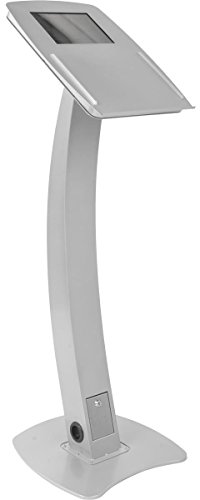


Displays2go iPad Lectern Stand for Floor, Hinged Enclosure Fits iPad Generations 2-4 and Air, Aluminum & Steel (Silver Steel)
| SELLER | SELLER SCORE | AMAZON FULFILLED | PRIME | FREE SHIPPING |
|---|---|---|---|---|
| Displays2Go | 9.67 | No | No | No |
The Displays2go iPad Lectern Stand for Floor offers unparalleled security through its heavy-duty locking enclosure. I found the build quality to be impressively sturdy, utilizing a professional blend of aluminum and steel that feels built to last in high-traffic environments. The versatility here is a huge plus. You can mount the enclosure in either portrait or landscape orientation depending on your presentation needs. I particularly liked the inclusion of three integrated ledges on the face of the enclosure, which provide a perfect spot for speakers to rest their notes without obscuring the screen. Plus, the in-post cable management keeps everything looking clean and professional by preventing messy tangles from distracting your audience.


Displays2go iPad/Tablet Floor Stand with Locking Enclosure, Adjustable for Countertop Use – Black (IPEVRFLBK2)
| SELLER | SELLER SCORE | AMAZON FULFILLED | PRIME | FREE SHIPPING |
|---|---|---|---|---|
| Displays2Go | 9.67 | No | No | No |
After weeks of use in a high-traffic retail environment, this Displays2go stand has proven to be an absolute workhorse for device security. The build quality is impressive, utilizing a mix of steel and aluminum that feels substantial without looking bulky or industrial. What really sets this unit apart is its versatility. You can easily transition it from a tall floor-standing model to a compact countertop version depending on your layout needs. I was particularly pleased with the integrated cable management, which keeps charging cords tucked away and prevents a messy look. The locking enclosure provides genuine peace of mind, especially with the included foam padding ensuring the tablet stays snug and scratch-free during daily operation.


Displays2go iPad Floor Stand, Height Adjustable, Locking Hinged Mount, Hidden Home Button, POS Kiosk w/Card Reader (Black Steel/Aluminum)
| SELLER | SELLER SCORE | AMAZON FULFILLED | PRIME | FREE SHIPPING |
|---|---|---|---|---|
| Displays2Go | 9.67 | No | No | No |
Retailers and event coordinators facing high-traffic environments need this rugged kiosk to transform a standard tablet into a secure, professional point-of-sale terminal. I found the locking enclosure particularly impressive because it doesn't just protect the hardware from theft. It also keeps guests focused by hiding the Home button, preventing accidental exits from your presentation or menu. The build quality of the black steel and aluminum construction feels substantial enough for public use, while the rotating bracket is a total game-changer for switching between portrait and landscape modes on the fly. Whether you are running a check-out station or a digital signage display, this stand bridges the gap between a consumer device and a dedicated business tool.


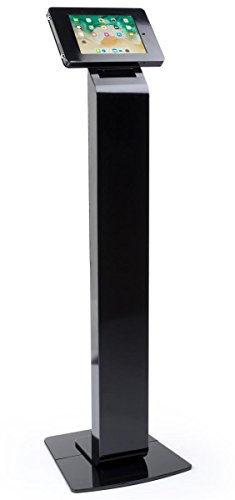


Displays2go iPad Pro 10.5 Inch Kiosks with Secure Frame and Hidden Power Strip – Black (IPRO105STBK)
| SELLER | SELLER SCORE | AMAZON FULFILLED | PRIME | FREE SHIPPING |
|---|---|---|---|---|
| Displays2Go | 9.67 | No | No | No |
Managing a public-facing tablet often turns into a nightmare of tangled charging cables and theft concerns. The Displays2go iPad Pro Kiosk solves this by wrapping your device in a heavy-duty steel and aluminum enclosure that looks incredibly sleek with its glossy black finish. I was particularly impressed by how it handles the messy reality of power management. The integrated power strip keeps everything tucked away so you aren't staring at a rat's nest of wires. It also cleverly hides the home button to prevent unauthorized access, and the ability to switch between vertical and horizontal orientations makes it versatile for different app layouts. It is a professional-grade solution for anyone needing a permanent, secure digital station.


Samsung Galaxy 10.1" and iPad 2-4 and Air Stand, Adjusts for Floor or Countertop Use, Includes Tablet Enclosure - White Steel/Aluminum
| SELLER | SELLER SCORE | AMAZON FULFILLED | PRIME | FREE SHIPPING |
|---|---|---|---|---|
| Displays2Go | 9.67 | No | No | No |
Most people assume a kiosk stand is a single-use piece of furniture, but this Displays2go setup completely defies that limitation by switching seamlessly between a floor model and a countertop fixture. I found the transition between these two modes incredibly practical for businesses that need to move a digital interface from a lobby to a service desk without buying new hardware. The white steel and aluminum construction feels sturdy enough to handle high-traffic environments, while the included enclosure keeps your device locked down tight. Whether you are running a portrait-mode menu or a landscape-oriented information hub, the ability to adjust the orientation makes it a versatile workhorse for any space. It is a clever, hybrid solution for anyone needing professional tablet mounting.


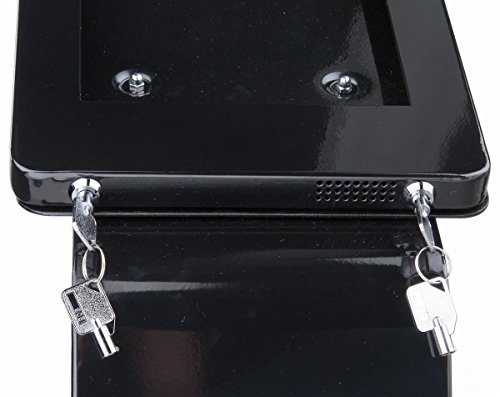

Displays2go 53" h Tablet Floor Stand with Locking Enclosure for iPad Mini, Includes Power Strip and in-Post Cable Management, Steel (Black)
| SELLER | SELLER SCORE | AMAZON FULFILLED | PRIME | FREE SHIPPING |
|---|---|---|---|---|
| Displays2Go | 9.67 | No | No | No |
A busy retail lobby or a high-traffic museum exhibit demands hardware that stays secure without looking like a mess of tangled wires. This Displays2go floor stand solves that problem by turning an iPad Mini into a professional, permanent kiosk. The steel construction feels incredibly sturdy, but the real magic is in the cable management. The integrated power strip and in-post routing hide every single cord, keeping your presentation space looking sleek and intentional. I love that the locking enclosure provides peace of mind in public spaces, and the ability to switch between portrait and landscape orientation makes it versatile for different app layouts. It is a polished, heavy-duty solution for anyone needing a reliable touch-screen interface that won't be easily tampered with.

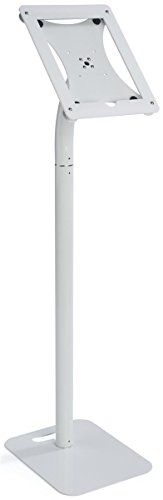


Displays2go Floor Standing Tablet Header, Steel, Aluminum, ABS Plastic – White (IPPROEVRF)
| SELLER | SELLER SCORE | AMAZON FULFILLED | PRIME | FREE SHIPPING |
|---|---|---|---|---|
| Displays2Go | 9.67 | No | No | No |
The cool, smooth touch of the white steel and aluminum frame immediately signals that this isn't some flimsy plastic stand. Standing at 49 inches tall, this Displays2go kiosk creates a professional, commanding presence in any retail environment, whether you're setting it up in a boutique or a busy mall. I found the versatility particularly impressive. You can easily flip the frame between portrait and landscape orientations to suit your specific software needs. It is built to secure iPad Pro 12.9-inch devices, but the adjustability allows it to accommodate smaller tablets too. Most importantly, the integrated kiosk locks provide that essential peace of mind by keeping both your hardware and your digital content safe from tampering in high-traffic areas.


Displays2go, Secure iPad Tabletop Tablet Kiosk Steel, Aluminum & Plastic Construction – Black (IPEVRCTBK2)
| SELLER | SELLER SCORE | AMAZON FULFILLED | PRIME | FREE SHIPPING |
|---|---|---|---|---|
| Displays2Go | 9.67 | No | No | No |
Can you actually trust a tablet to sit unattended on a busy retail counter? This Displays2go tabletop kiosk is designed specifically to answer that question with a heavy-duty blend of steel, aluminum, and plastic. I found the construction feels incredibly sturdy, which is vital for high-traffic environments where hardware is constantly at risk. It is purpose-built for the iPad Pro 9.7, and the inclusion of protective foam inserts and padding ensures the device stays snug and scratch-free within the enclosure. The anti-theft lock and integrated security slot provide that essential layer of peace of mind for business owners. It is a straightforward, rugged solution for anyone needing to turn a mobile device into a permanent, secure point-of-sale or information station.


Displays2go, Floor Standing iPad Kiosk, Compatible with iPad and iPad Air, Square Card Reader Compatible, Locking Design, Aluminum Construction - Blac...
| SELLER | SELLER SCORE | AMAZON FULFILLED | PRIME | FREE SHIPPING |
|---|---|---|---|---|
| Displays2Go | 9.67 | No | No | No |
Most businesses settle for flimsy tablet mounts that wobble under pressure, but this Displays2go floor stand provides the heavy-duty stability required for high-traffic environments. Built from commercial-grade aluminum, the 22-pound base ensures the unit stays planted even during constant interaction. I found the design particularly thoughtful because it leaves the home button exposed, allowing users to navigate effortlessly without compromising security. You can easily tilt and rotate the enclosure to switch between portrait and landscape modes, making it versatile for everything from digital signage to check-in stations. It even accommodates square card readers, which is a huge plus for retail setups. It is a professional, secure way to turn a standard iPad into a dedicated interactive tool.

The first step in your selection process is defining the environment. Are you looking for a desktop stand for a personal workstation, or a heavy-duty floor stand for a retail lobby? If the tablet is intended for customer interaction—such as a check-in kiosk or a digital menu—you need a stand that prioritizes security and stability. In these scenarios, look for stands with locking mechanisms that prevent the device from being easily snatched or tilted. For individual productivity, where you might be using the tablet as a secondary screen for video calls or reference material, focus on ergonomic adjustability to prevent neck strain.
The weight of your tablet plays a massive role in the longevity of the stand. A lightweight stand might suffice for an iPad Mini, but a larger, high-performance tablet requires a base with significant heft. Metal construction, particularly aluminum or steel, is preferred for professional settings because it resists wobbling during touch interactions. When a user taps a screen, the energy is transferred to the stand. If the base is too light or the center of gravity is too high, the device will shake, creating a frustrating user experience. For floor-standing models, ensure the base has a wide footprint or a weighted plate to prevent tipping.
Not all tablet stands hold devices the same way. You will generally encounter three main styles:
A stand that only offers one viewing angle is rarely a good long-term investment. For workstations, look for 360-degree rotation and tilt capabilities. This allows users to switch from portrait mode (ideal for reading documents or lists) to landscape mode (ideal for video playback or spreadsheets) instantly. If the stand is intended for a standing desk or a kiosk, height adjustability becomes a primary factor. The ability to move the screen into the direct line of sight of a seated or standing user is the difference between a functional tool and an ergonomic hazard.
If your tablet is going into a public-facing area, security is non-negotiable. Look for stands that offer integrated cable management to hide charging wires, preventing tampering or accidental unplugging. Additionally, consider stands that feature physical locks or specialized screws that require tools to remove. This ensures that the device remains a permanent fixture of your display setup rather than a mobile liability.
Quick answers about Displays2Go Tablet Stands before you buy.
Share of top-ranked products by brand, from our rankings.
We compared Displays2Go Tablet Stands products using product details and customer ratings to identify the best options in the computers & accessories..
From that comparison we shortlisted the top 9 Displays2Go Tablet Stands for this page..
We aim to help you find the right stands products for your needs and save you time when choosing which Displays2Go Tablet Stands to buy.
Compare the top 9 picks at a glance — select a column to sort.


