PickSmartly Buying Guide

Best Sypen Tablet Styluses in 2026

9.2 PM Score
Products Compared
1
Brands Ranked
1
Our guides are compiled from product information and customer ratings. If you click on links we provide, we may receive compensation.

Navigating the world of digital input tools can be daunting, especially when you are looking for a precision instrument that bridges the gap between physical handwriting and digital canvas. A high-quality stylus is more than just a plastic stick. It is an extension of your hand. Whether you are a digital illustrator requiring micro-millimeter accuracy, a student taking rapid-fire lecture notes, or a professional architect sketching blueprints, the right stylus determines whether your workflow feels fluid or frustrating. This guide is designed to help you cut through the technical jargon and identify the specific features that will elevate your tablet experience from simple tapping to professional-grade creation.

#1

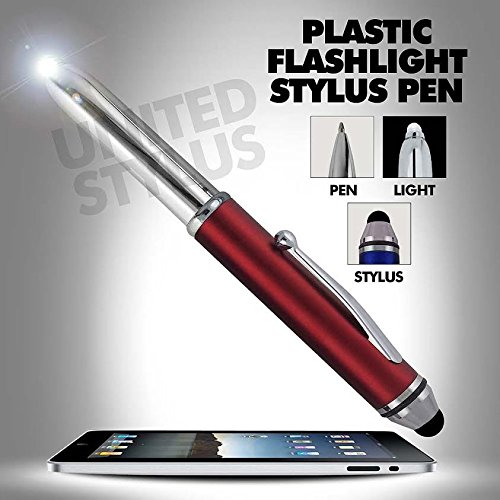
SyPen Stylus Pen for Touchscreen Devices, Tablets, iPads, iPhones, Multi-Function Capacitive Pen with LED Flashlight, Ballpoint Ink Pen, 3-in-1 Pen, M...

SyPen 3-in-1 Multi-Function Stylus and Ballpoint Pen

SYPEN SY-94-MULTI10 6.00 X 6.00 X 0.60 Inches 0.40 Pounds

PM Score for SYPEN (PM Score)

9.2 PM Score
Buy on Amazon
  • 3-IN-1 COMBINATION: SyPen offers our amazing stylus pen, which operates on smart devices, works as an LED flashlight, and also can be used as a standard ballpoint pen!
  • SHED SOME LIGHT: Always be prepared with our uniquely designed stylus pen, which includes an LED flashlight feature! Be ready at night and in dim situations! Simply push the flashlight tip to turn the small white LED light on and off.
  • DURABLE and ULTRA SENSITIVE RUBBER TIP: SyPen designs products that are made to be used again and again! Our stylus pens are made of a special plastic material which is stronger than most. The chrome lower barrel and shiny accents give the pen a sophisticated appearance.The Premium Soft rubber tipped end with sensitive touching helps reduce scratches and fingerprints on any touch device, works exactly like you finger.
  • MANY VARIATIONS: This special pen is available in the colors of Red, Silver, Black, Green, and Blue. You can also choose from a pack of 1 piece, 5 pieces, and 10 pieces.
  • COMPATIBILITY AND PORTABLE: 100% Compatible with all Capactive touch screen devices (Apple iPad 1 and 2, iPhone, iPod, Motorola Xoom Tablet, Galaxy, and Blackberry Playbook Virtuoso Touch) and small size clip which can easily be placed in your pocket, purse, or wherever you like! Keep it handy and never be without one!
SELLER SELLER SCORE AMAZON FULFILLED PRIME FREE SHIPPING
SyPen Inc. 9.86 Yes Yes Yes

After weeks of use, I have realized that the SyPen is the ultimate tool for anyone who constantly juggles a tablet and a notebook. It is rare to find a device that actually delivers on a triple-threat promise, but this stylus handles capacitive touchscreens with the same precision as a finger while doubling as a reliable ballpoint pen. The premium soft rubber tip is impressively sensitive, preventing those annoying fingerprints and scratches on my iPad. I was also pleasantly surprised by the integrated LED flashlight. Simply pushing the tip provides a quick burst of light that is perfect for dim environments. With its sophisticated chrome accents and portable clip, it feels much more high-end than a standard utility pen.

What We Like
Sensitive rubber tip
Integrated LED flashlight
Smooth ballpoint ink
Durable plastic construction
Portable pocket clip
Buying Guide

A Guide to Selecting the Best sypen tablet styluses

A Guide to Selecting the Best sypen tablet styluses

Understanding Pressure Sensitivity and Tilt Support

The most critical factor for any creative professional is pressure sensitivity. This feature dictates how the tablet responds to the amount of force you apply to the tip. High-end styluses offer multiple levels of pressure detection, allowing you to create thicker lines by pressing harder or delicate, wispy strokes with a light touch. Without this, your digital art will look flat and mechanical. Furthermore, look for tilt support. Tilt sensitivity allows the stylus to behave like a real graphite pencil or a charcoal stick. As you angle the pen, the software recognizes the shift in orientation, changing the shape and shading of the stroke. For artists, this is non-negotiable.

Palm Rejection and Connection Technology

Nothing ruins a digital sketching session faster than your hand accidentally triggering the screen while you write. When selecting a stylus, ensure it features robust palm rejection technology. This allows you to rest your hand comfortably on the tablet surface without interfering with your strokes. You must also distinguish between capacitive styluses and active styluses. Capacitive styluses are universal but lack precision and pressure sensitivity, acting essentially like a replacement for your finger. Active styluses, however, communicate directly with the tablet's digitizer, providing the high-fidelity response needed for fine detail work. Always verify that the specific active technology is compatible with your tablet's hardware before purchasing.

Tip Material and Friction Levels

The 'feel' of a stylus is heavily influenced by the nib or tip material. Some users prefer a hard plastic tip that glides effortlessly across a glass screen, which is ideal for rapid note-taking. Others find this too slippery and prefer nibs with a rubberized or felt-like texture that provides 'drag' or resistance. This resistance mimics the sensation of pen on paper, offering much better control for intricate line work. Keep in mind that nibs are consumable parts. If you plan on heavy use, check if the manufacturer offers replaceable tips to extend the lifespan of your device.

Ergonomics and Battery Life

If you plan to use your stylus for several hours at a time, ergonomics are paramount. A stylus that is too thin or lacks a balanced weight distribution will lead to hand fatigue and cramping. Look for an ergonomic grip—ideally one that mimics the diameter of a standard writing instrument. Additionally, consider the charging method. Some styluses use magnetic attachment for wireless charging, which is incredibly convenient, while others require a USB-C connection. For long study sessions or professional projects, prioritize models with long battery life or fast-charging capabilities to ensure you aren't interrupted mid-stroke.

Summary of Recommendation Logic

To make your final decision, categorize your primary use case. If you are a student, prioritize palm rejection and battery life for long study sessions. If you are an artist, prioritize pressure sensitivity, tilt support, and nib texture. If you are a casual user, a simple capacitive stylus may suffice, but an active stylus will always provide a more premium, responsive experience.

Ready to choose?

Jump back to our ranked picks or compare the shortlist side by side.

Frequently Asked Questions

Quick answers about Sypen Tablet Styluses before you buy.

Capacitive styluses mimic a human finger and work on any touchscreen, whereas active styluses contain internal electronics to provide pressure sensitivity and precision for drawing and note-taking.

Active styluses require charging via USB-C or wireless induction, while passive capacitive styluses never require power.

No. Stylus compatibility depends on the tablet's digitizer technology. For example, certain brands require proprietary active pens to enable features like palm rejection.

Palm rejection is a feature that allows you to rest your hand on the screen while writing without creating accidental marks, which is essential for a natural drawing experience.

Yes. Pressure sensitivity allows you to vary line thickness and opacity based on how hard you press, mimicking the behavior of real graphite or ink pens.

Yes, capacitive styluses are excellent for gaming, though active styluses are generally overkill for gameplay and better suited for creative tasks.

Active styluses with high polling rates minimize latency, providing a near-instant response that feels much more natural than cheaper alternatives.

Fine tip styluses offer high precision for writing, while disc-tip styluses provide a physical buffer that helps you see exactly where the cursor is placed on the screen.
Rankings & Insights

Our Sypen Tablet Styluses Rankings

1 Products Compared
9.2 Avg PM Score
1 Brands Ranked

Top 10 Sypen Tablet Styluses Brands on Amazon

Share of top-ranked products by brand, from our rankings.

  1. 01 Sypen 1 (100%)

How We Selected These Products

We compared Sypen Tablet Styluses products using product details and customer ratings to identify the best options in the categories..

From that comparison we shortlisted the top 1 Sypen Tablet Styluses for this page..

We aim to help you find the right styluses products for your needs and save you time when choosing which Sypen Tablet Styluses to buy.

Side by Side

Comparison Table

Compare the top 1 picks at a glance — select a column to sort.