Best Windows 10 Professional Tablets in 2026
- Products Compared
- 7
- Brands Ranked
- 1
Our Top Picks for Windows 10 Professional Tablets
The three top picks on this page — ranked by PM Score, our 0–10 measure built from the customer star rating and review volume.
Quick Filter
Showing 7 of 7XENCELABS Drawing Tablet Medium, Computer Graphic Tablets with 40 Customizable Quick Keys, 12" Ultrathin Pen Tablet with 2 Battery-Free Stylus, 8192 L...
Xencelabs Medium Pen Tablet Bundle in Nebula White
- A New Colorway for a Lighter Aesthetic: Xencelabs Pen Tablet Medium Bundle SE comes in Nebula White to appeal to creatives with a lighter workspace aesthetic. The exquisite appearance of the Pen Tablet aims to provide you with a much better creating experience. Now artists have a choice of what color graphics tablet they integrate into their personal workflow.
- Special Surface Design: This texture gives our included pens a surface that feels reminiscent of a pen to paper. The touch surface of our drawing tablet is made of special materials to offer an ultra-fine frosted textured surface with non-slip and wear-resistant. Exquisite craftsmanship and 6.5° gentle slope for wrist protection to draw easily and unleash your inspiration.
- Customizable Quick Keys: Working in unison with the Drawing tablet. The shortcut keys give you 5 sets of 8 keys – a total of 40 programmable functions per application. An OLED display to show you each key assignment at a glance and 30 hours of sustainable working when fully charged can make any workflow much more easier.
- Two Advanced Digital Pens with Pen Case: 8192 levels of pressure sensitivity, 5080LPI pen resolution and virtually no lag to provide the most ultimate precision and control performance and realistic pen-to-paper feel. The digital pen features two different diameters and number of buttons to adapt to different drawing methods and effects.
- Multiple Compatibility: Our driver is compatible with Linux, Windows, and Mac OS and software programs such as but not limited to: Adobe Suite, Adobe Substance Painter, Corel, Autodesk (Maya, Max & Fusion 360), Pixelogic, Toon Boom, Foundry (Nuke, Modo). You can quickly access the settings at the top of the graphic tablet.
| SELLER | SELLER SCORE | AMAZON FULFILLED | PRIME | FREE SHIPPING |
|---|---|---|---|---|
| XENCELABS OFFICIAL US | 7.35 | Yes | Yes | Yes |
After weeks of use, the Xencelabs Medium Pen Tablet has completely redefined how I approach my digital workspace. The Nebula White finish is a breath of fresh air, offering a much cleaner, lighter aesthetic than the standard black tablets I’ve used in the past. What really sets this bundle apart is the tactile experience. The frosted, non-slip surface combined with a gentle 6.5° slope makes drawing feel incredibly natural, almost like pen on paper. Having two different pen diameters included is a game-changer for varying grip styles, and the 40 customizable quick keys with their integrated OLED displays allow me to fly through complex software like Adobe or Autodesk without breaking my creative flow. It is a professional-grade tool that prioritizes both ergonomics and high-level precision.
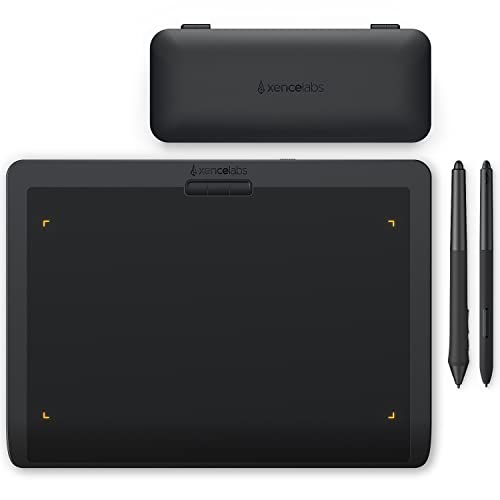
XENCELABS, Graphic Tablet Medium, Wireless Drawing Tablet with 2 Battery-Free Digital Pen, Tilt Support Stylus with 8192 Levels Pen Pressure Sensitivi...
Xencelabs Medium Wireless Graphic Drawing Tablet
- Professional drawing tablet: This tablet was co-designed with the input of industry leading creatives. The active area (10.33”x5.8”) has a true 16:9 aspect ratio to match industry standard displays. Ultra-fine frosted texture surface which is wear-resistant and non-slip. Provide a pen-to-paper feeling during creation.
- Battery-free digital pens: The Pen Tablet ships with two pens of different diameters and number of buttons. Both pens come with 8192 levels of pressure sensitivity, you can make and control the lightest strokes.Tilt recognition and virtually no lag.
- Easy to set driver: Our driver is a modern design built from the ground up to be easy and intuitive to use. You can quickly access the settings from the buttons at the top of the pen tablet.
- Wireless drawing tablet: At only 8mm, it is thinner than many other tablets. Part of the minimalist design features three nested buttons centrally located the top of the tablet for easy access and less clutter.
- Ergonomic design: Ergonomic features like a gently curved palm rest and a slim profile keep you more comfortable for hours of creativity. All of the elements come together in a minimalist form that promotes maximum creativity through efficiency, quality, and thoughtful design.
| SELLER | SELLER SCORE | AMAZON FULFILLED | PRIME | FREE SHIPPING |
|---|---|---|---|---|
| XENCELABS OFFICIAL US | 7.02 | Yes | Yes | Yes |
Most digital artists eventually hit a wall with clunky, uninspired hardware, but the Xencelabs Medium Wireless Graphic Tablet feels like it was built specifically to break that ceiling. Co-designed with industry professionals, this tablet ditches the standard awkward proportions for a true 16:9 aspect ratio that actually matches your monitor. I was particularly impressed by the ultra-fine frosted texture. It provides a genuine pen-to-paper tactile response that isn't slippery or distracting. The inclusion of two distinct battery-free pens—each offering 8192 levels of pressure sensitivity and tilt support—is a massive win for versatility. Between the slim 8mm profile and the ergonomic curved palm rest, it’s clear that Xencelabs prioritized long-term comfort and a minimalist, clutter-free workflow for serious creators.
XENCELABS, Graphic Tablet Small, Wireless Drawing Tablet with 2 Battery-Free Digital Pens and Quick Keys
Xencelabs Wireless Professional Graphic Drawing Tablet
- 【Professional Drawing tablet】Xencelabs professional drawing tablet was co-designed with the input of industry leading creatives. The active area (6.93 X 3.89 inches) has true 16:9 aspect ratio to match industry standard displays. Drawing tablets are widely used in various industries including: Education, Graphic Design, Game Design & Simulation, 2D Animation, 3D Animation, Industrial Design and more.
- 【Pen Tablet System Requirements】Windows7 or later, Mac OS X 10.12 or later, Linux , wireless or cable connection requires USB Type-A port (includes Type-C adapter), internet access to download driver.
- 【Two Advanced Digital Pens with Pen Case and Accessories】Draw thicker or thinner lines depending on how hard you push the pen to the tablet. Digital pens features two different diameters and numbers of buttons, 8192 levels of pressure sensitivity, 5080LPI pen resolution and virtually no lag, providing you ultimate precision and control to make lines smoother and more natural, allowing you to capture ideas faster and easier.
- 【Easy installation】XENCELABS Pen Tablet is a perfect combination of input device and driver which work together to create an intuitive and natural drawing experience. Convenient and easy to use, effortlessly syncing to your Operating System. Drawing tablet supports: GIMP, Krita, Inkscape, Adobe Photoshop, Illustrator, ArtRage, Sketchbook, Substance Painter, and more.
- 【Portable & Compact】At only 8mm, Xencelabs drawing tablet is thinner than many other tablets. The minimalist design features three nested buttons centrally located at the top of the tablet for easy access and less clutter. Elegent, well appointed Pen and Accessory case. Everything where you need it. Only needs 2.5 hours for charging, enough for 16 hours of full-time drawing.
| SELLER | SELLER SCORE | AMAZON FULFILLED | PRIME | FREE SHIPPING |
|---|---|---|---|---|
| XENCELABS OFFICIAL US | 7.20 | Yes | Yes | No |
Serious digital artists demanding surgical precision will find this Xencelabs tablet to be an absolute game-changer for their workflow. Co-designed with industry veterans, the 16:9 aspect ratio ensures your canvas perfectly matches your monitor, eliminating awkward scaling issues. What truly sets this kit apart is the inclusion of two distinct battery-free pens, allowing you to switch between different diameters and button configurations for specialized tasks like 3D modeling or 2D animation. The 8192 levels of pressure sensitivity and 5080LPI resolution deliver a lag-free, natural stroke that feels remarkably intuitive. It is incredibly slim at just 8mm, making it a portable powerhouse that fits easily into a studio bag, while the 16-hour battery life keeps you sketching through long sessions without hunting for a cable.
XENCELABS, Graphic Tablet Small, Wireless Drawing Tablet with 2 Battery-Free Digital Pens, Quick Keys and Drawing Glove M
Xencelabs Professional Wireless Graphic Drawing Tablet
- 【Professional Drawing tablet】Xencelabs professional drawing tablet was co-designed with the input of industry leading creatives. The active area (6.93 X 3.89 inches) has true 16:9 aspect ratio to match industry standard displays. Drawing tablets are widely used in various industries including: Education, Graphic Design, Game Design & Simulation, 2D Animation, 3D Animation, Industrial Design and more.
- 【Pen Tablet System Requirements】Windows7 or later, Mac OS X 10.12 or later, Linux , wireless or cable connection requires USB Type-A port (includes Type-C adapter), internet access to download driver.
- 【Two Advanced Digital Pens with Pen Case and Accessories】Draw thicker or thinner lines depending on how hard you push the pen to the tablet. Digital pens features two different diameters and numbers of buttons, 8192 levels of pressure sensitivity, 5080LPI pen resolution and virtually no lag, providing you ultimate precision and control to make lines smoother and more natural, allowing you to capture ideas faster and easier.
- 【Easy installation】XENCELABS Pen Tablet is a perfect combination of input device and driver which work together to create an intuitive and natural drawing experience. Convenient and easy to use, effortlessly syncing to your Operating System. Drawing tablet supports: GIMP, Krita, Inkscape, Adobe Photoshop, Illustrator, ArtRage, Sketchbook, Substance Painter, and more.
- 【Portable & Compact】At only 8mm, Xencelabs drawing tablet is thinner than many other tablets. The minimalist design features three nested buttons centrally located at the top of the tablet for easy access and less clutter. Elegent, well appointed Pen and Accessory case. Everything where you need it. Only needs 2.5 hours for charging, enough for 16 hours of full-time drawing.
| SELLER | SELLER SCORE | AMAZON FULFILLED | PRIME | FREE SHIPPING |
|---|---|---|---|---|
| XENCELABS OFFICIAL US | 7.20 | Yes | Yes | No |
The Xencelabs Graphic Tablet Small redefines professional precision by including two distinct battery-free digital pens in a single package. Co-designed with industry creatives, this ultra-slim 8mm device features a 16:9 aspect ratio that perfectly mirrors standard workstation displays. I was particularly impressed by the responsiveness. With 8192 levels of pressure sensitivity and 5080LPI resolution, the lag is virtually non-existent. Whether you are working in Photoshop, Krita, or Substance Painter, the experience feels incredibly natural. The inclusion of Quick Keys and a dedicated accessory case makes it a complete ecosystem rather than just a peripheral. Plus, a quick 2.5-hour charge provides a massive 16 hours of wireless freedom, making it a portable powerhouse for designers on the move.
XENCELABS, Graphic Tablet Medium, Wireless Drawing Tablet with 2 Battery-Free Digital Pens, Quick Keys and 20 Pack Replacement Nibs
Xencelabs Medium Wireless Graphic Design Tablet
- Professional digital design tablet: This tablet was co-designed with the input of industry leading creatives. The active area (10.33”x5.8”) has true 16:9 aspect ratio to match industry standard displays.
- Battery-free digital pens: The Pen Tablet ships with two pens of different diameters and number of buttons. Both pens come with 8192 levels of pressure sensitivity, tilt recognition and virtually no lag.
- Modern driver design: Our driver is a modern design built from the ground up to be easy and intuitive to use. You can quickly access the settings from the buttons at the top of the pen tablet.
- Wireless Drawing Tablet: At only 8mm, it is thinner than many other tablets. Part of the minimalist design features three nested buttons centrally located the top of the tablet for easy access and less clutter.
- Eco-Friendly packaging: With package design, we use environmentally friendly boxes with inserts to keep the tablet and accessories separated and well-presented.
| SELLER | SELLER SCORE | AMAZON FULFILLED | PRIME | FREE SHIPPING |
|---|---|---|---|---|
| XENCELABS OFFICIAL US | 7.20 | Yes | Yes | No |
Most professional tools feel like they were designed by engineers, but the Xencelabs Medium Graphic Tablet feels like it was actually built by artists. By collaborating directly with industry creatives, they’ve nailed a 16:9 aspect ratio that perfectly mirrors modern displays, preventing that awkward stretching feeling common in cheaper models. The ultra-slim 8mm profile keeps your desk looking clean, especially with the minimalist nested buttons that replace cluttered controls. I was particularly impressed by the inclusion of two distinct battery-free pens. Having different diameters and button configurations allows you to tailor your grip to the specific task at hand. Between the 8192 levels of pressure sensitivity and the intuitive, modern driver, this setup removes the technical friction that usually gets in the way of a good flow.
XENCELABS, Graphic Tablet Medium, Wireless Drawing Tablet with 2 Battery-Free Digital Pens, Quick Keys and 10 Pack Replacement Nibs
Xencelabs Medium Wireless Professional Graphic Tablet
- Professional digital design tablet: This tablet was co-designed with the input of industry leading creatives. The active area (10.33”x5.8”) has true 16:9 aspect ratio to match industry standard displays.
- Battery-free digital pens: The Pen Tablet ships with two pens of different diameters and number of buttons. Both pens come with 8192 levels of pressure sensitivity, tilt recognition and virtually no lag.
- Modern driver design: Our driver is a modern design built from the ground up to be easy and intuitive to use. You can quickly access the settings from the buttons at the top of the pen tablet.
- Wireless Drawing Tablet: At only 8mm, it is thinner than many other tablets. Part of the minimalist design features three nested buttons centrally located the top of the tablet for easy access and less clutter.
- Eco-Friendly packaging: With package design, we use environmentally friendly boxes with inserts to keep the tablet and accessories separated and well-presented.
| SELLER | SELLER SCORE | AMAZON FULFILLED | PRIME | FREE SHIPPING |
|---|---|---|---|---|
| XENCELABS OFFICIAL US | 7.20 | Yes | Yes | No |
Most digital artists eventually hit a wall with generic peripherals, but the Xencelabs Medium Wireless Tablet is engineered specifically to break through that ceiling. Co-designed alongside industry professionals, this tablet features a 16:9 aspect ratio that perfectly mirrors your monitor for a seamless workflow. I was particularly impressed by the dual battery-free pens. Having two different diameters and button configurations allows you to switch tactile feels instantly without losing that 8192-level pressure sensitivity. At just 8mm thin, the minimalist chassis keeps your desk clean, while the intuitive, rebuilt driver makes adjusting settings a breeze via the top-mounted buttons. It is a thoughtful, professional-grade tool that prioritizes the actual ergonomics of digital creation.
XENCELABS, Graphic Tablet Medium, Wireless Drawing Tablet with 2 Battery-Free Digital Pens, Quick Keys and Drawing Glove M
Xencelabs Medium Wireless Graphic Drawing Tablet
- Professional digital design tablet: This tablet was co-designed with the input of industry leading creatives. The active area (10.33”x5.8”) has true 16:9 aspect ratio to match industry standard displays.
- Battery-free digital pens: The Pen Tablet ships with two pens of different diameters and number of buttons. Both pens come with 8192 levels of pressure sensitivity, tilt recognition and virtually no lag.
- Driver design: You can quickly access the settings from the buttons at the top of the pen tablet.
- At only 8mm, it is thinner than many other tablets. Part of the minimalist design features three nested buttons centrally located the top of the tablet for easy access and less clutter.
- Eco-Friendly packaging: With package design, we use environmentally friendly boxes with inserts to keep the tablet and accessories separated and well-presented.
| SELLER | SELLER SCORE | AMAZON FULFILLED | PRIME | FREE SHIPPING |
|---|---|---|---|---|
| XENCELABS OFFICIAL US | 7.20 | Yes | Yes | No |
Your digital canvas finally matches your monitor when you're deep in a high-stakes character design session. The Xencelabs Medium tablet eliminates that frustrating mismatch by offering a 10.33”x5.8” active area with a true 16:9 aspect ratio. I was particularly impressed by the dual battery-free pens. Having two different diameters and button configurations allows you to switch grips mid-stroke without losing momentum. The hardware feels incredibly sleek and professional, especially since it's only 8mm thin, yet it remains highly functional thanks to the centrally located nested buttons for driver settings. Even the unboxing experience feels premium and thoughtful, utilizing eco-friendly packaging that keeps your Quick Keys and drawing glove organized and ready for immediate creative work.
Frequently Asked Questions
Quick answers about Windows 10 Professional Tablets before you buy.
Our Windows 10 Professional Tablets Rankings
Top 10 Windows 10 Professional Tablets Brands on Amazon
Share of top-ranked products by brand, from our rankings.
How We Selected These Products
We compared Windows 10 Professional Tablets products using product details and customer ratings to identify the best options in the computers & accessories. The top brands in this selection include ruiqiai, samsung, cupeisi, sgin, sumtab, north bison, coopers, apple and qukenk and zzb.
From that comparison we shortlisted the top 7 Windows 10 Professional Tablets for this page. The sellers featured here include ruiqiai-us, amazon.com, jiekejie, sgin du store, sumtab(us), hore, ussavior, tongxingstore and pdi mobile and lonestar mobile.
We aim to help you find the right tablets products for your needs and save you time when choosing which Windows 10 Professional Tablets to buy.
Comparison Table
Compare the top 7 picks at a glance — select a column to sort.