#TOP1

Reviving a classic gaming setup requires more than just the console itself. It requires reliable, responsive input devices that can handle the unique motion-sensing demands of the hardware. When searching for techken-style Wii U motion controllers, you aren't just looking for a simple gamepad—you are looking for a bridge between your physical movements and the digital action on screen. Whether you are looking to replace a lost original or expand your local multiplayer capabilities, selecting a third-party motion controller requires a keen eye for build quality, sensor accuracy, and ergonomic longevity.
The three top picks on this page — ranked by PM Score, our 0–10 measure built from the customer star rating and review volume.

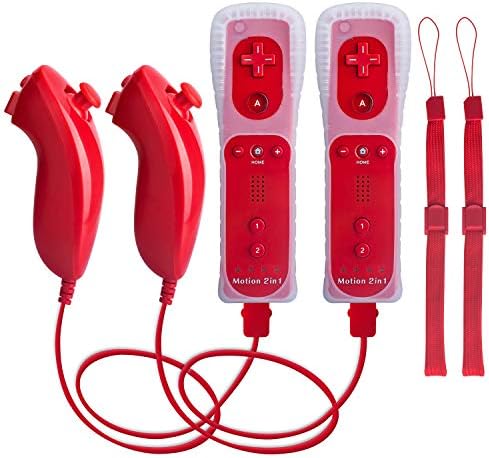
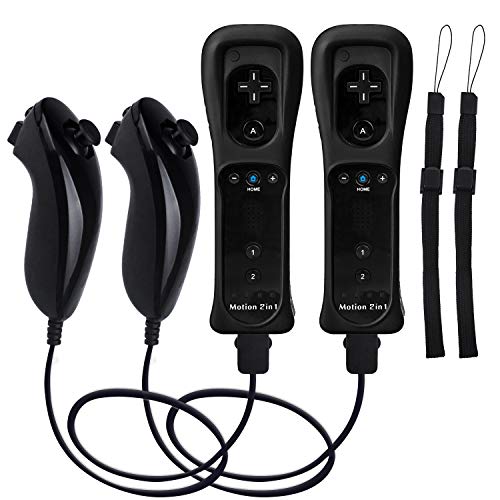
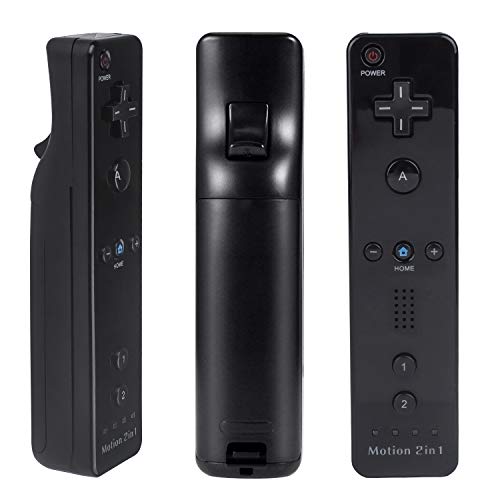
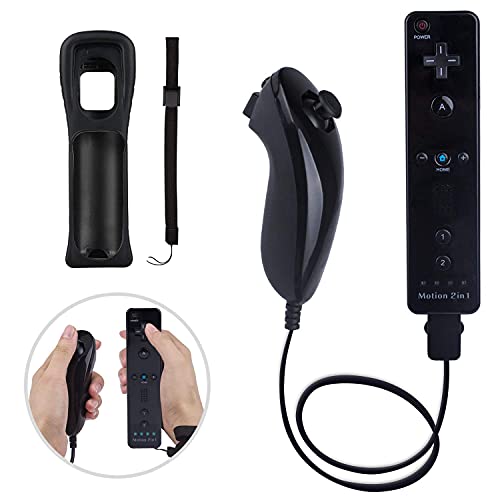


TechKen 2 Pack Remote Controller with Build in Motion Plus and 2 Nunchucks
| SELLER | SELLER SCORE | AMAZON FULFILLED | PRIME | FREE SHIPPING |
|---|---|---|---|---|
| TechKen | 9.76 | Yes | Yes | Yes |
The TechKen 2 Pack Remote Controller set delivers a surprisingly seamless experience for anyone looking to refresh their gaming setup without breaking the bank. While these are third-party controllers rather than official hardware, they mimic the original button placement and size perfectly, ensuring your muscle memory stays intact. During testing, the button clicks felt accurate and precise, which is vital for motion-heavy gameplay. The inclusion of built-in Motion Plus technology and rumble features adds that necessary layer of immersion, while the LED indicators make it easy to tell which player is active. Setting them up is a breeze too. You just hit the small sync button near the battery compartment and tap the red button on your console to get moving. It is a solid, functional kit for casual gaming sessions.

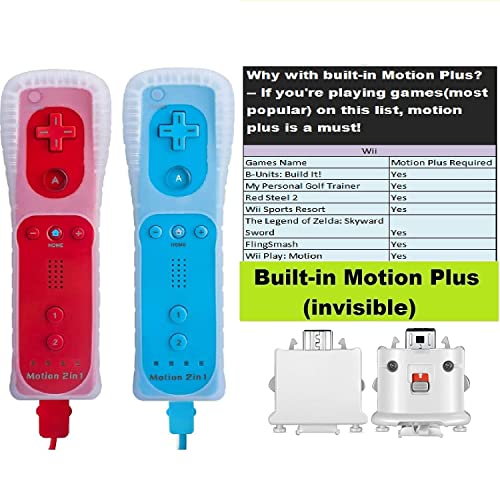


TechKen Wii Controller, Set of 2 Wii Remote with Nunchuck
| SELLER | SELLER SCORE | AMAZON FULFILLED | PRIME | FREE SHIPPING |
|---|---|---|---|---|
| TechKen | 9.77 | Yes | Yes | Yes |
The TechKen Wii Controller set delivers an immediate solution for anyone looking to jump back into classic motion gaming without breaking the bank. This two-pack includes both the remote and the Nunchuk, meaning you won't have to hunt down extra accessories to play your favorite titles. During testing, the buttons felt impressively precise with satisfying clicks, and the built-in motion sensors responded accurately during high-energy Wii Sports sessions. Syncing is a breeze. You simply hit the small button in the battery compartment and then the red button on your console to get connected. While these are third-party replacements, they function seamlessly across both original Wii and Wii U consoles, making them a reliable, cost-effective choice for family gaming nights.


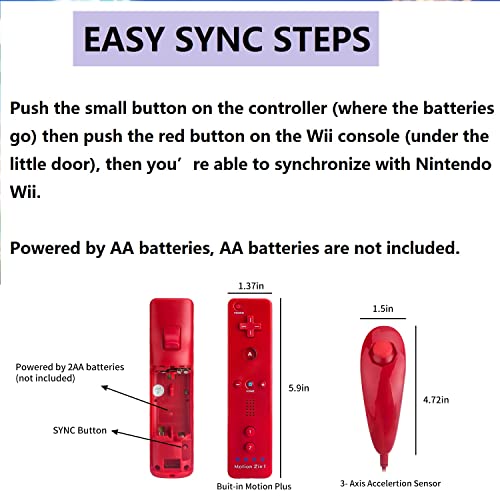
TechKen Wii Controller with Nunchuck and Motion Plus, 2 Sets of Red, Compatible with Nintendo Wii, Wii U
| SELLER | SELLER SCORE | AMAZON FULFILLED | PRIME | FREE SHIPPING |
|---|---|---|---|---|
| TechKen | 9.76 | Yes | Yes | Yes |
Budget-conscious families looking to revive their old Wii consoles should grab this TechKen two-pack immediately. Instead of hunting down individual accessories, you get a complete setup that includes the Nunchuk and built-in Motion Plus functionality right out of the box. During testing, the buttons felt surprisingly tactile and precise, providing that satisfying click necessary for fast-paced gaming. The motion sensors are responsive enough for intense sessions of Wii Sports, and the Nunchuk's thumbstick and triggers work seamlessly once plugged in. Syncing is a breeze too. You just hit the small button in the battery compartment and press the red sync button on your console. It is a high-performance, cost-effective way to ensure everyone has a controller in hand for multiplayer fun.


2 Pack Wii Remote with Wii Motion Plus Inside | Shock Wii Nunchuk Controller | Compatible Nintendo Wii, Wii U
| SELLER | SELLER SCORE | AMAZON FULFILLED | PRIME | FREE SHIPPING |
|---|---|---|---|---|
| TechKen | 9.76 | Yes | Yes | Yes |
TechKen delivers a practical, budget-friendly solution for retro gaming enthusiasts looking to expand their Wii or Wii U setups with this dual controller bundle. Integrating Motion Plus technology directly into the remote, this set eliminates the need for messy add-on attachments, though it is important to note these units won't slide into specific accessories like the Wii Zapper. Setting them up is a breeze. You simply sync via the small controller button and the console's red sync button. The included Nunchuk expands your movement range, making it a solid choice for motion-heavy titles. While you'll need to supply your own AA batteries, the tested button responsiveness and the 90-day TechKen warranty provide a level of confidence that is hard to find in third-party peripherals.


2 Pack Wii Remote with Wii Motion Plus Inside | Shock Wii Nunchuk Controller | Compatible Nintendo Wii, Wii U
| SELLER | SELLER SCORE | AMAZON FULFILLED | PRIME | FREE SHIPPING |
|---|---|---|---|---|
| TechKen | 9.76 | Yes | Yes | Yes |
Your living room floor becomes a high-stakes arena the moment you plug these into your console and start a motion-heavy gaming session. I tested this TechKen bundle to see if a third-party option could truly keep up with the intensity of Wii and Wii U titles, and the built-in Motion Plus functionality actually delivers on that promise. The controllers respond accurately to shaking motions, and the included Nunchuk works seamlessly with both the analog thumb stick and the triggers. Syncing is a breeze—just hit the small button on the remote and the red button on your console to get playing. Just keep in mind that these won't slide into your existing Wii Zapper accessories, but for pure gameplay performance, they are a reliable, budget-friendly way to expand your setup.


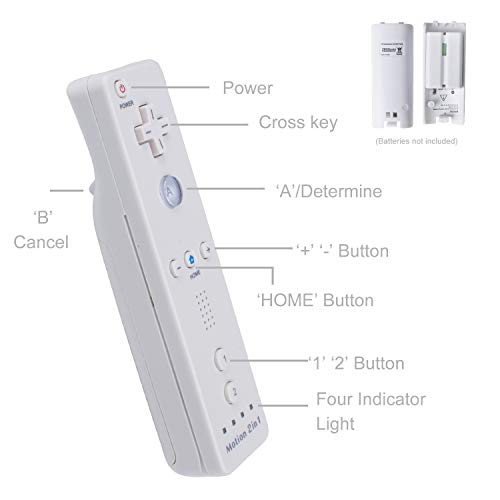


Wii Remote with Wii Motion Plus Inside | Shock Wii Nunchuk Controller | Compatible Nintendo Wii, Wii U
| SELLER | SELLER SCORE | AMAZON FULFILLED | PRIME | FREE SHIPPING |
|---|---|---|---|---|
| TechKen | 9.76 | Yes | Yes | Yes |
Budget-conscious gamers looking to revitalize their Wii or Wii U setups should grab this TechKen controller immediately. It serves as a highly sensitive alternative to the original hardware, offering a smooth experience that keeps your gameplay feeling authentic. The inclusion of Motion Plus is the real winner here, as it significantly enhances your control and sense of touch during more intense gaming sessions. Setting it up is a breeze. You just hit the sync button on the remote and the red button on your console to get playing. With a built-in speaker for instant audio feedback and a rumble feature to heighten immersion, this third-party option provides all the essential functionality without the premium price tag. Just remember to have your two AA batteries ready to go.


Wireless Controller Compatible for Wii, TechKen Built in Motion Plus Wii Controller Compatible for Wii, Wii U
| SELLER | SELLER SCORE | AMAZON FULFILLED | PRIME | FREE SHIPPING |
|---|---|---|---|---|
| TechKen | 9.77 | Yes | Yes | Yes |
The tactile rumble and instant audio feedback from the built-in speaker immediately pull you back into the action. This TechKen wireless controller serves as a highly sensitive alternative for anyone looking to refresh their Wii or Wii U setup without breaking the bank. It integrates Motion Plus functionality directly into the hardware, ensuring that the motion sensing feels just as smooth and responsive as the original equipment. Syncing is a breeze. You just hit the small button on the battery compartment and the red sync button on your console to get playing. The package is surprisingly comprehensive too, coming with a silicon case for extra grip and safety straps to prevent accidental drops during intense gaming sessions.

The defining characteristic of a motion controller is its ability to translate a flick of the wrist or a swing of the arm into precise in-game movement. When evaluating techken-compatible motion controllers, the quality of the internal accelerometers and gyroscopes is paramount. Lower-end alternatives often suffer from 'drift' or significant input lag, where the character on screen reacts a fraction of a second after you move. Look for reviews or specifications that emphasize responsive motion tracking. For rhythm games or sports simulations, even a millisecond of latency can ruin the experience. A high-quality controller should feel snappy and immediate, providing a seamless connection between your hand and the console.
Motion gaming often involves extended play sessions where you are physically active. This makes ergonomics a critical decision factor. A controller that is too bulky may cause hand fatigue during intense motion sequences, while one that is too small may feel flimsy. Pay close attention to the texture of the grips. A matte or rubberized finish is preferable to smooth plastic, as it prevents the controller from slipping out of your hands during vigorous movement. Furthermore, examine the button layout. The triggers and shoulder buttons should have a clear, tactile 'click' rather than a mushy sensation. Since many Wii U titles rely on rapid button presses in conjunction with motion, the durability of these mechanical components is essential for long-term use.
Because these controllers operate via wireless signals, the stability of the connection is a make-or-break feature. You want a controller that maintains a strong link even if there are other electronic devices in the room. Some third-party controllers struggle with interference, leading to sudden disconnections during critical gameplay moments. Check for mentions of stable pairing processes. A good motion controller should be easy to sync with the console and remain connected consistently without the need for constant re-pairing or manual resets.
Since motion controllers require constant power to run both the wireless radio and the motion sensors, battery life is a major consideration. Some models utilize rechargeable internal batteries, while others rely on replaceable cells. If you opt for a rechargeable version, investigate how long a single charge typically lasts. If you are a heavy gamer, a controller that requires daily charging may become a nuisance. Conversely, if you prefer the convenience of replaceable batteries, ensure the battery compartment is easily accessible and securely designed so it doesn't rattle during motion-heavy gameplay.
When making your final selection, use this hierarchy of needs: First, confirm the motion sensor responsiveness—if it can't track movement accurately, it isn't a true motion controller. Second, assess the build quality and grip. If it feels cheap in your hand, it will likely break under the stress of motion gaming. Finally, consider your playstyle. If you play primarily solo, focus on ergonomics and battery life. If you play heavily in multiplayer, prioritize sync stability and the ability to connect multiple controllers simultaneously without signal drop-off.
Quick answers about Techken Wii U Motion Controllers before you buy.
Share of top-ranked products by brand, from our rankings.
We compared Techken Wii U Motion Controllers products using product details and customer ratings to identify the best options in the legacy systems..
From that comparison we shortlisted the top 7 Techken Wii U Motion Controllers for this page..
We aim to help you find the right controllers products for your needs and save you time when choosing which Techken Wii U Motion Controllers to buy.
Compare the top 7 picks at a glance — select a column to sort.


