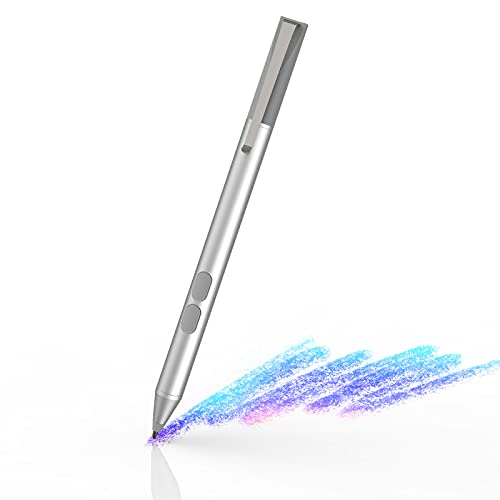


Stylus Pen for HP Pavilion x360 Touchscreen Laptop Pencil,HP Pavilion x360 11m-ad0 14M-ba0 14-cd0 15-br0;HP Envy x360 15-bp0,x360 15-cn0,X2 12-e0xx,...
AZX Digital Stylus Pen for HP Laptops
- [Compatible Models] This digital stylus for hp is compatible with HP Pavilion x360 14m-dw0023dx 11-ap0xxx 11m-ad0xx 11-ad0xx 14-dh0xxx 14-ba0xx 14m-cd0xx-cr xx5-HP xx5-cr15Specaktc0xx、 HP Envy x2 12-e0xx 12-g0xx、HP envy x360 15m-ed0023dx 15m-ee0023dx 13z-ag0xxx 15-ar0xxx 15-bp5b0xx xxx0xx15-bpxx 15-bp5b0xx-xxx0xx15-bp5 -dr0xxx 15-ds0xxx、 HP Spectre x360 13-ac0xx 13-ae0xx 13-ap0xx 13-aw0xx 15-blxxx 15-ch0xx 15-df0xx。(Please double check before placing order)
- [Function Description] This stylus has 1024-level pressure sensitivity which greatly improves the accuracy and precision. It gives you a very natural writing experience and will not scratch the screen. The upper button is for right button function, and down button is for erasing or sleeping mode. This stylus is perfect for children/students/office workers/teachers to draw, write, edit photos, play games, do graphic art or highlight text.
- [Easy to Use] The active pen for HP does not require a bluetooth connection. You just need to plug in the battery and it will work immediately. (The performance is the same as HP Pen 1MR94AA (Microsoft))
- [Power Saving]This stylus for HP supports 600 hours of continuous use and 200 days of standby time. Its grade 1024 pressure points is ideal for artists, architects, officials, teachers, students and children to write, draw, mark, sign and take notes anytime anywhere.
- [Customer Service] Free return within 90 days, 18-month warrenty and lifetime technical support. If you have any questions or concerns, feel free to contact us anytime.
| SELLER | SELLER SCORE | AMAZON FULFILLED | PRIME | FREE SHIPPING |
|---|---|---|---|---|
| Transborder Technology Limited | 8.79 | Yes | Yes | Yes |
The immediate sensation of gliding across your touchscreen with 1024 levels of pressure sensitivity makes this AZX stylus feel less like a plastic tool and more like a professional instrument. It eliminates the friction and guesswork of cheaper alternatives, providing a natural writing experience that won't scratch your screen. I was particularly impressed by the zero-setup workflow. You simply pop in the battery and you are ready to draw or sign documents without wrestling with Bluetooth pairing. The dual-button setup is intuitive, allowing you to toggle between right-clicking and erasing mid-stroke. Whether you are a student taking rapid notes or an artist sketching digital layouts, the massive 600-hour battery life ensures you won't be interrupted during critical work sessions.