PickSmartly Buying Guide

Best Navepoint Computer Racks in 2026

9.7 PM Score
Products Compared
34
Brands Ranked
1
Our guides are compiled from product information and customer ratings. If you click on links we provide, we may receive compensation.

When transitioning from a messy pile of networking gear to a professional, organized infrastructure, selecting the right enclosure is the most critical step. Navepoint has carved out a significant niche by providing versatile mounting solutions that cater to both home lab enthusiasts and small-to-medium enterprise IT departments. A computer rack cabinet is not merely a metal box. It is a thermal management system, a security barrier, and a structural foundation for your digital life. Choosing the wrong cabinet can lead to overheating, cable congestion, or even structural failure under the weight of heavy UPS units and servers. This guide will walk you through the technical nuances required to select a cabinet that scales with your hardware needs.

#1

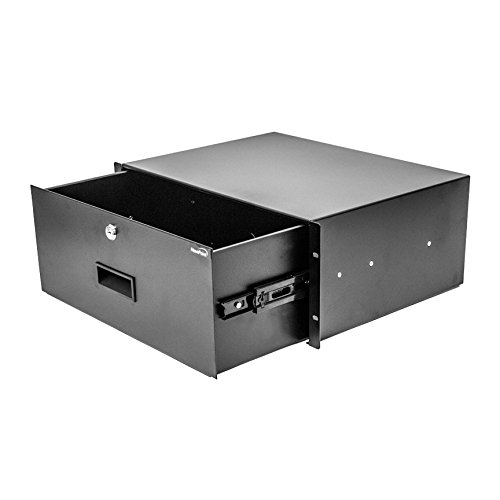
NavePoint Server Cabinet Case 19 Inch Rack Mount DJ Locking Lockable Deep Drawer with Key 4U

NavePoint 4U Lockable 19-Inch Server Rack Drawer

NAVEPOINT 400471506 20.00 X 16.00 X 8.00 Inches

PM Score for NAVEPOINT (PM Score)

9.7 PM Score
Buy on Amazon
  • Dimensions: 7"H x 17.5"W x 13.38"D
  • 22 pound weight capacity
  • Drawer Extension: 11.75"
  • Color: Black
  • Recessed handle design
SELLER SELLER SCORE AMAZON FULFILLED PRIME FREE SHIPPING
NavePoint, LLC 9.88 Yes Yes Yes

Professional AV technicians and IT administrators working in tight spaces require the NavePoint 4U Rack Mount Drawer to keep sensitive hardware both accessible and secure. This black steel unit fits perfectly into standard 19-inch racks, offering a compact footprint of 7 inches in height while providing a surprisingly functional 11.75-inch drawer extension. I found the recessed handle design to be a thoughtful touch, preventing snagging in crowded server environments. With a 22-pound weight capacity, it is ideal for storing patch cables, small controllers, or specialized DJ equipment that needs to be tucked away behind a lock and key. It turns disorganized rack space into a streamlined, protected storage solution without taking up unnecessary vertical real estate.

What We Like
Lockable security
Recessed handle design
11.75-inch extension
22-pound capacity
Compact 4U profile
#2

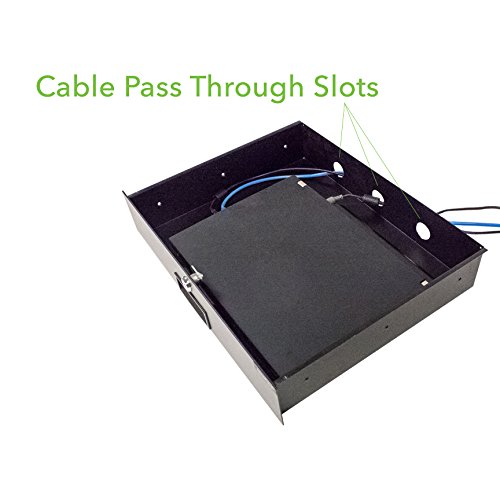
Navepoint Rack Mount Drawer for 19-Inch Server Cabinet Case Or DJ with Lock and Key 1U Black

NavePoint 1U Lockable 19-Inch Rack Mount Drawer

NAVEPOINT 400452207 15.00 X 20.50 X 4.00 Inches

PM Score for NAVEPOINT (PM Score)

9.4 PM Score
Buy on Amazon
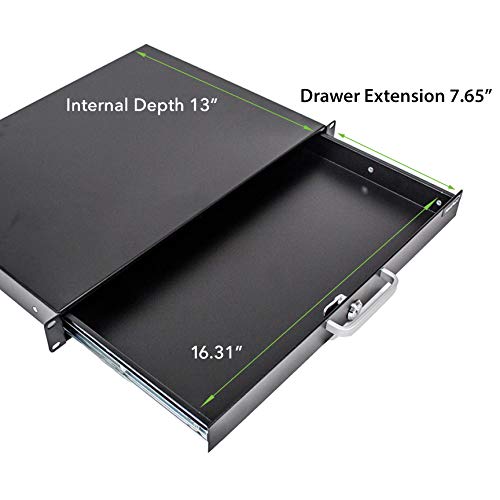
  • 19” x 14” x 1U (14 inch depth) - Mounts to any standard 19-Inch rack.
  • Drawer only extends 7.65 Inches.
  • Comes with lock and two (2) keys.
  • Black, powder coated heavy duty steel.
  • Includes rack screws.
SELLER SELLER SCORE AMAZON FULFILLED PRIME FREE SHIPPING
NavePoint, LLC 9.88 Yes Yes Yes

Your server rack is currently a chaotic mess of loose cables, dongles, and small peripherals that have nowhere to live. This NavePoint 1U drawer solves that clutter instantly by turning a single rack unit into a secure, organized compartment. Built from heavy-duty black powder-coated steel, it feels incredibly sturdy under the fingers rather than flimsy like some budget alternatives. I found the 14-inch depth perfect for most standard gear, though keep in mind the drawer itself extends about 7.65 inches when pulled out. It even comes with the rack screws and a lock with two keys, which is a lifesaver if you are housing sensitive components in a shared DJ booth or office environment. It is a straightforward, professional-grade solution for anyone needing to reclaim their rack space.

What We Like
Heavy duty steel
Lock and two keys
Powder coated finish
Includes rack screws
Standard 19-inch mount
Buying Guide

A Guide to Selecting the Best navepoint computer racks

A Guide to Selecting the Best navepoint computer racks

Determine Your Form Factor: Open Frame vs. Enclosed Cabinets

The first decision in your procurement process is deciding between an open-frame rack and a fully enclosed cabinet. Open-frame racks are excellent for environments where airflow is naturally high and security is not a primary concern, such as a dedicated, locked server room. They offer unmatched ease of access for cabling and maintenance. However, if your equipment is located in an office, a living space, or a shared utility closet, an enclosed cabinet is non-negotiable. Enclosed cabinets provide two vital benefits: physical security via locking doors and acoustic dampening to reduce the high-pitched whine of server fans. When choosing an enclosed model, ensure the door design—whether tempered glass or perforated metal—aligns with your cooling strategy.

Understanding U-Space and Depth Requirements

The most common mistake in rack selection is failing to account for the depth of the equipment. Rack height is measured in 'U' (Rack Units), where 1U equals 1.75 inches. While you might only have 10U of gear now, always opt for a cabinet with at least 20-30% more capacity than your current inventory to allow for future expansion. More importantly, you must measure your deepest piece of hardware—typically a server or a large Uninterruptible Power Supply (UPS)—and add at least 3 to 5 inches to that measurement to account for cable bend radius and power plugs. A cabinet that is too shallow will prevent you from closing the rear door, rendering your security and airflow management useless.

Thermal Management and Airflow Dynamics

Heat is the primary enemy of longevity in networking hardware. When evaluating Navepoint cabinets, look closely at the ventilation options. Perforated doors allow for passive airflow, which is highly effective if the room itself is climate-controlled. However, in stagnant environments, you should look for cabinets that support active cooling, such as integrated fan kits at the top of the unit. A well-designed cabinet should allow for a 'hot aisle/cold aisle' flow, where cool air is drawn in through the front and heated air is exhausted out the rear or top. Avoid cabinets that create 'dead zones' where heat can pool around high-density switches.

Cable Management and Accessibility

A rack is only as good as its ability to organize the chaos of Ethernet and power cables. High-quality cabinets feature integrated mounting points for vertical and horizontal cable managers. Look for models that offer sufficient depth to allow for 'side-car' cable routing, which keeps the main equipment area clear. Furthermore, consider the ease of access to the rear of the unit. If you are installing a cabinet in a tight corner, ensure the doors can swing open wide enough to allow you to reach the rear ports of your switches and servers without significant struggle.

Weight Capacity and Structural Integrity

Finally, do not underestimate the sheer weight of enterprise-grade hardware. A fully loaded 12U or 24U cabinet can easily exceed several hundred pounds. Check the static load rating of the cabinet to ensure the frame can support your gear without bowing. If you plan on stacking multiple units or placing heavy battery backups at the bottom, prioritize cabinets with heavy-duty steel construction and reinforced mounting rails. A sturdy base is essential to prevent the cabinet from becoming top-heavy and tipping during maintenance.
Ready to choose?

Jump back to our ranked picks or compare the shortlist side by side.

Frequently Asked Questions

Quick answers about Navepoint Computer Racks before you buy.

Network cabinets are generally shallower and designed for lighter equipment like switches and patch panels, whereas server racks are deeper and built with higher load capacities to support heavy, high-heat enterprise servers.

The 'U' (Rack Unit) measurement refers to the vertical space available. You should calculate the total height of all your hardware and add 20-30% extra space for cable management and future expansion.

Yes, many models feature glass front doors and sound-dampening properties, making them ideal for quiet residential or small office settings where aesthetics and noise reduction are priorities.

Proper ventilation is critical. Look for cabinets with perforated doors or integrated fan mounts to prevent heat buildup, especially if you are housing high-performance computing hardware.

Most standard cabinets are designed for front-loading equipment, but some specialized models offer dual-sided access or adjustable mounting rails for more flexible configurations.

Locking doors provide essential physical security, preventing unauthorized access to your networking hardware, sensitive data ports, and power switches.

You must measure your deepest piece of equipment (including the space needed for cables to bend behind it) to ensure the cabinet depth is sufficient to close the rear door safely.
Rankings & Insights

Our Navepoint Computer Racks Rankings

34 Products Compared
5.7 Avg PM Score
1 Brands Ranked

Top 10 Navepoint Computer Racks Brands on Amazon

Share of top-ranked products by brand, from our rankings.

  1. 01 Navepoint 34 (100%)

How We Selected These Products

We compared Navepoint Computer Racks products using product details and customer ratings to identify the best options in the computers & accessories..

From that comparison we shortlisted the top 2 Navepoint Computer Racks for this page..

We aim to help you find the right cabinets products for your needs and save you time when choosing which Navepoint Computer Racks to buy.

Side by Side

Comparison Table

Compare the top 2 picks at a glance — select a column to sort.